
It is difficult to draw a line separating CRO techniques from those belonging to UX or Analytics Digital, and even Growth.
I am going to try and, on top of that, order them according to the value and information they can provide us.
We have the following:
- User Test.
- Heuristics.
- Customer feedback.
- A/B Test.
- On-Page Analytics.
- Online Analytics.
- Screen recordings.
#1. User testing
It is based on observing and analysing how a group of real users uses the website, noting the problems they encounter.
It is commonly used when a new website or app is created, or when an entire important section is changed, such as checkout or the customer area.
We therefore have five basic parts when setting up a user test:
- The digital product (website or app) that we want to test in full or in part.
- The tests –tasks- we want them to perform. For example: signing up for a service, buying a specific product or changing the plan they have contracted.
- The group of users who will perform the tests.
- The observer who will conduct the test, answer any questions the user may have and take notes (us).
- The system for recording the user's session while carrying out the tests, their voice and (optionally) their face.
The process for running a user test
A user test consists of:
- Preparing the use cases of our site or prototype that we want to test.
- Making sure the website or prototype works properly for the tests. The more realistic, the better.
- Getting the right group of users, in line with our service's target audience. Between 5 and 10 users will be enough.
- Agreeing a date and time with them for the user to carry out the test.
- Conducting the test, asking the necessary questions and noting the problems the user encounters, as well as recording the session.
- Analysing the results and proposing an action plan.
- Optionally: repeating the process with the changes made after the feedback from the first group.
Example of a user test
We want to test the sign-up process for a telecom company.
To do this, we propose the following use case:
“You received a very high mobile bill last month and are thinking about switching companies. Find the offer on the site that best suits you and try to sign up for it”
The goal in this case, as I was saying, is to identify problems in the process of signing up for a plan.
Here is a post by Torres Buriel Estudio, where I trained in UX, explaining the process in more detail:
http://www.torresburriel.com/weblog/2016/05/10/simplificando-el-proceso-de-tests-con-usuarios/
Considerations
These tests provide a huge amount of information, more than any other technique, but they are not easy to run.
The most complicated part is recruiting, that is, finding users who match your buyer persona and are willing to complete the test.
Each user will take about 30 minutes and the compensation they receive may be around €50, to give you an idea of what it will cost.
Tips
You can start with the simplest option: prepare the test and give it to co-workers or relatives. Even if they are not your target audience, you can still get useful information.
Prepare good use cases, and practise with someone you trust if it is your first time conducting a test.
Have a script internalised: introduction, explanation of the test, signing documentation, reward if applicable…
Reassure the user: the site is being tested, not the user.
If it is a prototype, make it as realistic as possible to avoid distortions (copy, product complexity…).
If possible, have two observers: one conducting the test and asking questions, and another noting the problems.
If possible, record the screen for later analysis. If possible, record the user's face too, to review expressions. And if you can record eye movement, even better, although that requires much more complex systems.

#2. Heuristic analysis
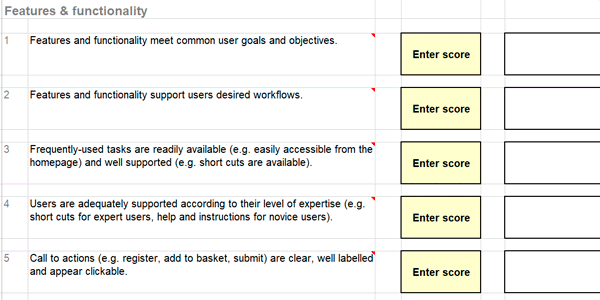
An analysis of this kind consists of one or more experts evaluating usability of a website based on objective criteria and best practices.
In the analysis, the principles we saw earlier are translated into different points and evaluated.
For example, you can assess the readability and understanding of the text, the clarity of error messages, the difficulty of the purchase process or the size of buttons on the mobile version of the website.
These points can be compared with competitors' websites to see where we stand. Heuristic analyses help us compare ourselves with competitors using the same aspects (benchmarking of UX).
For example, if you want to launch a new app, once you have a working prototype or product, a heuristic analysis can be a low-cost way to validate the first changes against usability best practices.
As they are much cheaper than user tests, you can start here and clean up the most obvious errors before fine-tuning things with tests.
Although they will agree on the biggest problems, they provide different information because in this case the analysts are experts in digital products, whereas users in user tests probably are not.
Advantages of heuristic analyses
Mainly these three:
- They are relatively inexpensive.
- They take little time: usually one or two days.
- They detect and identify blatant UX violations.
Disadvantages
Obviously, they also have some disadvantages:
- They do not explain much about a system's usability, because you are not testing it with real users.
- They may suffer from inconsistency if they are not carried out by the same person, as well as a certain degree of subjectivity.
Methodology
If you have some experience with digital products, it really is not very complex, because you will see that these are very logical things:
- Define your most common usage scenarios, through tasks and objectives (transactions, forms, first order vs repeat purchase, sharing photos, watching videos…).
- Review each scenario: what steps does the user need to take? Is the feedback we give them correct? Does the copy help?
- Use a template: for example, this heuristic testing template.
Example of a heuristic analysis
Here is a very complete example of a heuristic analysis from Oracle.
Usability problems are categorised as “low”, “medium” or “high”, with an accompanying description.
The Product team follows an iterative strategy: it isolates the 10 most important errors to fix them immediately and then evaluates again.
As you can see, a heuristic analysis can range from very basic things to complex projects like this one.
#3. Customer feedback
In case it is not clear, I will tell you that most customer complaints come from their expectations not matching reality.
For whatever reason:
- You promised more than you deliver.
- The customer experienced an issue with their order.
- You charged them something they did not expect (customs, prices with and without VAT, shipping costs).
- The customer did not read all the service information properly before signing up.
- …
In reality, the reason matters less than knowing that the way to close that gap is to create a feedback loop, where:
- We have or launch a product or service.
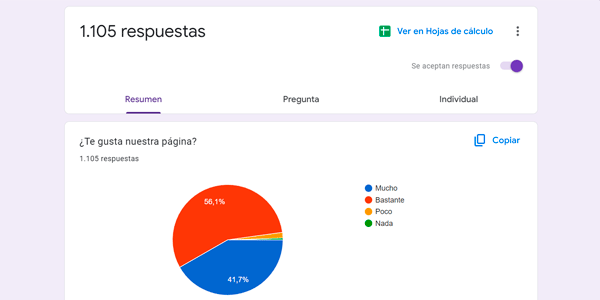
- We collect feedback from users.
- We improve the product or service based on what they tell us.
And so on, in a loop that never ends.
Ideally, we could segment this feedback like this:
Non-customers
Through short online questionnaires triggered after a specific user action before conversion. For example:
- After one minute of inactivity.
- When the user is about to leave the site.
- After several errors in the registration or checkout process.
Potential customers
You will need to follow up with users who registered but did not buy.
If, for example, they left an email address, we can send an abandoned-cart email.
Or if we have their phone number, we can call them to find out what is not convincing them about the offer.
Example:
AppSumo launched a new product ” How To Make a $1000 A Month Business ”, which had worked well during beta testing but generated only 30 sales from an initial email campaign sent to 30,000 people.
AppSumo then sent a survey with four simple questions to people who had opened the email and clicked but never bought.
It analysed the reasons and redesigned the landing page to answer customer objections. The new landing page ended up generating far more conversions.
Customers
Here we have many ways to collect feedback:
- From the purchase process.
- From the delivery process, if it is a physical product.
- From the product or service after a few weeks of use.
- From the CRM, through notes made by the customer service team.
- From interactions with customer service agents themselves (ratings).
- About the company, through surveys in the customer area.
- From directories such as Google Maps or TrustPilot.
- From marketplaces, if we have apps published there.
- …
In short, there are many approaches and, in medium-sized projects, the truth is that few of them are used.
And online reputation is genuinely relevant.
#4. A/B Test
Probably the most famous technique when we talk about CRO.
In fact, many people believe that “doing CRO” is the same as “doing A/B tests”.
And it is not.
You can already see that there are many other techniques, although this is undoubtedly one of the most important.
It is so relevant that there is a huge amount of methodology behind it. So much that it could easily fill an in-depth article dedicated entirely to the subject.
I am not going to go that deep here, but I do want you to understand perfectly what an A/B test is and what it can contribute to your project.
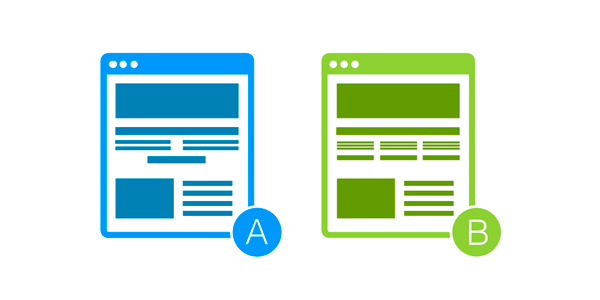
We could say that running an A/B test means making (at least) two different versions of a page or process (purchase, registration, plan change) on your website compete against each other.
On one side we have the original version and on the other, a modified version, with changes that we hope will improve the KPI chosen beforehand (button click, purchase, form completion…).
Then, with these (at least) two versions, we tell a tool like the one we will see later to send 50% of the traffic to each one.
Once enough time has passed –depending on the size of the project, this may be two or three weeks- the results are compared. And they may be:
- There is a statistically significant winner (the tool tells us): so we keep this version permanently on our website.
- There is a winner, but it is not statistically significant: we can leave the test running longer to see whether, with more data, the results really become significant.
- There is no statistically significant winner: we cannot conclude anything, so the best thing we can do is rethink the test.
A couple more notes:
Although I am not going to go into detail, I want you to know that ideally (and this is difficult in the world of multidevice) you should consider only new users, who have no previous experience with the page or process being tested.
On the other hand, tests must be kept running for complete weeks, because there is always a weekly pattern (Mondays are usually better days than Saturdays for most websites).
Finally, we have already seen that some users are faster and others slower. So the ideal duration of the test is one that fully covers the complete purchase cycle, which is the period in which 95% of purchases on your site take place. If that is 17 days on your website, for example, the test should run for 3 weeks.
#5. On-Page Analytics
Under this concept we group:
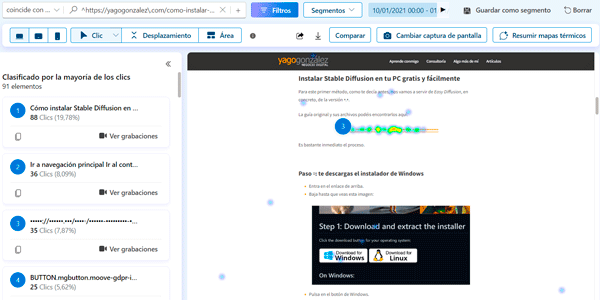
- Heat maps or heatmaps.
- Click maps.
- Scroll maps.
- Mouse-movement maps or eye-tracking maps.
All of them tell us about user behaviour on a specific URL of our site.
In other words, we can see where users click, whether they scroll to the end of the content, which links are clicked most or where users focus their gaze.
Except for eye tracking, data is very easy to collect for the other analyses and will help us understand whether users really carry out the actions we want on the website and which areas attract the most interest.
It is the first step before running an A/B test: this is where we collect the insights needed to propose our test hypothesis.
Process
So, a typical research process might be:
- Look at your dashboards and spot something that does not make sense.
- Go and extract more data from Analytics.
- Ask myself questions. For example: do users click non-clickable elements? Does the banner CTA blend into the background? Are there too many elements distracting from the page's real objective?
- Launch a heatmap (if we do not already have one running).
- Analyse the heatmap.
- Compare the heatmap with Analytics data and another tool, ideally an A/ test.
- Draw conclusions and an action plan.
Disadvantages
If they are not used properly, you may end up looking at them without knowing what to look for. They are fun and interesting to observe, but they will not teach you anything about your website.
That is why they cannot be your only or your main research and analytics tool.
They can take a very long time to complete if you have little traffic (to avoid this, you can leave them running all the time).
#6. Online Analytics
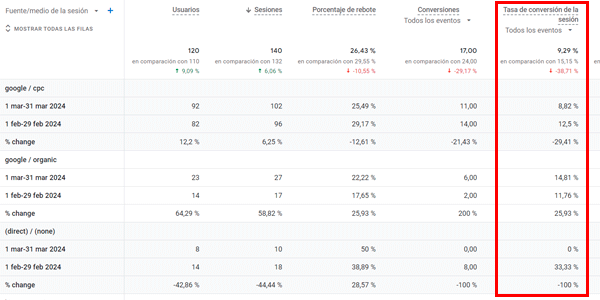
It is one of the main techniques we have for improving CRO, because it is rare for a major digital project not to have at least one tool of this kind implemented, normally GA4.
Here, digging through the reports, we will be able to extract different conversion rates:
- By user.
- By session.
- For ecommerce.
- By device type.
- By marketing channel.
- By country.
- For each step of the purchase process:Add a product to the cart. Enter checkout.
- Entrar al checkout.
- Complete the purchase.
In addition, GA4 will help us add volume data to the A/B Testing tool and estimate how long a test will need to run.
Anyway, I am not going to spend much time on this here because, if you want to go deeper into the topic, it is better to take a look at this.
#7. Screen recordings
They are replays of user behaviour and the interactions they carried out on the site during the session.
What can you observe?
- Device types: see the different use and performance of the same page on mobile and desktop
- Navigation: see whether menus or CTAs have problems, or scrolling. In this respect they are very similar to Heatmaps
- Forms and purchase processes: why do they abandon the process? What results is the system returning? Are they missing information?
Research process
- Define the problem to investigate. Use the tools available to you.
- Set goals and formulate your hypothesis.
- Start the recording or, if you already have recordings, start watching them, filtering those you consider relevant (if it is a mobile problem you can start with Android; if it is a problem in a checkout or landing page, you can filter sessions that go through it). Depending on the tool, sessions that meet certain requirements can be “tagged” to make filtering easier.
- Validate your hypothesis (or not) and carry out the action plan, classifying actions by:
- Device.
- Tipo de problema: bug, mejora, error de código, error de UX…
- URL.
- Prioridad.
- Type of action: development fix, design improvement, rethink navigation/flow, A/B test….
Advantages
Like Heatmaps, they complement other types of techniques and tools well.
They are useful for studying a specific problem on a site, for example the launch of a new checkout, complementing an A/B test and the transaction results obtained in Analytics.
They are “impartial and real” in the sense that, in a user test for example, the user may behave less naturally because they feel observed. Here, because it takes place in the user's natural environment, that does not happen.
They uncover problems and situations that heuristic analyses or user tests do not reach.
Disadvantages
We lack the usage context (we do not know why or when the user is on our site).
They can take a huge amount of time, depending on what we are trying to find.

This order I have just shown you is NOT the one I would recommend if you are starting with CRO, because some techniques, despite providing a lot of information, are more complex to execute.
That is why, in the next article, I explain the CRO tools you have available; there I suggest the same order I almost always recommend to my clients.
More about CRO…
Did you like the article?
Well, here you can continue with the rest of the articles in the CRO series:
- CRO techniques to improve conversion (the one you are reading).
If you want to receive a new article in your email every Thursday, subscribe here. So you do not miss a single one.
And if what you need is help with your digital project, tell me here.
Frequently asked questions
What are CRO techniques?
They are specific actions applied to a website to improve its conversion rate, based on data and user behaviour.
Why is it not enough to apply CRO techniques without prior analysis?
Because without data you may optimise something irrelevant. Techniques should respond to problems identified beforehand.
Which CRO techniques have the greatest impact?
Those related to the value proposition, visual hierarchy, copy, CTAs and reducing friction in the purchase process.
How does the value proposition affect conversion?
It is one of the key elements: if it is not clear or does not connect with the user, the rest of the optimisations lose effectiveness.
What role does design play in CRO?
Design guides the user's attention. Poor visual hierarchy or a confusing layout reduces conversion.
Why is it important to optimise CTAs?
Because they are the direct conversion point. Changes to copy, placement or design can significantly affect the result.
What is friction in CRO?
These are obstacles that make conversion harder: long forms, complex processes, lack of trust or unclear messages.
Which techniques help reduce friction?
Simplify forms, improve copy, add social proof and remove unnecessary steps.
How does trust affect conversion?
Elements such as reviews, testimonials or security seals reduce uncertainty and increase the likelihood of conversion.
Can all techniques be applied at once?
No. They should be prioritised and tested to understand their real impact.

Leave a Reply