
The CHUWI HeroBox with an Intel Celeron N4120 is one of those mini computers that, despite being a few years old, can still be an interesting buy.
Obviously, it can't compete in performance with Ryzen-powered mini PCs. Not even with Intel processors a couple of generations newer, such as the N100 or N150. But for certain uses, the difference may not be significant.
It doesn't cost the same, either: while an N100 currently goes for at least €140 on second-hand platforms, you can find this HeroBox for around €80, practically half the price.
And as I say, for certain uses you don't need any more power.
Before writing this review, I tested it in different scenarios:
- With Windows 11, which comes installed as standard.
- With Linux Mint.
- For multimedia playback.
- With emulators and older games.
- For office work.
My conclusion is that its best use is very clear, and it also has quite a lot to offer as a secondary computer.
That said, there's one important drawback which, of course, I'll discuss in this review.
A great HTPC for very little money
For me, this is the main use for the CHUWI HeroBox N4120.
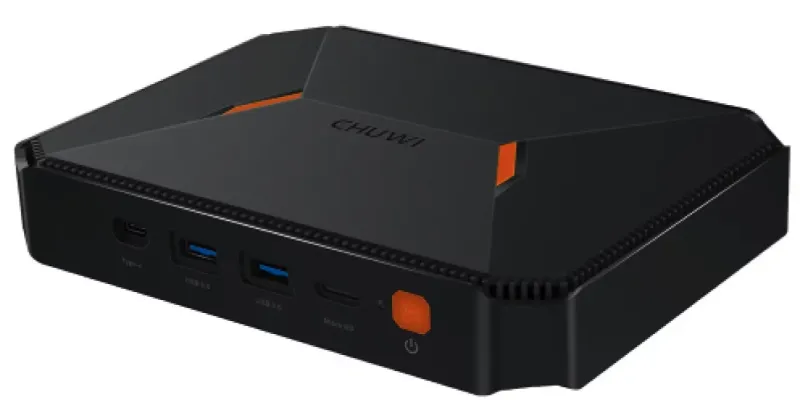
First of all, it has no fan. Its cooling is completely passive, so it makes no noise. Something you especially appreciate when you're watching a film and the computer is next to the television. This sets it apart from most PCs and mini PCs on the market, which have fans that are more or less noisy.
What's more, the Intel Celeron N4120 has a TDP of just 6 W. In other words, we're talking about a machine designed to run with low power consumption.
And that combination means you can consider leaving it on for many hours, even all day, downloading videos or working as a small home server or NAS..
Its generous selection of connections, which I'll cover below, also helps.
4K playback and video codecs
The Intel UHD Graphics 600 supports hardware decoding for H.264, 8- and 10-bit H.265/HEVC, and VP9.
I've tested 10-bit HEVC files at 4K resolution and playback was smooth, with no noticeable issues in either VLC or PotPlayer (my video players of choice on Windows).
I've also used the latter with HDR files. I could switch HDR processing on and off and see a clear difference in the colours on the TV, without affecting playback smoothness.
So if you like watching films or series, this machine makes a good companion, but bear in mind one limitation compared with more recent mini PCs: it doesn't support hardware AV1 decoding, which more modern processors do offer.
Yes, AV1 content is nowhere near the most common, but having the option is better than not having it.
By the way, here's an article where I explain these video codecs and formats, in case you want to dig deeper into what I'm discussing in this review.
Storage for films and TV series
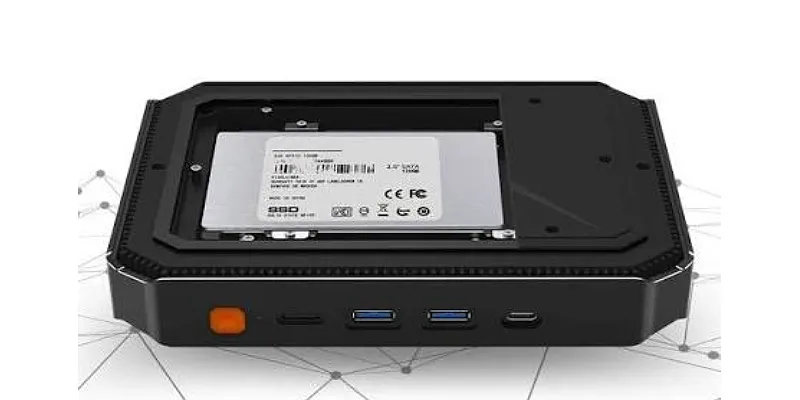
Another advantage is that you can install a 2.5-inch SATA hard drive inside the case, in addition to the main SSD.
This lets you set up a small media centre (with Kodi, for example) or a NAS with an inexpensive, high-capacity HDD. You can also connect external drives via USB if you need more storage.
And because it has dual-band Wi-Fi and Gigabit Ethernet, you can use it to play content stored on your network or download files. In my tests, both connections worked correctly, without any issues.
As I say, for a simple HTPC this machine does a great job for very little money. And without a fan whirring in the background.
A little retro console: emulators and older games
The second interesting use is turning it into an emulation machine.
For classic systems such as the NES, Super Nintendo, Mega Drive, original PlayStation and Nintendo 64, the N4120 has enough power to enjoy games without complications.
You can go further, too. With more demanding consoles, things change a bit and you have to keep your expectations realistic.
PSP works quite well, except for very specific titles such as God of War, which suffers some slowdown.
GameCube, Wii and PS2 are getting pretty close to this processor's limits. Some games run reasonably well with modest settings, while others will slow down. Dolphin tends to deliver better results than PCSX2 on this kind of hardware, although it depends heavily on the game.
That means I wouldn't buy this HeroBox specifically to emulate PS2, but if your ambitions range from 16-bit consoles to N64, PSP, Dreamcast and certain titles from more powerful consoles, it's worth a look.
Here's a video of this same machine but with a slightly weaker N4100 CPU:
It can also run older PC games, usually at 720p with low graphics settings, because the UHD Graphics 600 has fairly limited power.
There's another detail I like: the VGA output..
If you still have a CRT computer monitor, you can connect it, build yourself a little retro console and see games the way they originally looked..
All this sounds great, but there's a problem: temperature if you play 3D titles for hours. Later I'll tell you how hot my unit got.
Linux Mint suits it better than Windows 11
The HeroBox also works perfectly well as a computer for home and office tasks.
I've worked with Windows 11 and, normally, performance seems sufficient for browsing, working with documents and doing light image editing..
The problem starts when Windows decides to update itself.
The Celeron N4120 has four cores and four threads, with a 1.1 GHz base frequency. It hardly has power to spare, and when Windows Update gets going, CPU usage shoots up and the machine becomes much less responsive.
Frankly, that's the only real criticism I'd make of a machine with these specifications, which obviously isn't meant for rendering AutoCAD plans.
With Linux Mint I've had a better experience..
The system runs more smoothly for my usual tasks, makes good use of the available 8 GB of RAM, and lets me work comfortably on everyday tasks, browsing and multimedia.
If I bought it as a secondary computer, personally, and until I've tested the new Windows 11 version with improved RAM use on 8 GB machines, Linux Mint would be the more capable option.
In that sense, it's a great secondary computer for other purposes — you know that I like keeping things separate — and a useful emergency backup for work.
Maintenance, upgrades and temperatures
One thing I appreciate about this CHUWI is that its internals are relatively easy to access.
To open the bottom cover you only need to remove six screws. Once inside, you can add the SATA drive without further complications.
Replacing the included 256 GB M.2 SATA SSD and changing the processor's thermal paste is a little more complicated. Not hugely so, but you do need to be careful and disconnect a couple of cables.
Memory is another story. The 8 GB of RAM is soldered, so you can't upgrade it. It's enough for the uses I'm describing, but it's worth knowing before buying.
The temperature problem
Where the HeroBox has disappointed me most is its cooling under full load.
Passive cooling is wonderful for avoiding noise, but it also has obvious limitations.
My unit reached 87 °C with the CPU at full load, even after changing the thermal paste, using the factory BIOS power settings, which are the recommended ones.
The BIOS kept the sustained power limit at Intel's official values, although it allowed a little more headroom during performance bursts. Seeing how it dissipated heat, I didn't even consider manually raising those limits for testing.
Also, replacing the thermal paste with a higher-quality one allowed me to reduce temperatures by around 5 °C during normal use (office work and video playback).
The 87 °C reading is below Intel's specified 105 °C thermal limit, but I still think it's too hot for a low-power mini PC, so I wouldn't recommend buying it for regular 3D gaming or demanding emulation.
And that reminds me of what happened with the CHUWI MiniBook X N150, which I ended up returning because of a combination of mediocre battery life and high temperatures.
With the HeroBox, however, I've decided to keep it. The difference is how I use it: I mainly want it as an HTPC, where the load is usually much lower thanks to hardware decoding. For that purpose, silence and low power consumption outweigh its limited ability to dissipate heat during demanding tasks.
That said, it's placed in a well-ventilated spot, not shut inside a cabinet.
Connectivity, size and portability
The HeroBox is slightly larger than other mini PCs, but I don't see that as a drawback.
With approximate dimensions of 18.8 × 13.8 × 3.7 cm and a weight of around half a kilo, it's still extremely easy to carry. And the extra size provides more connections and room for an optional 2.5-inch drive..
It has HDMI, VGA, four USB-A ports, one USB-C, Gigabit Ethernet, a microSD reader and a 3.5 mm audio jack.
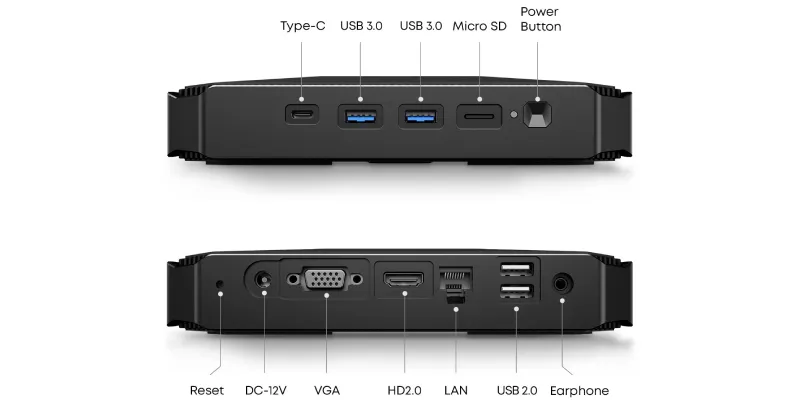
What I've missed most in my tests is a second HDMI port. You can connect two screens using HDMI and VGA, as I did, but the latter doesn't support 4K output, and I normally work with two 4K monitors at 60 Hz.
As one last interesting use case, you could power it from a power bank with a suitable output and an adapter for its barrel connector. If you have a portable display, you could consider using it in place of your laptop. In my case, that makes sense and is another reason I've decided to keep it.
The best things about the CHUWI HeroBox N4120
- Completely silent: passive cooling, ideal for an HTPC.
- Low power consumption: suitable for keeping it on for many hours.
- Good multimedia playback: hardware decoding for H.264, 10-bit 4K HEVC and VP9.
- Expandable storage: M.2 SATA SSD and an additional 2.5-inch bay.
- Generous connectivity: HDMI, VGA, Gigabit Ethernet and plenty of USB ports.
- Price: at around €80 second-hand, it offers quite a lot for these uses.
The worst things about the CHUWI HeroBox N4120
- High temperatures when running 3D games or demanding emulators.
- Limited performance: especially noticeable when Windows 11 is doing things in the background.
- Soldered RAM: the 8 GB can't be upgraded.
- Only one HDMI output and no hardware AV1 decoding.
Conclusion: is the CHUWI HeroBox N4120 worth €80?
Yes, especially if you want a silent HTPC, a small retro-emulation machine or a second PC running Linux.
For around €80, you get a machine that takes up hardly any space, plays 10-bit 4K HEVC video, supports extra storage and has enough connections for a wide range of uses.
But I wouldn't buy it to work regularly with demanding applications or to game for hours. The N4120 falls well behind the N100 and N150, and the temperatures under load don't help either. That's the price of passive cooling.
If you're looking for a main computer and can spend around €150 on a mini PC with an N100—or even stretch to €200 for a Ryzen—it's probably worth doing.
On the other hand, if you know you want to watch films, store videos, use Linux Mint or play classic games on emulators, while also having a secondary PC, the savings make sense..
For watching films and playing the odd retro game, all I need is smooth playback, low power consumption and silence.
CHUWI HeroBox N4120 specifications
| Feature | Specification |
| Processor | Intel Celeron N4120 |
| Architecture | Gemini Lake Refresh |
| Cores / threads | 4 / 4 |
| Frequency | 1.1 GHz, up to 2.6 GHz in bursts |
| Processor TDP | 6 W |
| Graphics | Intel UHD Graphics 600 |
| RAM | 8 GB LPDDR4, soldered |
| Original storage | 256 GB M.2 SATA SSD |
| Expansion | One additional 2.5-inch SATA drive |
| Video outputs | HDMI and VGA |
| USB | 2 USB 3.0, 2 USB 2.0 and 1 USB-C |
| Networking | Gigabit Ethernet and dual-band Wi-Fi |
| Other connections | Bluetooth, microSD and 3.5 mm audio |
| Cooling | Passive |
| Dimensions | 187.6 × 138.3 × 37.3 mm |
| Weight | Approximately 0.5–0.6 kg, excluding adapter |
| Attractive second-hand price | Around €80 |
Rating
Who it is for
✔️ For anyone who wants an affordable, completely silent HTPC.✔️ For anyone looking for a machine for emulators and older games.
✔️ For anyone who wants a small home download and storage machine.
Who it is not for
❌ For anyone who needs a main computer with strong performance.❌ For anyone who expects to emulate the entire PS2 and Wii catalogues without problems.
❌ For anyone who wants to play demanding 3D titles for long sessions.
❌ For anyone who needs more RAM or to use two 4K monitors at 60 Hz.
Frequently asked questions
Is the CHUWI HeroBox N4120 worth buying in 2026?
Yes. At around €80 second-hand, it's appealing for HTPC use, retro emulation and light office work. If you need more performance, it's worth considering an Intel N100 mini PC.
Is Windows 11 or Linux Mint better?
In my experience, Linux Mint runs more smoothly. Windows 11 is usable, but updates can overwhelm the Celeron N4120.
Can it play 10-bit H.265 movies in 4K?
Yes. I've confirmed smooth playback of 10-bit 4K HEVC files. I haven't verified native HDR10 output, however.
Can it emulate PlayStation 2 and Wii?
It can run some games, but performance varies a lot and some titles will slow down. It's much better suited to emulating earlier consoles.
Does the CHUWI HeroBox get very hot?
Yes, under heavy use. My unit reached 87 °C even after changing the thermal paste, although multimedia playback puts it under less load.
Can the RAM be upgraded?
No. Its 8 GB of RAM is soldered. You can replace the M.2 SATA SSD and install an additional 2.5-inch drive.
Does it make noise?
No. It uses passive cooling and has no fan, so it's completely silent.

Leave a Reply