
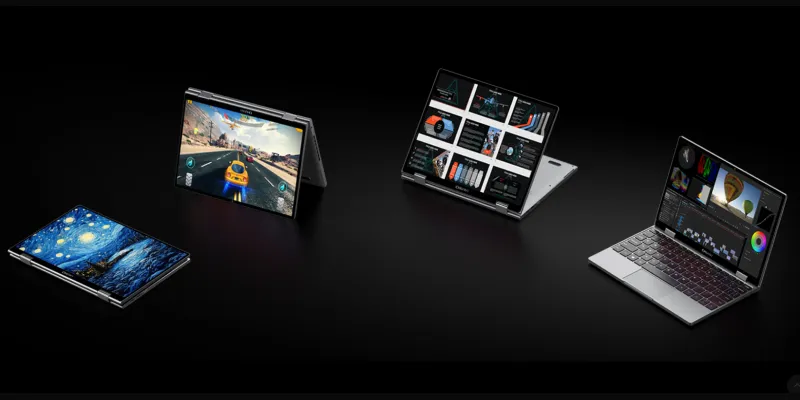
The CHUWI MiniBook X N150 is a Windows 11 convertible: a device you can use as both a small traditional laptop and a rather thick—but not especially large—tablet.
It is a fairly versatile device that fills a growing market niche: the need for laptops for mobility, with the greatest possible portability and a desktop operating system, not a tablet OS.
It is also one of the best-value Windows laptops I have tested. For €320—that is what I paid, although the price fluctuates—it offers excellent portability, 16 GB of RAM, 512 GB of storage, a convertible touchscreen and enough power for studying, working and consuming content.
And yet I returned it.
It was not because of poor performance, but because of two issues that mattered to me. I will explain them now.
A tiny laptop you can take anywhere
Let us start with the good.
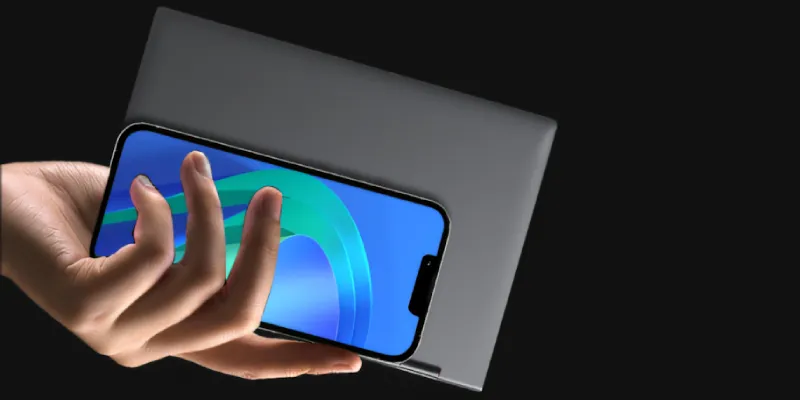
With its 10.5-inch screen and 920-gram weight (with the keyboard built in), it is slightly thicker than a regular tablet. And it fits in any backpack. It even fits in my parka pocket.
That makes it very appealing as a computer for travel, visiting clients or attending events, which is what I wanted it for.
On top of that, the build quality is better than I expected. It combines metal with metal-look plastic, but it does not creak or feel as fragile as other cheap Chinese laptops.
As for the hinge, like any convertible device, it rotates 360 degrees. It did not feel flimsy, nor did I think normal use would break it, as happens with some devices, so if you plan to use it in hybrid mode—laptop/tablet—there is little to worry about here.
That said, if you will use it mainly as a tablet and only occasionally as a laptop, I would think twice for a couple of reasons:
- The keyboard adds weight that you could avoid with a normal tablet, since its keyboard is not permanently attached as it is here.
- Windows works very well on PCs and laptops, but not on tablets. It is usable, yes, but the experience is light-years behind iOS and even Android on this kind of device.
I used the device as a tablet for reading comics and it is usable. At least for a while, because it is too heavy to hold in that position for long.
For that reason, and because of the operating system's ergonomics, I would not buy this CHUWI if tablet use were the main priority.
Screen, keyboard and touchpad
The laptop's outermost components—the ones we see and touch—have their pros and cons.
Small screen, but used well
The 10.51-inch touchscreen has a resolution of 1920 × 1200 and a 16:10 aspect ratio. Text looks sharp and the colours are accurate. Everything is fine here.
The glossy finish does not convince me on a work device because of the extra reflections, and the screen runs at 50 Hz, presumably to save a little battery. It is fine for office work and video, but motion is not especially smooth, and you notice it at times.
Even so, I find all of this acceptable.
The keyboard takes some getting used to, but not because of its size
This point is more complicated, at least if you type with a Spanish keyboard layout.
It is backlit and works well for this size. You do not miss the extra space of larger devices all that much.
The problem is that it comes with a US layout. And if you type a lot, you notice it.
My unit included two sets of stickers to adapt it to Spanish, although I did not apply them at first because I had been considering returning it from the outset.
Used as supplied, you quickly get used to the missing Ñ key, but not to remembering where some relocated symbols are. More than once I found myself searching and wasting time until I hit the right key—quite literally.
As for the touchpad , it is small, but I found it perfectly adequate. I should say that I barely used it because I almost always use an external mouse.
Intel N150 performance
The CPU, an Intel N150 low-power chip, has four cores, four threads and a base power consumption of 6 W. It is clearly not a powerful CPU—it performs roughly like a ten-year-old i5—but it is not too limited for everyday tasks or even advanced office work.
The 16 GB of RAM lets you work with many tabs, keep several applications open, do light image editing and even edit short Full HD videos.
It is helped by an NVMe SSD that makes everything load relatively quickly.
I insist: this is not a powerful machine, but for normal use or as a secondary computer it is more than capable.
A good multimedia device
Where this convertible really stands out is video playback.
The integrated graphics provide hardware decoding for 10-bit AV1, as well as H.264 and H.265, of course. In other words, this is a very good machine for video playback in every form, whether that means YouTube, Netflix and similar services, or torrents and Stremio.
You can play games, within limits
I did not want it for that, but since I had it I tried a couple of popular games: GTA V and Tomb Raider: Legend..
I was pleasantly surprised: at 720p with reduced settings, both games were quite playable..
That showed me the machine can run older titles, but there is a catch: push it hard and you get a lot of heat..
It is therefore reasonable to wonder how long the machine can keep going before the CPU suffers from thermal throttling and has to reduce its clock speeds, although I did not measure that very likely loss of performance.
Connectivity: two USB-C ports that offer plenty of flexibility
A device this small inevitably has to be limited in this respect.
The CHUWI includes two multifunction USB-C ports and a 3.5 mm audio jack. You will probably need a hub, but both USB-C ports support charging, video output and accessories, which gives the device considerable versatility..
In this respect, I tested it with my Dell 4K USB-C monitor, which supports Power Delivery, so one cable to the PC was enough: USB-C sent the image to the monitor while powering the laptop.
To finish this section, it is worth noting that it includes Wi-Fi 6, Bluetooth 5.2, a 2 MP front camera and Windows 11 Home. The camera and speakers are unremarkable, but acceptable.
The problem: battery life and temperature
Everything I have said about the device so far is fairly positive, but now it is time to explain what I liked least and what made me return it.
Battery life that is simply too limited
In my use, the battery lasted between six and eight hours with fairly aggressive power saving—battery saver enabled, Bluetooth not left on constantly and brightness turned down. That may sound sufficient, but I expected more from a 6 W CPU in a machine built around mobility.
Connected to a USB-C monitor that powers it, the problem disappears, but then buying such a small laptop loses much of its point.
It gets hotter than expected
I could live with the short battery life—after all, carrying a phone charger is easy enough—but the heat was what really put me off.
As soon as you started heavy browsing—several tabs with Notion, Google Docs, Slack…—or light image editing and the game tests, the fan roared and the machine became hot. It could even become somewhat uncomfortable when resting on your legs.
Beyond those workload peaks, the fan can often be heard. It is not particularly annoying and my unit had no coil whine, but I expected an almost silent device.
So, between the limited battery and the high temperatures, which made me doubt its long-term reliability , I decided to return it.
I cannot say it would have failed—my unit worked correctly—but I know the brand and this is neither the first nor the last CHUWI device I will own. Even so, seeing it run that hot did not inspire confidence.
Verdict
Despite returning it, this €320 laptop offers a lot: it is small, light and convertible, with 16 GB of RAM, a good screen and enough performance for basic use.
As a secondary device it is very attractive. It can even work as a main computer for studying, browsing, working with documents, doing light image editing and watching videos—the usual workload of a teacher.
It did not suit me because I did not want to keep an eye on the charger or wonder how long it would last while running hot, but I think it can be an excellent purchase in many cases, provided you accept those compromises.
Its price now fluctuates and you may find it more expensive—AI and RAM are to blame—but it may still be worthwhile until a newer replacement appears at a similar price, which, honestly, does not look likely to happen soon.
Here are the purchase links:
Technical specifications
| Feature | Specification |
| Processor | Intel N150, 4 cores and 4 threads |
| Memory | 16 GB LPDDR5 |
| Storage | 512 GB replaceable M.2 2280 SSD |
| Display | 10.51" IPS touchscreen, 1920 × 1200, 50 Hz |
| Weight | Approximately 920 g |
| Battery | 28.88 Wh |
| Connections | 2 multifunction USB-C ports and 3.5 mm audio |
| System | Windows 11 Home |
| Rating | 3.5/5 |
Rating
Who it is for
✔️ Anyone looking for a very small secondary Windows laptop.✔️ Students and users focused on office work, browsing and video.
✔️ Anyone wanting a good-value laptop-tablet combination.
Who it is not for
❌ Anyone looking for a powerful or gaming laptop.❌ Anyone who needs a full day away from the charger.
❌ Anyone who wants a cool, silent machine.
❌ Anyone whose main priority is tablet use.
Frequently asked questions
Is the CHUWI MiniBook X N150 worth it?
Yes, as a secondary device, if you can accept its battery life and heat.
How long does the battery last?
Between six and eight hours with fairly aggressive power saving.
Does it get very hot?
Yes, especially with heavy browsing, image editing and games.
Does the keyboard have an Ñ key?
Not physically. My unit included Spanish keyboard stickers.
Is it suitable for work?
Yes, for office work, studying, browsing and light editing.
Does it play 10-bit AV1?
Yes, the Intel N150 decodes it in hardware.
Can it run games?
It can run older or undemanding games at 720p.
Can it connect to a 4K monitor?
Yes. I tested it over USB-C with video and power through a single cable.
Does it include Windows?
Yes, Windows 11 Home.
Why did I return it?
Because of the battery, the heat and doubts about its reliability.

Leave a Reply