

This article, as you probably guessed without much effort, is meant to be a review of Acumbamail.
A review covering its features, pricing plans, why you should use it — or not —, the support you can expect and a little of its history…
Of course, I’ll also cover its strengths and what I think the tool is missing, because there are a few things.
And this, interesting as it is on its own, is the step before the most important part: in the next articles I’ll be creating different mini-tutorials so you can see how the tool works and learn how to use it.
In fact, one is already published with the first step: how to sign up for Acumbamail. And save a few euros along the way.
Why am I talking to you about this platform and not another one?
Because it’s the one I use for my own business and, so far, I’m quite happy with it.
Also, by using it I’ve had to work out how to complete certain steps that aren’t as immediate as on other platforms and can take you a little while.
Lastly, before we begin, I should warn you that the links in these articles are referral links. This means that if you sign up through one of them, I’ll earn a 15% commission on what you pay.
I had actually planned to write the articles without needing this incentive because, as I said, I’m a satisfied customer, but after discovering the programme, I think it would be absurd not to include it.
And after that introduction, let’s get into the review.
What is Acumbamail?
First things first: what is Acumbamail?.
Acumbamail could be described as a digital marketing platform focused mainly on email marketing.
It also has other features, such as sending SMS —an interesting channel for certain businesses—and the ability to create landing pages easily.
Although, in truth, if you work with your own domain and CMS (such as WordPress, for example), you probably won’t use this feature.
Like any email marketing tool, its purpose is to strengthen the relationship with subscribers and customers, improve how they see the business and, ultimately, increase sales and repeat purchases.
No more, but no less either.
How is it different from similar tools?
We’ll get to that later, but first I want to give you a little more context.
Acumbamail’s history and track record
Acumbamail was founded in 2012 by Ignacio Arriaga, Rafa Cabanillas, Miguel Gómez and Carlos Hervás to offer an easy-to-use alternative for managing email marketing campaigns.
From the beginning, the company took a different approach from many tech startups, choosing to grow without external funding rounds, which allowed it to maintain full control over its business and decision-making.
In other words, they chose to reinvest their own profits to finance growth, avoiding investor pressure and focusing on building a solid, profitable product from the start.
During its early years, the company scaled steadily without needing outside capital injections.
As the company grew, with the usual ups and downs of a startup, it kept iterating and focused on SMEs. Gradually, thanks to new features such as landing pages, SMS and automation, larger clients began to arrive.
One of its biggest milestones was its acquisition by Italy’s MailUp Group in 2015, which helped broaden its reach and improve its features.
Here’s a link to the team, in case you want to put faces to the names.
Services offered by Acumbamail
I mentioned them earlier, but let’s look at what each one actually does.
Email Marketing
The core service. The most widely used one and the feature that gives the tool its name.
If you’ve worked with email marketing tools, it offers more or less what most of them do:
- WYSIWYG email editor: basically, you build emails almost as if you were using Word.
- Plenty of responsive templates, so your emails look good on any device.
- Simple and complex automations. Curiously, though, I miss a very simple one: moving a subscriber to another list after they complete a funnel. I’ll go into this later.
- A/B test campaigns, to see which email version performs better.
- Reports with send results.
So if it’s similar to other tools, you may be wondering what advantages I see in it, why I’ve paid for it and why I recommend it when free alternatives exist.
Well, its main advantage is really just one, but a very important one: its deliverability.
In other words, how many of the emails you send end up in your users’ inbox or promotions tab.
The higher this rate, the better it is for your business, obviously. So it is a FUNDAMENTAL metric for evaluating this type of tool.
I’ve worked with many email tools. I’ve also audited businesses using many others. And the fact is that Acumbamail is one of the best, if not the best, in this area.
On top of that, its prices are quite reasonable, especially if you can get a lifetime plan — more on that later.
Considering both points, I haven’t found a tool with a better value-for-money ratio.
That’s why I use it. And precisely why I recommend it.
SMS Marketing
It isn’t a channel for everyone.
I don’t use it myself, so I can’t tell you much about it here.
That said, I have to admit that certain businesses that contact me this way do it well, and I’m convinced it works for them. Especially local businesses with physical shops, which may have your phone number but not your email.
If that’s your case, it may be worth trying. It does cost money—there are several plans; for example, one costs €150 and includes 3,400 SMS (€0.04 per SMS)—and if you subscribe, you can send bulk text messages to customers with an open rate above 90%.
It’s ideal for urgent communications, promotions or reminders, ensuring the message reaches the recipient directly.
Landing Pages / multi-page website
It makes it easy to create and publish landing pages or complete websites.
You know, without any code:
- Choose a template.
- Change the images and text.
- And publish.
It can be useful if you’re just starting out and know nothing about WordPress. Or if you want to save on hosting and keep only the domain and email marketing tool.
Outside those two scenarios, I’ll always recommend using a CMS suited to your project—WordPress, as mentioned, or Shopify or PrestaShop for ecommerce—because of its power and versatility and because, if things work out, you’ll inevitably need one.
So it’s easier to do it from the start than migrate later.
Surveys
You can create forms with questions to collect feedback from your users.
If you’ve worked with Google Forms, you’ll have an idea of the possibilities.
The advantage here is that you can embed the survey in a website created here or in the email you want to send—with a little trick.
Like the website builder, it’s useful if you don’t want to use Google Forms or want everything to be as integrated as possible.

Pricing plans and rates
Like most email tools aimed at everyone—not just professionals—Acumbamail offers different plans, which you can see here.
Anyway, I’ll summarise them briefly.
Free Plan
Ideal for anyone starting with email marketing. It includes up to 2,000 email sends per month and lets you manage up to 250 subscribers.
This plan gives you access to the email marketing editor and a selection of templates, and your sends display the brand logo. You’ve been warned, in case that matters to you.
Paid Plans
Designed for businesses with greater sending needs and more advanced feature requirements.
For example, the paid plans let you:
- Remove the Acumbamail logo from your campaigns.
- Send at 25 times the speed.
- Access more complete reports, with click maps, URL tracking and subscriber lists.
- Publish the landing pages created with the page editor.
- Create campaigns with an autoresponder, A/B tests and automations.
- Use Acumbamail’s SMTP sender service, dynamic forms, webhooks and the API.
- Save and reuse rows in your email and landing-page designs (emails and pages are built from rows placed one below another).
If you need any of these features, the plans are divided into three:
Basic Plan
Includes all the features of the free plan, plus phone support, automations, access to every template and the option to remove the Acumbamail logo from communications.
Pro Plan
Offers all Basic Plan features, plus advanced options such as automatic resending to non-openers, list cleaning, Facebook Ads audience integration and monthly email marketing advice.
Enterprise Plan
Designed for large companies that need advanced optimisation tools, priority support, personalised consultancy and the option of a dedicated sending IP.
Important: the three paid plans vary in price depending on whether you choose a sending limit or a subscriber limit, so calculate both volumes and estimate which limit gives you the best value.
By the way, if you use up your plan in a given month, you can always buy credits that let you send more emails without moving to a higher plan.
Lifetime offers on AppSumo and discount codes
At certain times of year, Acumbamail offers lifetime-access deals (lifetime deals) through platforms such as AppSumo.
These offers give us access to paid-plan features with a single payment instead of a monthly fee.
Obviously, they’re VERY good value.
On the other hand, if you prefer paying month by month, Acumbamail provides promotional codes during special events such as Black Friday, sometimes offering discounts of up to 50% on its plans..
Anyway, given the choice, my recommendation is to keep an eye out and grab a lifetime licence when the opportunity comes. At least, that’s what I did.
Acumbamail support
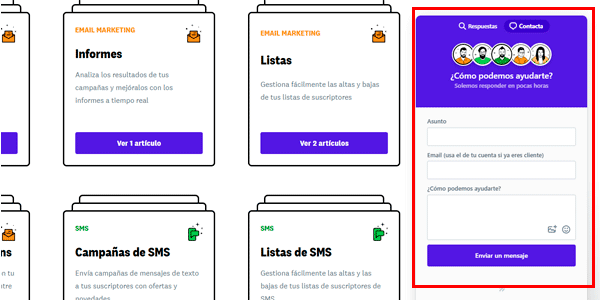
Let’s say Acumbamail, like most B2C SaaS products, offers two types of support:
- Plenty of documentation, so users can find what they need themselves: https://soporte.acumbamail.com/
- Personalised support: when you can’t find what you need, you can contact them by chat. I’ve only had to do it three times: twice the response was quite fast—under an hour—and once it took more than 24 hours.
Generally good, and on top of that in Spanish, which can be a big help for some people—we’ll see that other tools don’t offer this.
Acumbamail API and Webhooks
For businesses looking to integrate Acumbamail with other applications or systems, the platform offers a robust, well-documented API, although you’ll probably need a technical profile or a developer to make the most of it.
This API—and the webhooks—lets you perform actions such as managing subscriber lists, sending campaigns and retrieving results reports, making integration with other platforms easier.
I’ve barely used it because I haven’t needed it, so the best I can suggest is that you take a look for yourself.
Referral programme
Acumbamail has a referral programme that lets paying users earn a little extra money.
By recommending the platform through a personalised link, we can earn 15% of the revenue generated by referrals during their first two years.
This programme is a proper win-win :
- The company expands.
- Users can earn some extra money.
Restricting access to paying users also adds an extra layer of credibility to reviews like this one, whose links all come from my referral programme.
Comparison with other platforms
You’re very likely wondering whether Acumbamail is right for you or which email marketing tool suits you best, because there are many email marketing platforms on the market, each with its own audience.
I’ll explain the main differences from two other common options you may be considering: MailerLite and MailRelay, both of which I’ve also used extensively.
I’m not including the very popular Mailchimp because, although I’ve used it on the odd project, I’ve never worked with it as deeply as the others—only for specific tasks and cases—so my opinion would be biased.
Acumbamail vs MailerLite
MailerLite is one of my favourites. It’s what we use at Círculo Copy, and I’ve also configured it for a few clients.
The truth is that I like it and think it’s better than Acumba in certain areas:
- More options and easier tools for managing users between lists—Acumbamail’s biggest weakness for my use case.
- Better integrations with other tools, or at least simpler ones. I find it easier to achieve what you want.
- This is personal, but MailerLite feels more intuitive overall in the way processes are carried out—creating forms, managing lists, even the email builder itself. I think it’s more logical and easier for any new user to understand.
In Acumbamail’s favour:
- Its deliverability. And this is a fundamental advantage. MailerLite’s isn’t bad, but it doesn’t reach the same levels.
- The initial setup of the server is simpler.
- Its support is in Spanish, whereas the only time I had to use MailerLite’s support—precisely for server setup with Cloudflare’s CDN—I had to do it in English.
Acumbamail vs MailRelay
Let’s move on to another very popular tool, one I’ve worked with a lot—really, a lot.
Let’s start with MailRelay’s strengths:
- The best and most powerful free plan you’re going to find.
- It doesn’t include the company logo in free-plan sends, which looks more “professional”.
- Overall, it is more intuitive. And I think the email editor is better designed.
And now, its drawbacks:
- Deliverability is very poor. It isn’t unusual for registration confirmation emails to go straight to spam, even with all the technical setup done correctly—which is why I migrated to Acumbamail.
- For complex issues, support on the free plan is quite poor.
- Also, after working with them for five years without problems at Yo pongo el hielo, they closed our account without explanation. We never found out why. Luckily, we stored user records elsewhere as a backup, because otherwise we would have lost them.
Which one would I recommend?
Honestly, I’m quite clear about it: if you only want to test whether email marketing is for you, MailerLite’s free plan is fairly well balanced in every respect, so I’d probably choose it.
However, if you already have some email marketing experience, I’d choose a paid Acumbamail plan. A lifetime one, if possible: that’s exactly what I did.
This video shows how easy it is to sign up for Acumbamail.
What I would never recommend is being seduced by MailRelay’s huge free plan. With the other two alternatives available, it feels like a short-term gain and a long-term loss.
You’re reducing the chances of your email channel working as it should. And if it does work, you’ll have to migrate sooner rather than later. I honestly see no advantage.
Conclusion
Acumbamail is a very good email marketing tool, above all.
Although it has other features, most of us really use it for one thing: sending emails … that reach subscribers’ inboxes . It sounds obvious, but once you get down to it, you discover it isn’t that simple.
If you run a business that isn’t an ecommerce and you’re considering paying for an email marketing platform, this is a safe choice.
If you have an online shop, it will also work for certain sends, but not for every automation you can implement and which I explain in detail in my email marketing course for ecommerce.
Acumba will work for some types of sends, but for the rest you’ll need more specialised tools.
Or you can build your own automation system — as we did at Yo pongo el hielo — and use Acumba only as an email sender, which is also possible and a very good option.
In upcoming articles I’ll go deeper into how to use the tool so you can learn to handle it like a professional. They’ll be collected here:
Acumbamail tutorials and guides
In the meantime, here are more articles about email marketing, and some free resources you can subscribe to by email, plus my new YouTube channel , where I publish tutorials and talk about digital business, analytics, marketing and all the other stuff that fills my working day.

Leave a Reply