
I’ve been optimizing processes since I got serious about marketing, 20 years ago now.
Did I do it because some boss suggested it?
No.
I started doing it simply because I realized that repetitive processes — like launching a weekly newsletter or creating an ecommerce product page — took me longer if, every time I got down to one, I had to think about which steps to follow.
And besides, if I got overconfident because I had done it a thousand times before and my head wasn’t fully switched on, I could make mistakes.
Since then, for these two reasons — saving time and avoiding mistakes — I try to optimize every process I know I’m going to repeat.
This optimization:
- Sometimes it means automating completely or partially, other times improving the flow, and other times finding tools that improve some part of the process, as we’ll see now.
- It works for any kind of process:
- Business
- Sales
- Marketing
- Technical
- Analytics
- Logistics
- And I always achieve it by following the same steps.
These seven that I’ll explain below.
#1. Decide which process to optimize
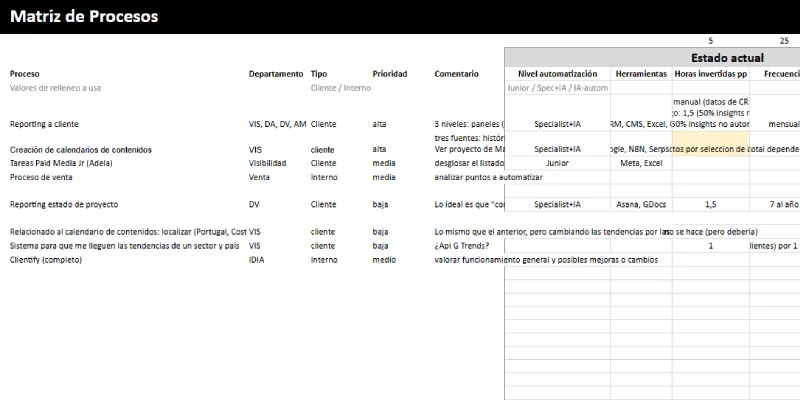
This is the first thing. Before optimizing anything, you need to know what is worth optimizing. I do it using a very simple formula, considering these variables:
- Time it takes to execute a process.
- Number of times it is executed per month.
- Estimated time it will take after the optimization.
- Cost of developing the optimization.
Based on this, I create a process-optimization priority matrix.
And I start with the first one.
#2. Repeat the process manually several times
That is, even if I know it is a process I’m going to repeat several times in the future, the first time I face it I don’t try to automate or optimize it.
No, because I know that if I do it straight away, I’m going to miss things. It is impossible to catch everything if I have not executed it before.
That’s why the first thing I try to do is “master” the process. In other words, become a master of it by repeating it a few times. Enough times to come across different possibilities or variations that can appear, which I will then take into account when optimizing.
Once I’m clear on how to handle each case, that’s when the optimization begins.
#3. Define the process
The second point is perhaps the most important. Because if it is defined badly, it is completely impossible to optimize, let alone automate, any process.
Connections will be missing.
The data will not travel how or when we need it to.
In short, we will get frustrated in later phases because the foundation is not correct.
How to define a process
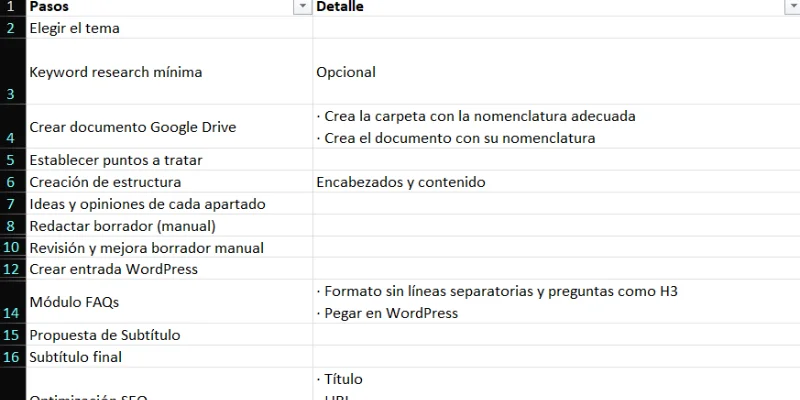
Well, actually, I think it is very simple. Basically, it means writing down, in a mind map or in Excel — in the end we almost always end up in Excel, no matter how we start — each and every action involved in a process.
Without grouping.
No matter how simple they seem.
Something like this:
Because the typical “download the month’s sales data”, when it comes to automation, is not the same as:
- Go to this URL: xxxxxx
- Log in.
- Go into the sales report.
- Filter by the last month.
- Export.
You see the difference, right?
In the first case (“download the month’s sales data”), a human will know how to interpret and do it if it is explained.
An AI agent probably will too.
But an automation tool like N8N will not. And it is not always necessary and/or useful for an agent to do it.
#4. Think how each step could be improved, evaluating different solutions
And the thing is, following the previous idea, in many cases adding an agent means:
- Burning tokens for no reason.
- Trusting it to carry out the process correctly.
When there are APIs that connect to platforms and return the data we need just by entering a few details into a workflow node.
These are the kinds of decisions we will have to make here:
- Which points can be automated.
- Which are better handled by a human manually.
- Analyze if and where AI.
- Whether the AI output should be reviewed by a person or not before continuing with the process.
- Whether a classic development (a CMS feature in PHP or Python) is better, or one with N8N and/or AI.
- Which tools are the most suitable, depending on:
- The result.
- The development complexity.
- The cost.
When you evaluate all this, you get something like this:
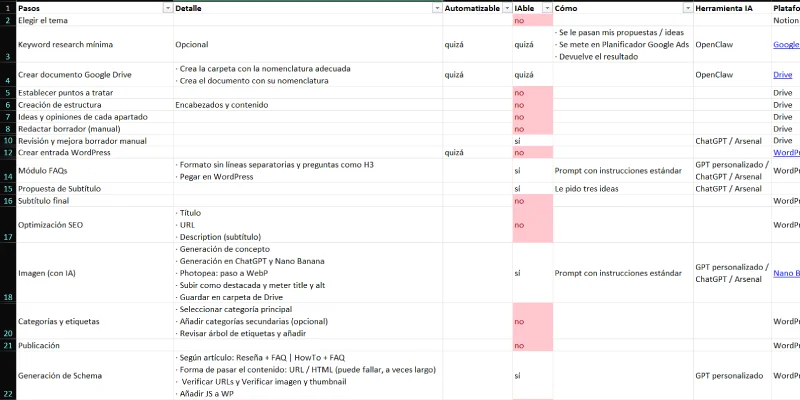
Where it is made clear which points should stay manual, whether the others can be automated or handled by AI, and which tools are worth assessing.
In the example above, I proposed three possible solution paths:
- A first one where the process is fundamentally human, with help from AI at certain points in the process. This will definitely work and improves what exists now, with almost no need for development.
- A second path where we automate a large part of the process, but we do it with N8N, leaving AI for only a few points and adding human validation. The AI tool also changes: in path 1 I propose NotebookLM, whose API is not suitable for this path 2, so the tool has to change.
- An agentic path, where agents will be developed to carry out most of the process, leaving certain human validation points.
Finally, in this case we chose the intermediate path, because it was the best fit for the project’s objectives.
#5. Develop and implement the solution
With this map ready, it is a matter of you, or whoever, getting down to developing the solution.
It is, without a doubt, the longest and most complex point in the process. The one where most hours will go, but that is the price to pay to save more later.
And here, I insist, the paths will be:
- Optimize through improved human execution, use of enabling tools. For example, macros in Excel or Photoshop. Or integrating a CRM for customer service. Or an issue-tracking tool.
- Automate with tools for this: N8N, Make, Zapier…
- Automate with developments — usually web-based — custom-made (modules for the CMS).
- Add an AI layer, either at a specific point or by shifting the entire load of the process to one or several agents.
In each case you can choose one of these paths or a combination of several.
This is an example of how we managed campaigns at Yo pongo el hielo:
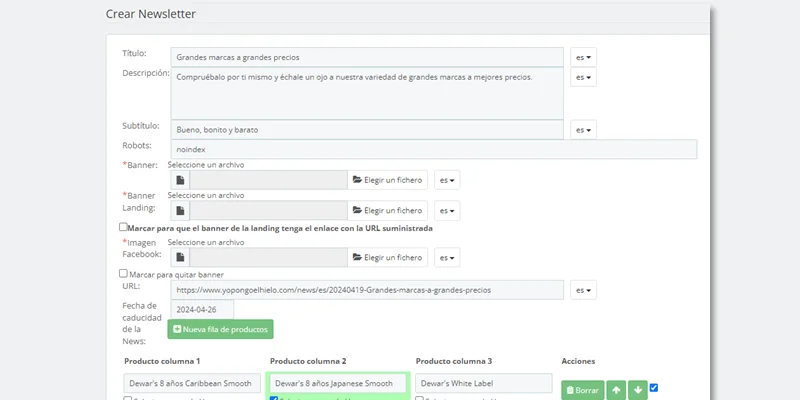
From this backoffice URL we generated:
- Landing page with the promo products.
- Newsletter in 3 languages, with selection of the promoted products sent by email and scheduled sending date.
- Promo hero banner.
- Featured-products module on the homepage.
- Badge on the promoted products.
- Strip with promotional banner.
All from that same single URL.
A custom development that allowed us brutal automation and a considerable saving of hours: we went from spending one hour versus the previous eight.
Important here: the automation and AI sector is constantly evolving, so it is likely that in a month some point of the process can be executed more easily.
The point there will be deciding whether it is worth continuously evolving the process or whether it is more productive to leave it stable for 3 or 6 months and, when the time comes, see whether it is worth making several improvements at once, which, in general, is my preferred option.
By the way, it is very likely that, while developing the solution, we will see the need to make changes to what was planned. Some changes are normal. Many changes mean we did not execute the previous point well (the evaluation) and we should keep that in mind for future processes.
That said, let’s not confuse changes with possible improvements that are left for a later phase 2. They are different things, and this possible phase 2 is normal and positive if you want to start improving the process as soon as possible.
#6. Test and adjust. And phase 2
Although tests are carried out during the development of the solution, once you roll up your sleeves and start working with the new solution, everything may go as expected or it may not, and some adjustment may be needed.
The point is that, if there is good communication between the person or team developing the solution and the person or team using it, the adjustments will be minor and quick, and from that very first moment we will notice the time savings.
If not, we have done something wrong.
Following the previous example, at Yo pongo el hielo we saw that we could further optimize the landing-creation system by changing the way products were added.
In phase 2, we moved from doing it on the previous landing page to a module that imported Excel files with all the product-offer data (attributes, offer price, previous price, offer duration, quantity limit):
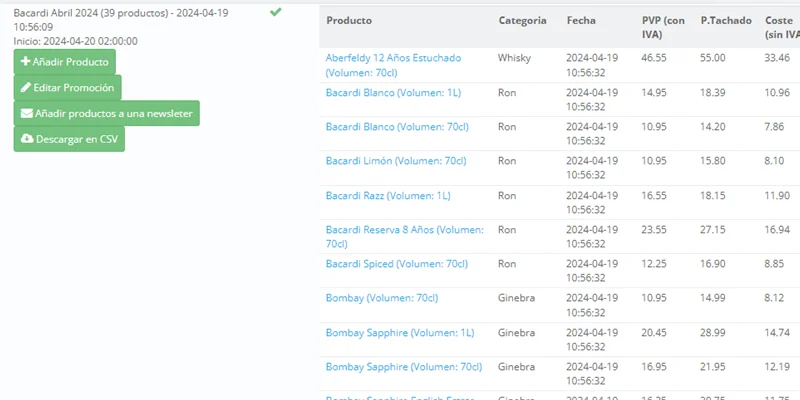
This way, we worked on the products better with Purchasing in a shared Excel, which marketing then imported into the landing page, avoiding the one-by-one selection of each product.
The time gain was significant, especially because there were campaigns like Black Friday with several hundred references.
#7. Document
This is optional, but recommended, if the automation will be managed by someone else or if you will manage it yourself but want to replicate it in the future.
For example, it may be an automation you want to replicate with each client: document how it is replicated.
And the thing is, it is useful to know which steps have to be followed so you are not relying on memory, which we have already seen is slower and leads to mistakes.
A simple Google Doc is more than enough to explain the key points.
If it is for someone else, you may need to add more details or screenshots. This is how I do it at Disruptivos, when I create automations that other people will later replicate.
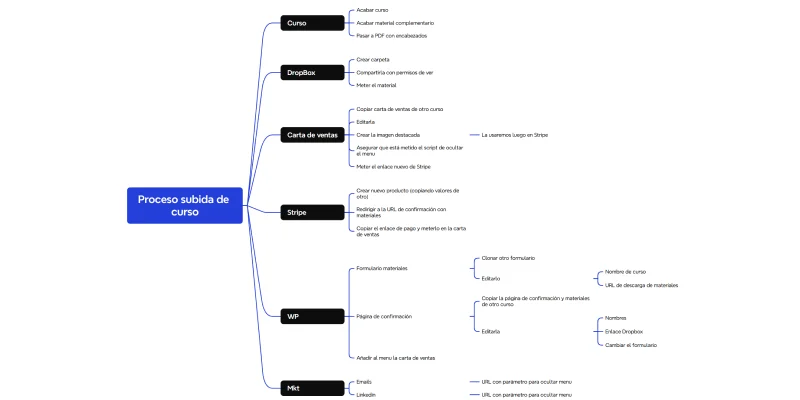
Or for myself, with complex processes like creating a membership website, where, even if I am not going to automate them, it is worth always following the same order to move fast. Or, also, uploading courses to the website, which has several steps and takes a while, so it is much better to have it written down and follow the step by step:
That’s it.
With these seven steps you have an improved and documented system, so that anyone who has to do it in your place (new hire, holidays, job change, your future self who no longer remembers how it was done…) can execute it without much trouble.
It is no small thing: over time, I have realized that having optimized and automated processes is a very clear sign of business or company robustness.
Real cases of optimized and/or automated processes
And so you don’t think I’m staying in theory, I’m going to leave you several examples of optimized processes to give you some ideas.
I already mentioned how we reduced the time needed to create campaigns at Yo pongo el hielo, but in that project we did many other things, such as:
- Invoice automation system.
- Batch creation of product pages.
- Creation of product images with AI.
- Analyzing logistics invoices with AI.
And I’m surely leaving out some other interesting case.
Soon I will link here an article with the system for creating articles with the help of AI that I am preparing for my website (this website).
Later, when I have it operational, a major project I’m building at Disruptivos: a consulting SaaS, with which we want to streamline the audit and strategic-proposal processes for new digital projects that come in.
Conclusions
Optimizing processes is not about automating everything, but about thinking deeply.
Because the biggest mistake is adding tools, AI or automations on top of processes that are not well defined.
The system I have just shown you has a clear advantage:
You always start from the manual process, from understanding it thoroughly. And only then do you decide what to optimize, whether it needs to be automated and with what (not always AI).
That reduces errors, avoids unnecessary developments and forces you to apply judgment to your decisions.
Another important idea:
Not everything should be automated.
There are steps where:
- It is cheaper to do it manually
- It is safer (for example, bank access)
- Or it simply does not compensate for the effort of creating the automation (in hours) or the cost of having AI do it.
And speaking of AI, there will be cases where it fits perfectly, while in others, adding it will be more expensive, more unstable or downright unnecessary.
In short, keep this in mind:
Optimizing processes is essential for a project to move forward. To do it, prioritize those with the greatest real impact, define them correctly before you start automating, and always measure the savings against the cost.
Because in the end, this is not about adding technology, but about building a project that works without depending on your memory for everything.
A project without defined processes does not scale. One with optimized processes can.
Frequently asked questions
What is process optimization and why is it important?
It is the process of improving repetitive tasks to save time and reduce errors. In practice, it avoids having to think each time about which steps to follow and reduces failures as volume grows.
Is optimizing a process the same as automating it?
No. Optimization can involve automation, but also improving the flow, using better tools or simply executing the process better manually.
How do you decide which process deserves to be optimized?
By analyzing four variables: current time, execution frequency, time after improvement and cost of implementing the optimization. With that, you can prioritize which processes to tackle first.
Why is it not a good idea to automate a process from the start?
Because if you have not executed it several times, you do not know all its variations. Automating without understanding the process leads to errors and rework.
What does it mean to “master” a process before optimizing it?
Repeating it manually until you understand all its cases. Only when you know how it behaves in different scenarios does it make sense to optimize it.
What is the most common mistake when defining a process?
Defining it at a high level. To automate correctly, you have to break down each concrete action, step by step, without grouping.
Why is defining a process well so important?
Because if the foundation is wrong, the automation fails: connections are missing, data does not flow correctly and the system ends up breaking in advanced phases.
Is it always a good idea to use AI in a process?
No. In many cases it is better to use APIs or classic automations. AI can be more expensive, less reliable or unnecessary depending on the case.
How do you decide between automation, custom development or AI?
By evaluating the expected result, the development complexity and the cost. There is no single valid solution for every process.
What types of solutions can be applied to a process?
From manual improvements with tools, automations with platforms like Make or n8n, custom developments or occasional AI integration.
What happens if there are many changes during development?
It is a sign that the analysis phase has not been done well. Some adjustments are normal, but many indicate problems in the initial definition or evaluation.
What is phase 2 in process optimization?
It is an improvement after the initial launch, based on real use of the system. It allows you to keep optimizing without blocking the initial implementation.
Why is it important to test and adjust optimized processes?
Because theory does not always match practice. Only by using the system day to day can you detect necessary improvements and adjustments.
Does it make sense to document an optimized process?
Yes, especially if someone else will use it or if you want to replicate it in the future. It avoids depending on memory and reduces errors.
What does having optimized and documented processes bring to a business?
It brings robustness. It allows the business to work without depending on one specific person and makes growth and scalability easier.

Leave a Reply