
When you launch an ecommerce, one of the tasks that will demand the most work is creating the product pages.
At least if you want to do it properly, because you have to:
- Enter the product name.
- The values of the product attributes or characteristics (color, size, format…).
- An image with a defined style (square, 800x800px and with a white background, for example).
- Select its category.
- Choose the price.
That is the bare minimum for it to appear on your website. And that's it.
But with only the above, selling is difficult, because your product page will look more like a skeleton than something alive.
It is missing the flesh, the substance, which comes from a few more fields, such as:
- A short description.
- A long description (SEO-optimized if possible).
- A meta Title.
- A meta Description.
These are the fields that, first, will bring you SEO traffic and, second, will convince your users that what they are looking at is what they need and get them to add it to the cart.
So now you know that you are going to have to complete both groups of fields for every product you want to upload.
And on top of that, several times, once for each language available on your website.
Imagine having to upload 100, 200, 500 or 1.000 products: the number of hours needed to get the catalog on sale can be overwhelming.
Before you start tearing your hair out if you are thinking about launching your ecommerce, I'll tell you that for a long time we have been looking for ways to make this process much easier.
At TiendAnimal we had automated the English translation and the writer only had to complete it in Spanish. Using the Google Translate API, the English was filled in automatically.
It saved half the time, but of course, then “pienso para perros” appeared on the website as “I think for dogs”. No, I'm not joking. That is what appeared.
At Yo pongo el hielo we faced the dilemma of having to upload 1.000 products from a supplier all at once, so we used what were known as spun texts.
It was an SEO technique in which a common description is generated for all products and completed with variables specific to each product, such as category, country of origin, number of sales… The fields from the first group, which are specific to each product, are used to create a unique description.
Some synonyms are also used as general variables, chosen at random from a group (cheap / inexpensive or best-selling / most purchased / most popular / preferred / favorite…).
You do not need to understand it in depth because you no longer need to use it, but keep this idea in mind: for each product, the values from the first group were entered and the content of the second group was generated automatically, which is also the content that takes the longest to create.
So in this article I'm going to explain how to do the same thing, but with today's technology, which has a first and last name: AI and ChatGPT.
And we're going to see it with a real case, our ecommerce Mister GoodBuy.
Starting point
In this case, we have a series of products from our parent ecommerce -Yo pongo el hielo- that we want to appear in our new store -Mister GoodBuy-.
The attributes of each product (the first group of fields) are what they are; that does not change. They are the same in Yo pongo el hielo as in Mister GoodBuy, so they are exported from one to the other exactly as they are.
What really has to change is everything related to the second group. Here they are again:
- A short description.
- A long description (SEO-optimized if possible).
- A meta Title.
- A meta Description.
And it has to change because, if we copy them exactly as they are in Yo pongo el hielo and paste them into Mister GoodBuy, there is a very real risk that Google will penalize us and our new store will not rank.
Since I've already told you that there is now a better way than the text spinning we used back in the day at Yo pongo el hielo, let's get to work on the process.
I think you're going to like it. And so you can see the final result of the process, here is the template we're going to build:
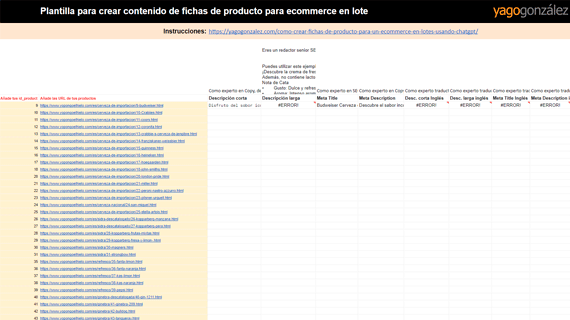
Create product descriptions in bulk quickly and easily
One of the most time-consuming tasks when managing an ecommerce is creating product pages:
– Short description this.
– Long description that.
– SEO Title this.
Meta Description that…
Now you can automate the creation of all this content for multiple products simultaneously, in one go. And at a more than acceptable level of quality, too.
The trick? Connect Google Sheets to ChatGPT.
This template has it all set up, so all you have to do is add your products and you're done.
#1. Required data
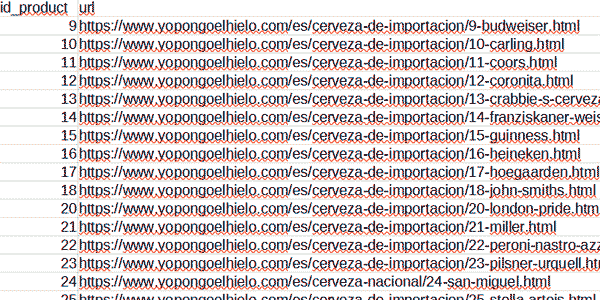
Once we have defined the Yo pongo el hielo products we want to appear in Mister GoodBuy, we will need a list containing the product ID and URL it has in Yo pongo el hielo.
One thing: the ID does not affect the content itself or the process. It is only there so the products can be matched during import.
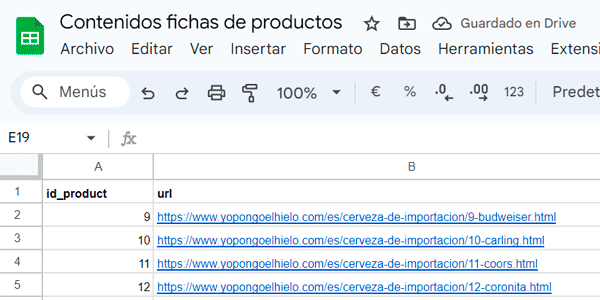
For the export, it does not matter whether you use a module or a database query; the result will be a CSV with two columns like this:
#2. Create a new file in Google Sheets
There is no mystery here, so I won't even include an image.
Go to Google Sheets and create a new file that will contain all the content we need.
#3. Install GPT for Sheets
It is the Google Sheets extension that will let us connect the file to ChatGPT.
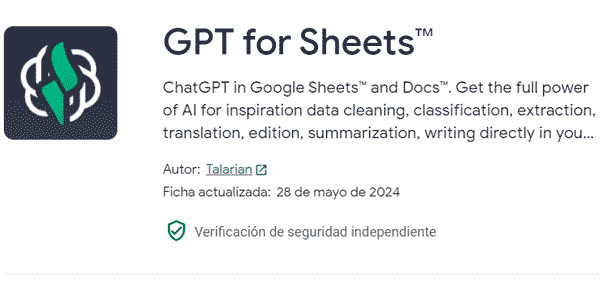
You can download it here: https://workspace.google.com/marketplace/app/gpt_for_sheets/677318054654
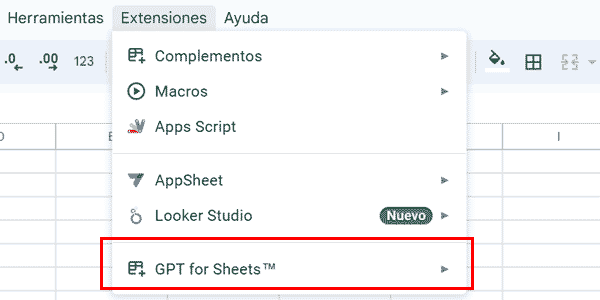
Install it normally, selecting the Google account you want and granting the necessary permissions.
Once that's done, you'll find it here:
#4. Copy and paste the products
Take the initial CSV and paste it into Google Sheets as-is:
#5. Configure the plugin
Open the Google Sheets add-on and the configuration options will appear:
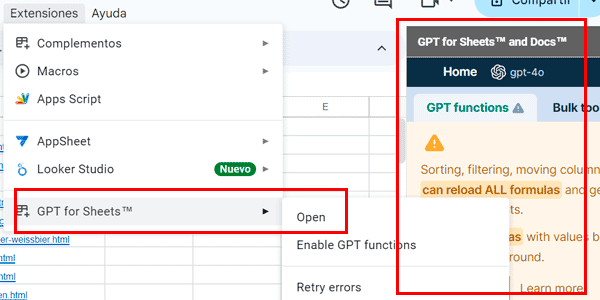
Accept and close the yellow window that appears the first time.
#6. Configure the table
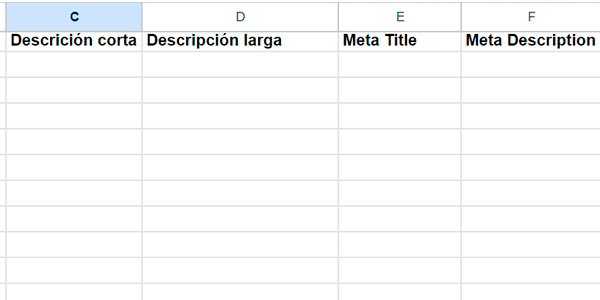
Now we're going to create the Google Sheets table with the fields we need to configure, the 4 we mentioned above:
#7. Add the prompts
Add a row above the headers where we will write the prompts for ChatGPT.
It should look something like this:

I'm going to give you the prompts I used, but you can modify them however you like so they fit the type of product description you want (short or long paragraphs, lists, bold text…)
Short description
As a copywriting expert, describe this product in one sentence.Long description
You are a senior SEO copywriter specializing in ecommerce. Your mission is to make your best effort to create a product page. You must use a natural, friendly and informal tone. Put in bold the words that help the reader recognize and interpret the important parts of the text so they can understand it at a glance. The text must be at least 500 words.

You can use this response example for the product "Pantera Crema de Fresa con Tequila":

Discover Pantera strawberry cream with tequila and give your moments a special touch! This drink combines the sweetness of fresh strawberries with the unmistakable touch of authentic Mexican tequila, creating a unique and refreshing flavor experience. Ideal for anyone who enjoys fruit and tequila, this cream is perfect for sharing on any occasion.

It is also lactose-free and suitable for vegans, so it can be enjoyed by anyone who appreciates a good drink.

Tasting Notes

•        Taste: Sweet and refreshing, with an authentic strawberry flavor and a subtle touch of tequila.

•        Aroma: Intense aroma of fresh strawberries.

•        Appearance: Strong, attractive pink tone.

•        Finish: Smooth and persistent with a strawberry aftertaste.

What Makes It Special?

Pantera strawberry cream with tequila stands out for its perfect balance between sweetness and tequila, making it an ideal choice for fruit and tequila lovers. It is a versatile drink that can be enjoyed neat, over ice, or as the star ingredient in cocktails and desserts.

Product Presentation:

•        Packaging Material: Glass with metal closure.

•        Bottle Dimensions: 289.5 mm high and 66.33 mm in diameter.

Summary:

Pantera strawberry cream with tequila is an exquisite combination of fresh strawberries and authentic tequila, offering a sweet and refreshing flavor with an intense aroma and attractive appearance. Ideal for enjoying on any occasion, its glass bottle presentation ensures a premium experience from the first sip to the last.

I need you to give me the response in HTML, only the content of the <body>, with headings and omitting the H1.
Meta Title
As an SEO expert, give me the Title tag that will help this product rank as high as possible on Google when someone searches for it. Write only the Title, with no further explanation.Meta Description
As a copywriting expert, give me the meta “description” tag that will make this product attractive and stand out in Google's SERPs when someone searches for it. Write only the Description, with no further explanation.If you notice, I ask it to return the long description -the most complex field of all to fill in- in HTML. I do it this way because that is how PrestaShop (our CMS) stores the description field in the table.
#6. Let the magic begin
Come on, we're almost done.
We dress up as Harry Potter and add the necessary formulas to the cells I show you:
- C3 : =GPT($C$1;B3)
- D3 : =GPT($D$1;B3)
- E3 : =GPT($E$1;B3)
- F3 : =GPT($F$1;B3)
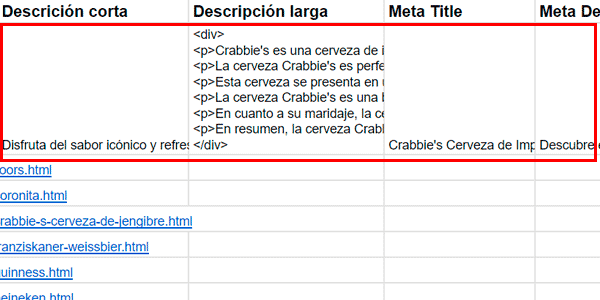
What we're doing is telling ChatGPT to take the product from the URL and, using the prompt specified in the formula, create the content we need for it.
Check that the results are suitable. If they are not (rare), fix the prompt and make sure the table is configured exactly as I explain.
You should see something like this:
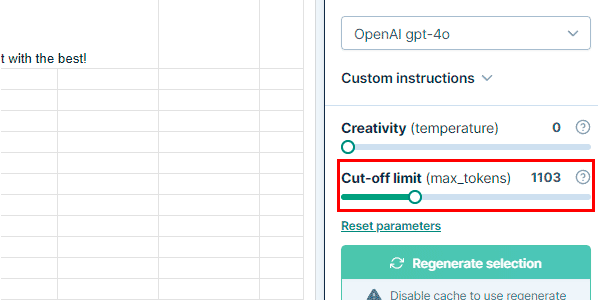
That said, you may get this error in the generated long-description field:
"This response was truncated by the cut-off limit (max tokens). Open the sidebar, Increase the parameter in the settings and then regenerate.
“`html"
If that happens, simply increase this option in the bar on the right and regenerate the content until it disappears:
Once everything is OK, all you have to do is drag the formulas down so the system we've built can work its magic.
Expelliarmus!
#7. And now we translate too
One more thing.
If your website is available in several languages, what we would do is ask ChatGPT to translate the content into the corresponding language, using a prompt such as:
As an expert translator, translate this into English.And for the long description:
As an expert translator, translate this into English while preserving the HTML. Write only the translation, with no further explanation.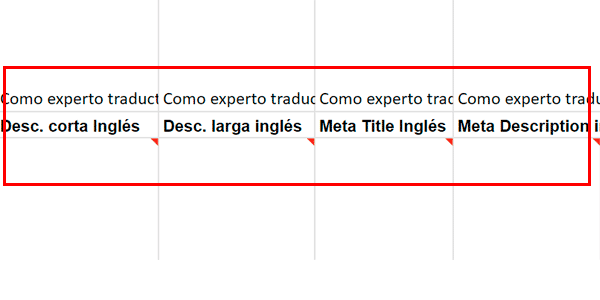
And its formula in this cell will be:
- G3 : =GPT($G$1;B3)
We do the same with each field to be translated. And if we have more languages, we simply add them to the columns on the right.
This is the result of the whole process:
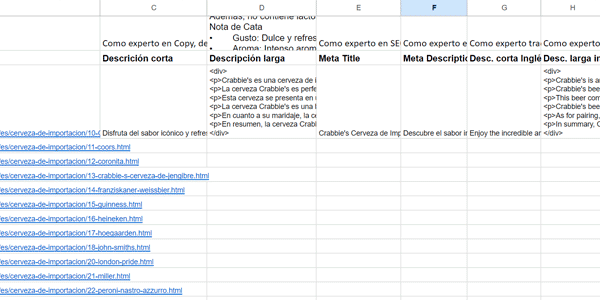
Now all that remains is to drag the formulas down so ChatGPT starts filling in the content.
Do it little by little, though, if you want to avoid overloading the API.
By the way, if you want the ready-made template, check the last paragraph of the article
#8. Download the file
And upload it to the CMS yourself or send it to IT so they can import the products.
Limits
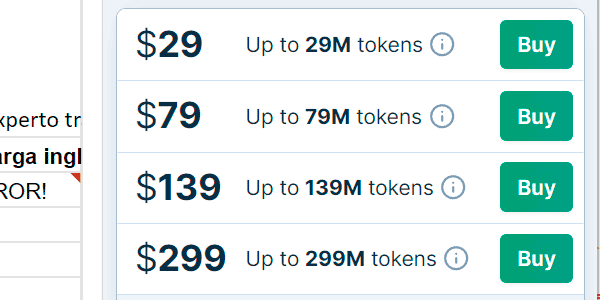
It is very possible, not to say certain, that you will reach the free usage limit of the plugin..
Once you reach it, you'll have to pay, but it is so cheap, so very, very cheap, that you'll happily pay for the package you need (at the moment the smallest one is 29 dollars).
It cost us 20€ to create 2.000 product pages, to give you an idea.
Conclusions
As you can see, the process is not complex, even though it has 8 steps.
The part that will take you the longest when setting up the whole system will be paying for the plugin. That tells you everything.
And, of course, it is nothing compared with the time it would have taken you to write by hand this ridiculous amount of text.
Besides, the content is much higher quality than with text spinning. Not that this was difficult either.
Does this mean the days of manually writing a good product page are over?
No, not at all. This system is for getting lots of them at once, but the quality is not exceptional. Whether it is good enough will depend on each person's standards.
That said, I’m clear that for top products or those that are little known and that you want users to try, as things stand today, human copywriting is superior.
The good thing is that, with this system, you have already created the foundation for all the products in the ecommerce and, from here, you can start prioritizing improvements to the content of whichever products you choose, while the rest remain on sale instead of sitting idle waiting for the writer to get to them.
I think it's brilliant, frankly. And it also has a sequel.
I'll leave for the next article the case of creating product pages from the typical catalog / technical sheet that the supplier provides us in PDF.
In that case, I'll use what I've explained here to show you how to tackle this process, which is also very common. And yes, once again we'll use ChatGPT.
Get the ready-made template
But first, if you want the Google Sheets template ready for you to copy and use in your project, you can get it here (among other freebies). And while you’re at it, you’ll subscribe to my newsletter and get your dose of articles every Thursday.
If you want to take a look first at what you’ll find, here are several articles about AI, , ecommerce or tools, among other topics.

Leave a Reply