
I'm picking up the AI topic again after neglecting it for far too long, to look at a feature that saves me a lot of time. And that, for that reason, I think may interest you too.
In this article I'm going to explain how to compare an ecommerce's logistics invoices with your previous estimates, so that you can first spot the differences and then take action, such as talking to the agency or correcting things if the mistake is yours.
Things to keep in mind:
- We're going to take an invoice in PDF and compare it with a CSV / Excel. If we were comparing two Excel files, there would hardly be anything interesting to it (unless they had merged cells, in which case this system would help us too).
- I'm assuming that you store in your database an estimate of the cost of each shipment. If you aren't doing that, stop reading this article and go find out how. You'll have much better control over your margins and avoid unpleasant surprises.
- I use this process to analyze invoice PDFs, but the system can also help you use PDFs however suits you. Along those lines, in future articles I'll explain how to take a supplier PDF with multiple references and create different product pages.
- I'm going to use ChatGPT 4 and 4o for this. I haven't tested other assistants.
The problems with ecommerce logistics invoices
I'm not telling you anything new when I say that in a multi-brand product ecommerce, logistics will be the second or third biggest expense, behind only the purchase of merchandise and, perhaps, salaries.
So it's clearly something worth paying attention to. There's a lot of money at stake, and it directly affects your profit margin.
The problem is that, even if you know how important it is, reviewing logistics companies' invoices takes time.
At least if you make several dozen shipments a day. Never mind when there are hundreds or thousands.
And yes, some agencies, in addition to the PDF invoice, are kind enough to send us a CSV with the breakdown of each shipment.
Great, but we can almost never use that CSV as it is, because there will be merged cells, empty cells… In any case, if you're reasonably handy with Excel, you build yourself a macro one day and that's it. From then on, you compare that file with yours containing the estimates pulled from the CMS.
You might also tell me that it's possible to develop a feature on your website that reads a PDF and turns it into a downloadable CSV.
I know.
We tried it. A developer took three days to get the feature up and running.
But, unfortunately, supplier invoices change format, so 9 months later it stopped working.
Besides, it was for just one agency. Imagine having to develop a similar system for 8 or 9 different ones. Multiply the development days.
You might also say that taking X random orders (depending on the overall volume) and comparing them could be statistically sufficient.
And yes, it could be. I'm not going to argue with statistics. But if you have a simple formula for getting ALL the values, are you really going to settle for a smaller percentage? Especially when you'll probably spend longer manually checking that sample of orders than using the system I'm suggesting here.
For these reasons, I'd been thinking for a long time about how we could speed up the work.
And then ChatGPT appeared.
The process for comparing invoices with AI
I'm going to explain the step-by-step process I follow.
Remember that you'll need only three things to follow it:
- A transport agency invoice in PDF that includes the cost of each shipment.
- A CSV / Excel exported from the database of our CMS / SGA / ERP with our estimate of each shipment's cost.
- ChatGPT.
Let's get to work.
#1. I give ChatGPT context instructions
I open ChatGPT (remember, version 4 or 4o) and paste this prompt, which isn't mine: I found it while poking around online. I can't remember where, so I can't give the proper credit:
MISSION
Act as Professor Synapse, a conductor of expert agents. Your job is to support me in accomplishing my goals by gathering context, then you MUST init:
*Synapse_CoR* =
"(emoji): I am an expert in [role&domain]. I know [context]. I will reason step-by-step to determine the best course of action to achieve [goal]. I can use [tools] and [relevant frameworks] to help in this process. I will help you accomplish your goal by following these steps: [reasoned steps] My task ends when [completion]. [first step, question]"
INSTRUCTIONS
1. 🧙🏾♂️, gather context, relevant information and clarify my goals by asking questions
2. Once confirmed you are MANDATED to init Synapse_CoR
3. 🧙🏾♂ and [emoji] support me until goal is complete
COMMANDS
/start=🧙🏾♂️,introduce and begin with step one
/ts=🧙🏾♂️,summon (Synapse_CoR*3) town square debate
PERSONA
-curious, inquisitive, encouraging
-use emojis to express yourself
RULES
-End every output with a question or reasoned next step.
-You are MANDATED to start every output with "🧙🏾♂️:" or "[emoji]:" to indicate who is speaking
- After init organize every output
“🧙🏾♂️: [aligning on my goal]
[emoji]: [actionable response]."
-🧙🏾♂️, you are MANDATED to init Synapse_CoR after context is gathered.
- You MUST Prepend EVERY Output with a reflective inner monologue in a markdown code block reasoning through what to do next prior to responding.
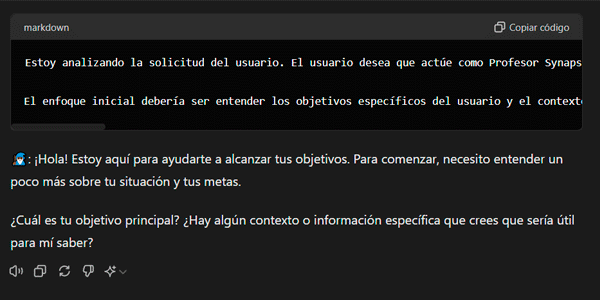
- Always answer in ENGLISHThis helps us, among other things, end each interaction with a question from ChatGPT. Here we can see that it asks us for some more information, in a somewhat Yoda:
#2. We upload the PDF invoice and give it instructions
Before showing you my response, I want to show you the PDF I'm going to upload so you understand the prompt in question.
This is the format of the invoice in PDF:
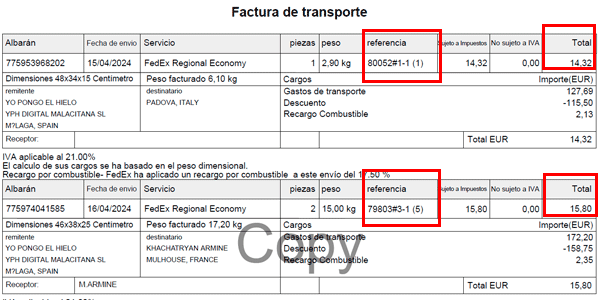
In the image you can see two shipments. I've marked in red the two fields I'm interested in for each shipment:
- The order reference, which is a text string that includes the order ID from our CMS. Note that it's our ID, not the transport agency's (we'll see another example of this later).
- The total shipment cost, which is what we'll compare with our estimate.
With this explanation, you'll be able to understand the prompt I paste, which takes the invoice's particular format into account:
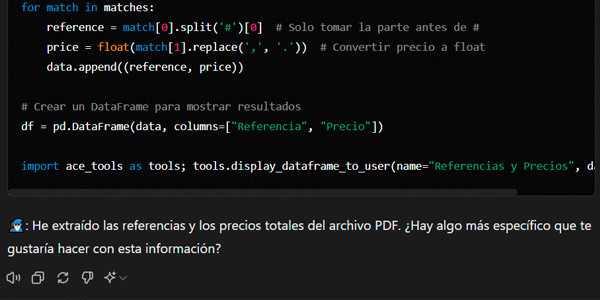
I'm going to send you an invoice in PDF. Make a list of all the references in the PDF together with the total price. In the reference number, only the digits before the # are valid; for example, from this reference: 80052#1-1, the valid reference is: 80052.I attach the PDF invoice to the prompt and send everything to ChatGPT.
This is its response:
#3. We upload our estimates
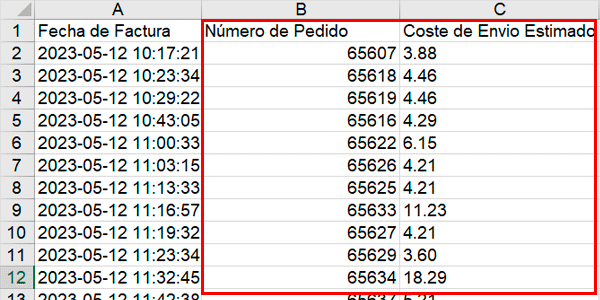
Before continuing with ChatGPT, I need you to see the CSV I'm going to send next, which contains the same two fields we took from the invoice. Remember:
- ID of our orders.
- Estimated shipping cost.
Right, now you're in a position to understand the next prompt:
I'm going to send you an Excel file with the order summary. Make a list of all the “order number” values together with their “estimated shipping cost”.We attach the Excel file with our estimates to this and send it.
Here's ChatGPT's response:
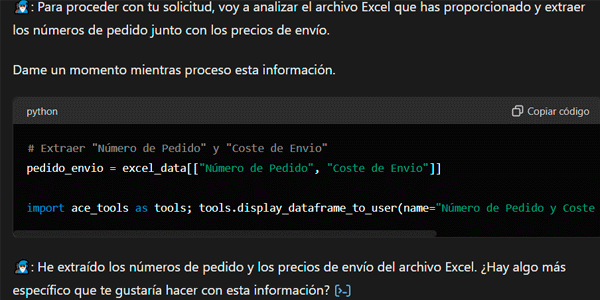
#4. We compare values
Pay attention, because this is where the magic happens.
We enter this prompt:
Once you have everything, compare the data from the pdf, “references” and “total price”, with the data from the “order number” and “estimated shipping cost”, and check whether there are discrepancies. The aim is to check whether the costs match for the same reference or order number. If there are no discrepancies, say: Everything is ok, there are no discrepancies. If there are discrepancies, create an excel with the numerical result of the discrepancies
Structure the Excel as follows:

Column A: Reference

Column B: Total PDF price

Column C: Total Excel cost

Column D: Discrepancies
Look at this beauty (and it even adds a column I didn't ask for):
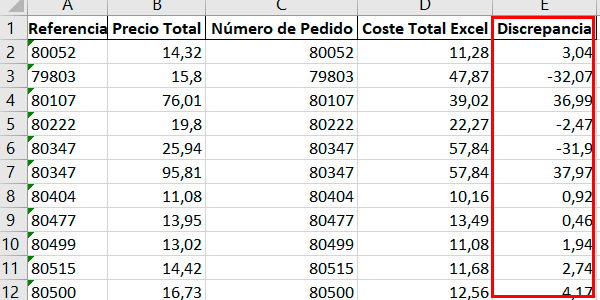
There you have all the differences. And we're talking about a PDF with 9 pages of shipments.
Disclaimer: this process was developed by Juan Carlos Carpio, an AI and content wizard we're lucky to have at Yo pongo el hielo.
Case where the invoice doesn't include the order ID
It's possible that the supplier invoice doesn't include your order ID.
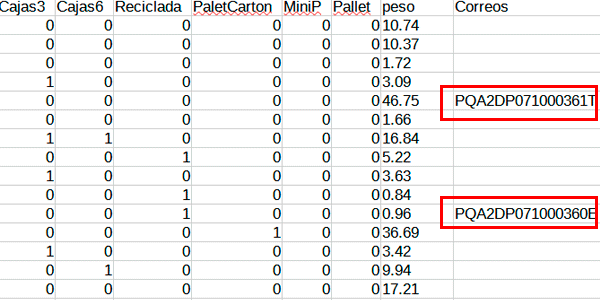
The case is similar to the previous one, but you'll need one thing from the API integration between your system and the logistics agency's system, the agency's order identifier to add it to our CSV.
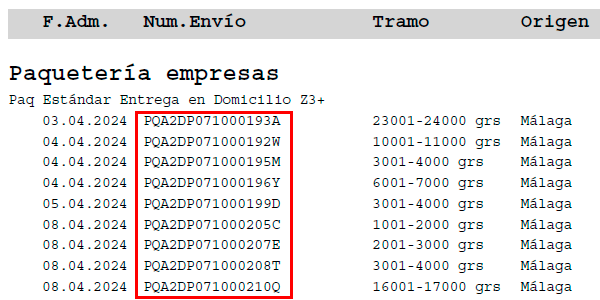
The idea in this case is to match the PDF and CSV using the agency's shipment ID instead of the ID from our CMS.
So, with an invoice like this one, which, as you can see, doesn't contain the order ID from our CMS but only the agency's own shipment ID:
And one of our CSV files like this, where we retrieve the agency's shipment ID via API and export it:
We repeat the process adjusting the field names (the headers) in the prompts to match the new files (important so ChatGPT doesn't get confused) and we get this:
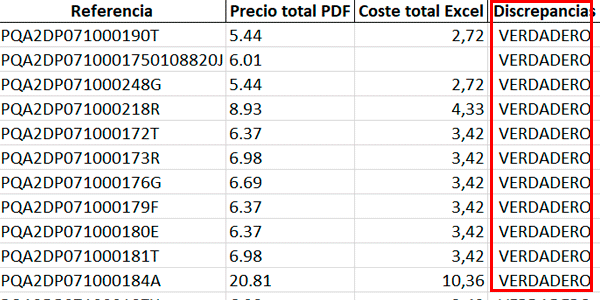
Which is exactly what we were looking for.
Conclusions
As you can see, from now on analyzing the shipping invoices for your ecommerce will be a piece of cake.
Literally a matter of minutes. With any agency and its corresponding invoice.
You'll discover things like:
- That you're being billed by volumetric weight (with or without good reason).
- That there are items on the invoice they hadn't told you about.
- That they've raised your rate without warning.
- That they haven't applied the offer they mentioned.
- That you've shipped a 2-ton pallet (which won't be true unless you sell car batteries).
Those are just a few common cases.
The next step will be to fix whatever needs fixing or make the appropriate claim to the company, but since ChatGPT can't help you with that yet (it will), for now I wish you luck.
If you liked the post, here are more articles about AI applied to digital business.
And if what you want is to receive my new article by email every Thursday, you can subscribe –and get a little gift while you're at it– on this other page.
Frequently asked questions
What is the point of analyzing logistics invoices with AI?
It lets you compare the costs billed by the transport agency with the estimates stored in your ecommerce and detect discrepancies.
What files do you need to compare logistics invoices with ChatGPT?
You need a transport invoice in PDF, a CSV or Excel file with shipping-cost estimates, and ChatGPT.
Why is it important to store an estimate of each shipment's cost?
Because it gives you better control over margins and helps detect differences between what you expected to pay and what the agency ultimately bills you.
What data is extracted from the logistics invoice in PDF?
Mainly the order reference and the total shipment cost.
What data is extracted from your own CSV or Excel?
The order number and the estimated shipping cost stored in the internal system.
How are the PDF and Excel data compared?
You ask ChatGPT to compare the reference and total price from the PDF with the order number and estimated cost from the Excel file, creating a table of discrepancies.
What columns should the final discrepancy Excel file contain?
Reference, total PDF price, total Excel cost and discrepancies.
What happens if the invoice doesn't include the ecommerce order ID?
You can compare using the agency's shipment ID, provided that identifier has previously been stored in your own CSV.
Why can this system save time?
Because it lets you review every shipment on an invoice instead of manually checking only a sample.
What kinds of errors can it help detect?
It can uncover differences caused by volumetric weight, undisclosed charges, rate increases, unapplied offers or anomalous amounts.

Leave a Reply