
Over the past few days or weeks, a new source—and a new medium—has appeared in GA4 reports:
““(Data not available)”, next to a warning triangle:
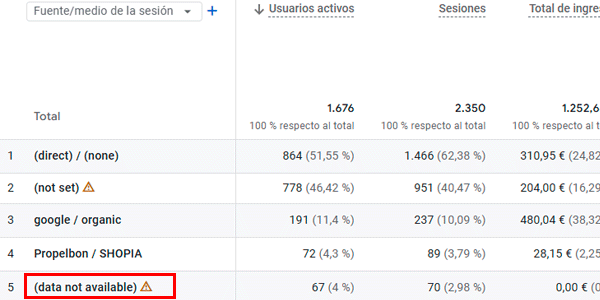
Yes, alongside “Unassigned”, “(not set)” and “Direct”, we now have a new traffic channel whose origin we do not know.
And speaking of not knowing, let’s see what is known so far about this source. I can already tell you: not much.
I explain it in the video first; below, you’ll find the explanation in text and images:
What does “(Data not available) ” mean in Google Analytics 4?
As I mentioned in the introduction, the “(Data not available)” label—literally, data unavailable—is a value used in the traffic source and medium dimensions..
In other words, it groups traffic generated by users who have reached your website. Keep that in mind for now.
Because it is so new, we still do not have all the answers, but they will gradually emerge, as always.
Let’s dig a little deeper.
Why does “(Data not available)” appear in GA4?
According to Google, the decision to display this traffic grouping is supposed to provide greater transparency in your project’s data.
“(Data not available)” appears in reports when Google Analytics cannot provide the source and medium dimensions for a portion of the traffic reaching your website.
This can happen for two reasons::
- GA4 has not yet processed that portion of the traffic.
- GA4 has already processed that traffic, but cannot provide the source and medium dimensions.
Until now, this data was placed in the “Direct” or “Unassigned” category.
In other words, you did not have any more information about it either—assuming you really understand what direct traffic is.
The only change is that GA4 now tells you that some sessions previously shown as “Direct” are being placed in a new category: “(Data not available)”.
The most important thing, in my view, is knowing that some of these sessions will later be reassigned to their actual source and medium.
Causes of “(Data not available)”
For now, Google has mentioned three causes:.
#1. Processing time
The most recent data—for example, the last 24 hours—will contain a fairly high number of sessions marked “(Data not available)”.
We already know that GA4 processing times are generally quite long. This is another reminder that you should not analyse today’s or yesterday’s data in GA4.
Instead, wait 48 hours before analysing the data.
#2. Overrepresented user ID
In other words, it is assigned to too many events.
I’ll show you the documentation as an image first, because it is interesting:
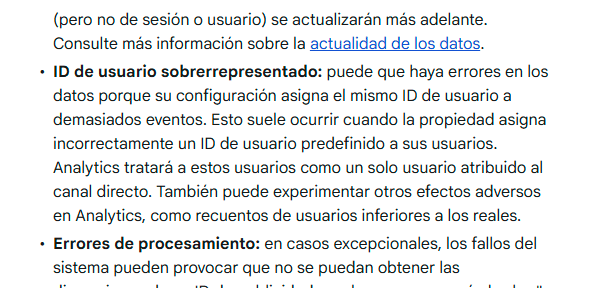
My interpretation is that “Data not available” will appear more often in properties where userID is implemented incorrectly and values such as these are sent:
- "none"
- "undefined"
- "null"
- “0000”
Or a similar value sent to GA4 when the user ID is unavailable—for example, before the user logs in.
This is incorrect, because any string or text sent to GA4 as a user ID is treated as a real user ID. Sending the same userID value for every logged-out user is what creates this “overrepresentation”.
So, if you see a lot of traffic under this source, review your user ID implementation and make sure this mistake is not being made.
#3. Processing errors
Yes, Google Analytics can sometimes make mistakes and fail to retrieve data related to the traffic source.
It happened before, it happens now and it will keep happening. Since the percentage is minimal, it should not concern you.
Conclusion
Personally, I think this is a positive change:
- It reinforces the idea that we should wait 48 hours before looking at the data.
- It removes some traffic from the already overloaded Direct category.
My question is when Google will provide clear guidelines for properly understanding how these related traffic-source concepts are classified:
- (not set).
- Direct.
- Unassigned.
- (Data not available).
I doubt it will take long. Let’s see whether that is actually the case.
I’ll cover it here in the GA4 tips section. To make sure you do not miss anything, you can subscribe to my newsletter —with a new article every Thursday—or visit my YouTube channel..
See you in 7 days.

Leave a Reply