
In this article I want to tell you about the latest collaboration I set up for my former company, because I think it might give you an idea for your business.
In this case, it was about setting up a surprising pricing system. Or at least it was for me, when they told me what they had in mind and asked me to create it for them.
To help you better understand the solution and the context, I'll tell you that the company I built it for was our beverage distributor for the HORECA channel (our holding company had several different businesses), which had more than 4,000 SKUs and very competitive purchase prices.
In addition, I'll add that the initial problem was not the prices. Or not directly, at least.
The issue to solve was order price quoting.
In the sector, it is quite common to have a customer service WhatsApp where customers constantly ask for prices and order quotes.
And of course, we're talking about professionals who have different suppliers available, with different prices for the same or different catalog, and who look for this quote when making their purchases, so they need it immediately.
The solution was looking for a formula that would automate and centralize this as much as possible, since several people were involved and the answers were not always identical or immediate.
Yes, it could have been a chatbot, but we thought there were better options.
And we came up with an approach that gave customers two things:
- Generate quotes for their own orders.
- Adjust the costs of each SKU.
This way they had the answer right away and could also adjust the purchase prices of each product, which allowed them to buy in whatever way was most convenient for them: all SKUs from the same supplier (us), or use different suppliers, considering the total purchase price, shipping costs, minimum orders and delivery times.
Sound good? Well, the truth is that what we set up is working wonderfully. I'll explain it in detail.
Our solution
This is the system and its key points.
Goal
As I told you, it was twofold:
- Make product quotes immediate and always consistent.
- Get current customers to buy more SKUs from us, ideally all of them.
How to achieve it
Allowing the customer to quote the order price automatically, while also choosing the price of each SKU on their order sheet.
We set a recommended price for each product — market prices, not higher ones to simulate a bigger offer — but the customer is free to lower it if they think it makes sense.
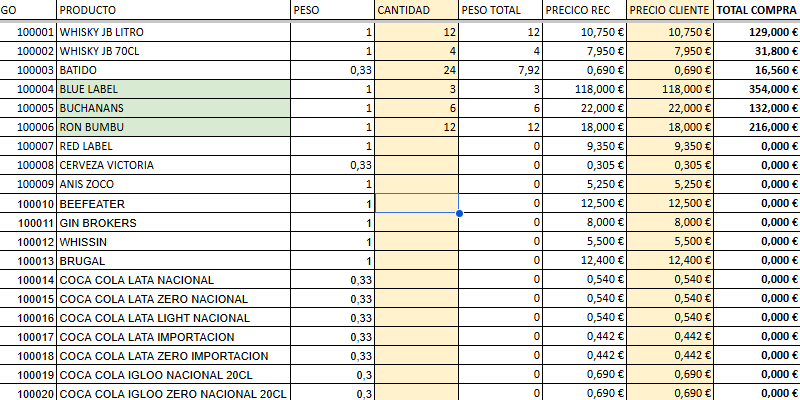
With one limit, of course.
The system has implemented a traffic light that calculates the margin of the total purchase and tells you whether the order is viable or not:
- Green: the order can be placed automatically.
- Yellow: it has to be quoted manually.
- Red: the order is not viable.
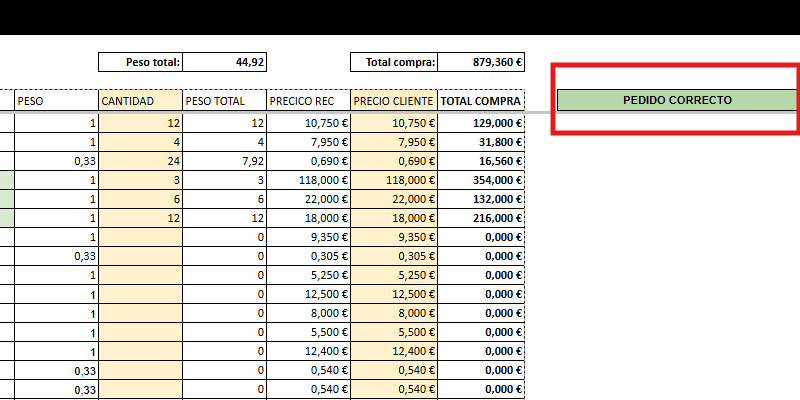
This way, most orders are quoted automatically without human intervention, which is only required for orders with a yellow traffic light. The workload on our side is therefore reduced, and the customer gets an instant answer.
The technology behind it
The system started from the premise that it had to be simple and as standardized as possible.
We had already tried web apps that worked on mobile and PC, and customers never quite ended up using them.
Why didn't they?
Well, because they were not used to working with it in their day to day and, even though they were extremely simple, they did not use them because there was friction.
Our decision here was the one you've seen: choose a tool they are used to working with, such as a spreadsheet.
So, the system we built is based on two spreadsheets, both in Google Sheets for three reasons:
- The familiar interface for the customer.
- The possibility, on our side, of adding code via Apps Script.
- How easy it is to share the order sheet with customers.
How all this works
Well, the truth is that the solution is simpler than it might seem. It has only three parts.
#1. The database
One of the spreadsheets is our database. Why that and not something else? Well, for convenience and agility for the purchasing and product department.
There we enter the product prices, costs and weights:
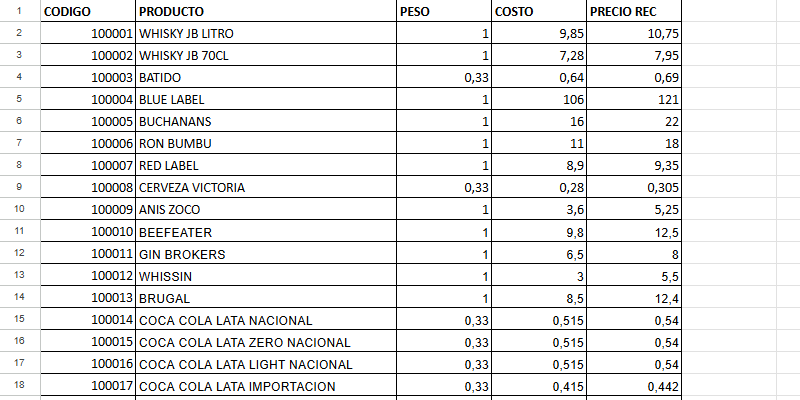
We also have another tab where the cost of each shipment is calculated based on destination and weight.
This sheet is obviously for internal management, since it contains the business data that will be used to calculate the total margin of the order.
#2. The order sheet
This sheet is the one shared with the customer so they can enter their prices.
Logically, a copy is shared with each customer so that one customer's orders do not overwrite another's.
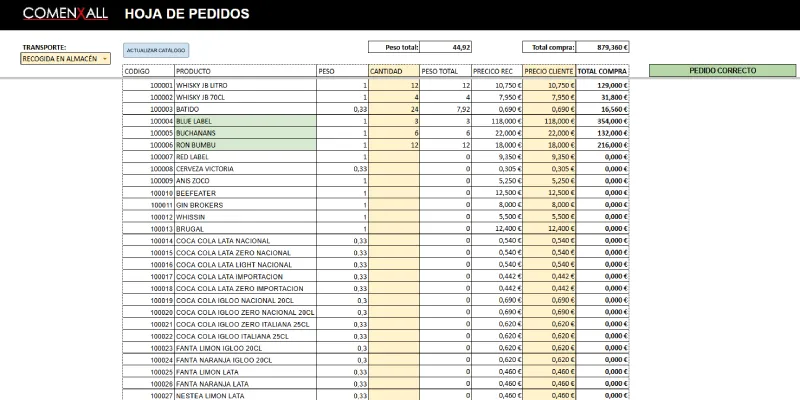
Here each customer will choose:
- Whether they require delivery or pick up the order at the warehouse.
- The products they want, their quantities and their price.
In addition, the sheet automatically calculates:
- Total purchase price.
- Order margin. It is not shown, but it changes the color of the traffic light.
- Total order weight (to calculate shipping costs).
Finally, some products are marked in green because they are the ones for which it is recommended that the customer review the price and add them to their order, since they are promoted.
And it does this thanks to the following.
#3. The code
A code snippet in Apps Script is embedded in this same Google sheet:
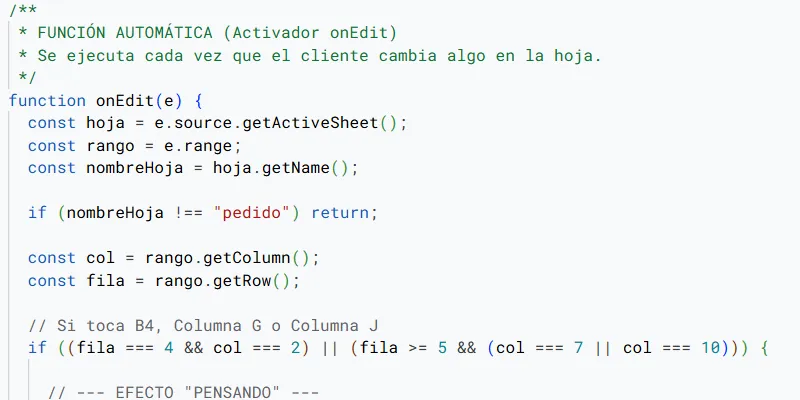
This is where all the system logic is.
The main thing is the traffic light, which calculates the total margin of the order. This calculation takes into account the product margin according to the price the customer has set and the shipping cost based on weight and distance, and it is what gives the order the green light or not.
Finally, as prices change every week or month, the code also takes care of updating the prices changed in the internal database sheet and reflecting them in the order sheet.
Summary and conclusions
I don't know if you had ever considered a pricing system like this.
It is very focused on distribution companies that work with multi-brand SKUs. Many of them, if possible.
It is a very good way to take advantage of it if one of your advantages is the purchase price, because for the customer it is clearly a great opportunity.
In any case, besides the price itself, the system solves the main problem: avoiding constant and manual quoting of customer orders. The customer self-quotes their order immediately, so friction is completely reduced.
I hope that, if you never thought this was possible, this system gives you ideas for your business, because I can tell you that it is working very, very well for my former colleagues.
Frequently asked questions
What is a pricing strategy where the customer chooses their price?
It is a system in which the customer can adjust the price of each SKU within their order sheet, always within limits set by the total margin of the purchase.
What is this pricing system for?
It is used so the customer can self-quote their order instantly and to reduce the internal workload in companies that receive many requests for prices and quotes.
What type of company does it make the most sense for?
It makes sense above all for distributors with many SKUs, professional customers and competitive purchase prices, especially if they work with recurring orders and comparisons between suppliers.
Can the customer set any price?
No. The customer can lower prices, but the system calculates the total margin of the order and marks whether the operation is viable, whether it needs manual review or whether it simply cannot be accepted.
How does the viability traffic light work?
The traffic light indicates the status of the order: green if it can be processed automatically, yellow if it has to be reviewed manually, and red if the order is not viable.
Why use a spreadsheet instead of a web app?
Because many customers are already used to working with spreadsheets. If the tool fits their daily routine, there is less friction and a better chance that they will actually use it.
What technology is behind the system?
The system relies on Google Sheets and Apps Script: an internal sheet with prices, costs and weights, an order sheet for each customer and code that calculates margins, shipping and updates.
What does the customer gain from this system?
They gain speed and control. They can instantly see whether it is worth placing the entire order with one supplier, adjust prices, compare costs and decide without waiting for a manual quote.
What does the company gain?
It reduces manual quoting, centralizes criteria, responds faster and can get current customers to buy more SKUs from it without always relying on WhatsApp conversations.
Is this a recommended strategy for any business?
No. It works best when there are many SKUs, professional customers, recurring orders and enough margin to play with prices without losing profitability.

Leave a Reply