
This might surprise you, but for me, the best handheld console on the market is not made by Nintendo.
Not the Steam Deck. And certainly not any other console-style PC.
No.
It’s the R36s. And you may well never have heard of it.
No, not unless you’re into the world of retro video games. And properly into it; knowing MAME and an emulator or two doesn’t count.
I discovered it a couple of years ago in the Chollometro newsletter. And I bought it instantly.
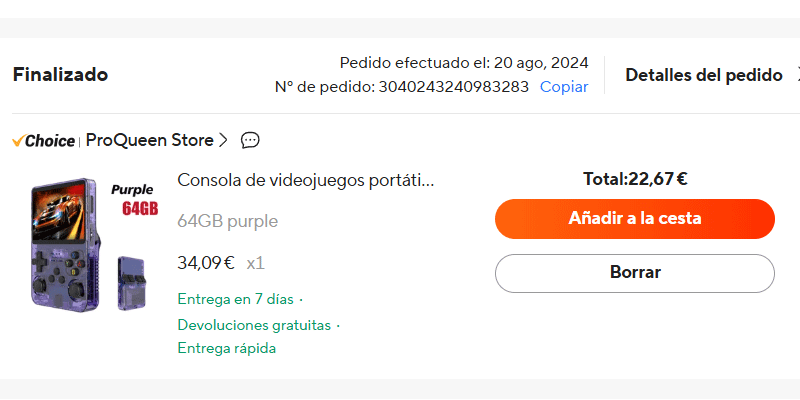
And, as you can see, it’s a retro-style console, very similar to the legendary original Game Boy, but made to emulate video games from the 90s and earlier.
That is, from the NES and Master System (and earlier systems), up to—with caveats—PSX, PSP, Nintendo 64 and Sega Dreamcast, including the golden age of 2D games, with Mega Drive, Super Nintendo, NeoGeo and Capcom and Konami arcades as the main stars.
If you’re like me and grew up among Street Fighter, , Sonic, , Mario, Puzzle Bobble and Metal Slug games , know that you’re looking at a little gem.
And not an expensive one either: for what it cost me —less than €23— and because it is an original R36s (more on that later), I can assure you it’s an absolute bargain.
If you’re already convinced, here’s the link to the shop I bought mine from:
https://s.click.aliexpress.com/e/_c3mVi1sR
And since it is often out of stock there, here’s another shop where I bought the console for my little nephew (also original, although a bit more expensive):
https://s.click.aliexpress.com/e/_c4mZxflx
And if you’re still not convinced, here’s why.
R36s specs and review
It is a handheld console with a 3.5-inch screen and 600×480-pixel resolution, meaning a 4:3 format.
That may not tell you much, but it means it looks pretty good for the games it is aimed at.
In fact, its quality may surprise you when you turn it on, as your brain compares it with your memories of games from that era and you realise this one “looks better”.
The console comes with a rechargeable battery that lasts several hours. I have not timed it, but I would say around 4 or 5 hours. That is fine, without showing off: it will not feel too short, but you will not waste it either.
As for the sound, it does the job. It may be less surprising than the screen, but it certainly does not surprise you in a bad way either.
Lastly, in case you are interested, the processor is an already somewhat old RK3326 and it comes with 1 GB of RAM, which falls short for many 3D games.
If we are talking about the buttons, I am not going to lie to you: they are not the best.
They are far from those on any official Sega, Nintendo, Sony or Xbox console. They feel much more like any cheap unofficial controller: plasticky feel and noises / creaks when you press them.
Although you have to separate them by type:
Front buttons: there are 4 plasticky, but acceptable, cross-shaped buttons. Plus the usual Select, Start and another one. They do not cause problems.
Rear triggers: it has 4, two R and two L. Yes, it is an original layout to replicate the usual PlayStation and Xbox controls, but it is not the most comfortable. At least not for me.
Given the games it focuses on —an earlier era when there was usually only one trigger on each side— I think it would have been better to leave only two triggers and fit a 6-button front layout, including L1 and R1. Playing N64, for example, would be much more comfortable.
D-pad: average. Probably the worst part of the set. Acceptable for platform games, but not for fighting games, where to pull off certain special moves you will have to try several times. While your fighter jumps without you wanting him to.
I grew up with the Mega Drive pad —one of the best of all time for this kind of game— and on PC I have a FightPad by Mad Catz, so the difference compared with these is enormous. The price too, of course.
Here is a manual “hack” to try to fix this d-pad:
I have done it, it takes no more than 5 minutes and it is very simple, but do not expect miracles.
Maybe this other one is the solution:
Although in my case, I have not tried it. You need a certain amount of patience for this and I am afraid that, at this point, I do not have it.
Analog sticks: acceptable. They do not reach the level of home-console sticks, but for fighting games you may even end up throwing hadokens with them.
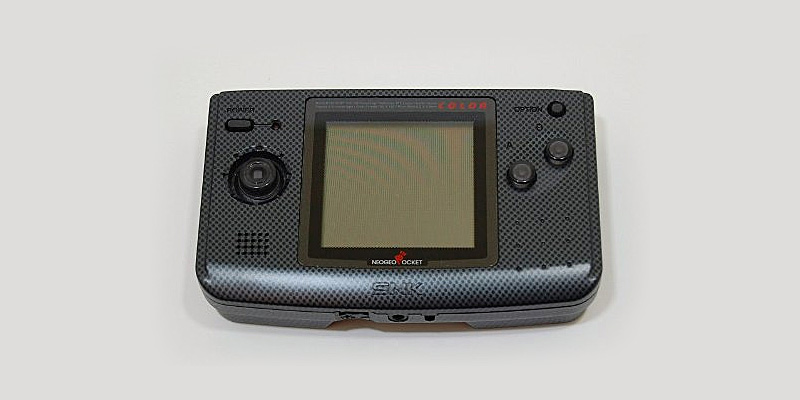
A note: I do not know why no manufacturer uses a mini-joystick similar to the NeoGeo Pocket one, the best I have seen on a handheld: it is precise, reliable and does not stick out:
Ergonomics
We are looking at a fairly light device, one you can hold in your hands for sessions close to two hours (my limit) without it feeling heavy.
That said, although it is very retro and very similar to the Game Boy, that does not mean it is very comfortable.
It is not.
If you are used to playing with controllers —whether PlayStation, Xbox or PC ones— you will definitely notice the difference.
Well, nothing very different from picking up a Nintendo DS Lite nowadays.
That said, here I have good news. Making it muuuch more comfortable will cost you very little:
- Practically nothing, if you have a 3D printer.
- €5 on Wallapop buying an adapter like the one I grabbed:
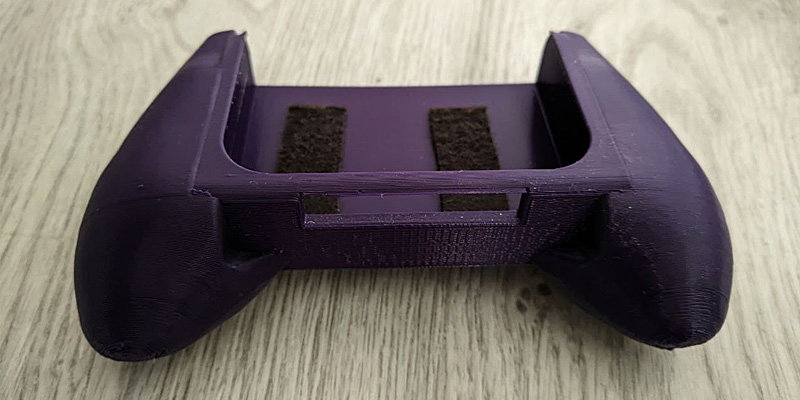
Which fits perfectly:
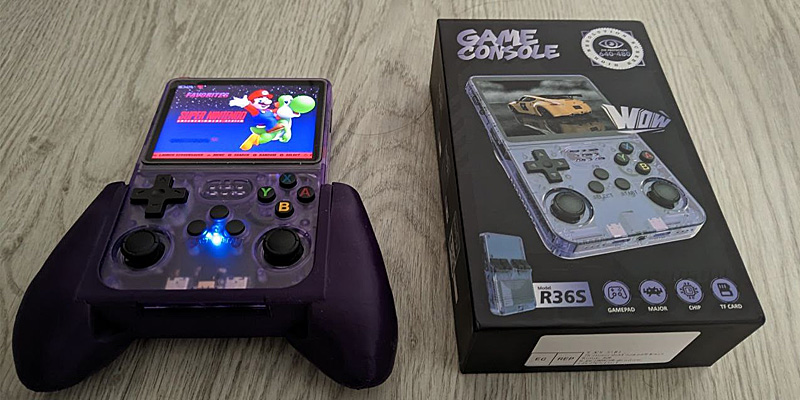
And it frees up your fingers beautifully. Highly recommended.
Emulation
In this case, there is good news and bad news.
On the one hand, everything before the 32-bit era emulates wonderfully.
You will be able to play all the great Super Nintendo, Mega Drive, NeoGeo and arcade classics without any problem.
Anywhere. And with the added ability to save your game (save states) at any moment.
Simply delicious.
On the other hand, we have the 32- and 64-bit consoles, such as PlayStation, PSP, Nintendo 64, Sega Saturn and Dreamcast.
Here things are not quite so pretty.
Most PSX games run more or less well, but the rest of those consoles are harder for it to swallow.
Even certain 3D titles you can play, such as Mario 64 , feel different. You will not see them as you remembered. I do not know whether textures are removed or the anti-aliasing changes, but, although they are playable, they look worse.
And well, then there are the unplayable ones: Jet Force Gemini, , God of War, and even 2D games like Guardian Heroes will probably force you to tweak the emulator and the operating system to get stable frames.
The truth is that there are ways to do it, as you can see with one of the most complex N64 games, Perfect Dark:
But it will take time to configure or install emulators, BIOS files and ports.
It is no longer as plug-and-play as with the other consoles.
If you put time into it, you can squeeze every last watt of power out of the CPU, but unless you enjoy that kind of tinkering, I doubt it will be worth it.
That said, with some effort, you will even be able to play PC games such as the legendary Half-Life 1 and 2:
Day-to-day use
It is very good, especially if you like retro games and the 16-bit era. You will enjoy it enormously, because it is a return to:
- Turn on.
- Play.
And that’s it.
No downloads.
No loading times.
No online waits.
Just:
- Turn on.
- Play.
With an immense catalogue of games that, probably, you mostly did not get to enjoy back then.
And it is that simple because the version I bought came with a 64 GB microSD with everything preconfigured.
It really was turn it on, choose a console and a game, and get playing.
Very easy.
When I bought it, I could choose two other versions besides mine:
- A higher-end one, with a 128 GB SD card, a few more emulated consoles and twice as many games, for €5 more.
- One without an SD card, for €4 less.
In my case, I thought my version was the most balanced, buuut today I would buy one without a microSD. For one reason.
The microSD cards that come with these consoles are of two types:
- The ones that have already failed.
- The ones that are going to fail.
Yes, they are terrible.
So, as I had read, the first thing I did once everything worked was put it into the PC and copy all the ROMs and BIOS to a separate hard drive, as a backup.
Then I kept playing with the console calmly in bursts (when I picked up a game and until I finished it) for about a year.
Suddenly, during one of those pauses between games, I picked it up and when I turned it on I got an error screen.
Fortunately, as I say, it was between finishing one game and wanting to start another, because it must be infuriating to be about to finish a 30h adventure and suddenly lose your save because the SD card fails.
Because it is going to fail.
So you have two options:
- Enjoy it while it lasts and deal with it when it fails.
- Copy the ROMs to a hard drive as soon as the console arrives and install an image of the console’s operating system on a good SD card of your own (like a Samsung, for example). And play with peace of mind.
I repeat for those at the back: you are going to have to do this process sooner or later. It does not matter how much you use the console or how carefully you look after it.
Chinese microSD cards all get corrupted. All of them.
Fortunately, it is not a serious issue.
The operating system and the scene
It isn’t, because there is a strong scene around the console —people developing software and looking for uses and solutions.
There are developers, Facebook groups, Telegram channels, GitHub repositories…
A bit of everything.
Which makes installing the operating system easier. Whichever one you want, really. The official one is ArkOS, but there are several more.
All of them, if I remember correctly, are Linux versions. And as they progress and new ones are released, emulation improves massively.
The N64 emulation the console managed with the operating system that came by default on the SD card that failed has nothing to do with what it can do now with ArkOS.
And if you want to use it for Nintendo 64, dArkOS handles it much better out of the box.
Anyway, here is a very detailed guide so you can create your image with the latest ArkOS version and put it on your console.
Really, just keep in mind that the most complicated thing will be finding out which panel your machine has, because there are several different ones and you have to use the one for your specific panel. This link they explain how to do it.
Right, once you get your hands dirty with the operating system, you will see it has lots of options. You can adjust almost everything here, and getting used to that much takes a while.
I repeat: for the pre-32-bit era there is no need to touch anything (perhaps adjust the buttons). It is from 32 bits onward that you will need to do it.
By the way, it is the OS that enables one fundamental thing: being able to save your game at any time.
Besides the OS, there are different developments that let you do things such as:
- Playing the PC games mentioned above (PortMaster games).
- Turning it into a movie or music player.
- Streaming local games from your PC through Moonlight, if you have an NVIDIA graphics card.
- Other geeky things: Pi-hole, web server, NAS…
Anyway, if you could only have one device to play on, this would be a good candidate.
Fake versions
Yes, this little gadget has been so successful that unofficial clones with different specifications have appeared.
They are hard to spot at first glance, especially if you are not an expert. But the internet is full of threads like this and videos explaining their differences.
The main problem with these fake copies is that many are not compatible with ArkOS, so you have to figure things out yourself to find the right OS for your device.
That is why, before buying one, make absolutely sure it is the “official” one. Here again is the link where I bought mine, which is genuine:
https://s.click.aliexpress.com/e/_c3mVi1sR
And the alternative shop link, a tiny bit more expensive, which I have also bought from on occasion when the previous one is not available (and it is not fake either):
https://s.click.aliexpress.com/e/_c4mZxflx
Conclusions
If you were born in the 80s and liked video game consoles, this is a time machine back to your childhood.
Impossible not to be interested.
And of course, if you add the price into the equation, it becomes the best-value impulse buy you will ever make.
100% guaranteed.
The amount of time and enjoyment you can get out of it for so little money is astonishing. Never has so much fun cost you so little..
In my case I have finished several of my pending little gems, such as Final Fantasy 6 and Guardian Heroes, from the Sega Saturn.
I have also replayed and enjoyed again two of the games I played the most back then: Wave Race, from N64 and Wip3Out, from PSX.
In the future I have in mind Tactics Ogre, Final Fantasy Tactics, Shining Force II and Vagrant Story.
And I must confess, even if it is sacrilege, that I have left Final Fantasy IX half-finished. It has not hooked me at all: not its story, not its battles, not its pace. After finishing VI, which may be the best of all, this one does not seem to me to be on the same level. I will talk about it in another post.
In short: buy it without hesitation.
For you and for your child, so they understand how fun it was to race through Green Hill with Sonic, or discover the ultra-hard secret world of Super Mario World.
If they have not yet discovered Fortnite, they will thank you.
Rating
Who it is for
✔️ If you were born in the 80s or 90s.✔️ If you like 2D games.
✔️ If you enjoy tinkering.
✔️ If you want a cheap treat that guarantees hours of fun.
Who it is not for
❌ If you want perfect 3D.❌ If touching an SD card and internal files gives you the creeps.
❌ If you are picky about the D-pad.
Frequently asked questions
Is the R36s worth €23?
Yes, if your focus is 2D games and pre-32-bit consoles. At that price, the fun-per-euro ratio is hard to beat. It is not perfect, but it is an extremely good-value impulse buy.
Which consoles does the R36s emulate well?
It works very well with NES, SNES, Mega Drive, NeoGeo, Game Boy, Game Boy Advance and arcades. PlayStation (PSX) runs fairly well. Nintendo 64, Dreamcast, Saturn and PSP work with limitations and tweaks.
Can the R36s run Nintendo 64 and PSP?
It can run some games, but not all of them run smoothly. Mario 64 is playable. More demanding titles require tweaks in ArkOS or are simply not recommended.
Is the included microSD reliable?
No. The included microSD cards are usually low quality and end up getting corrupted. The best thing is to back them up as soon as you receive the console and install the system on a branded microSD card (Samsung, SanDisk…).
What operating system does the R36s use?
The official one is ArkOS, based on Linux. There are optimized versions such as dArkOS that improve emulation, especially on Nintendo 64.
Is the R36s better than the Miyoo Mini Plus?
It depends on the use. The Miyoo Mini Plus has better build quality and a better D-pad, but it is usually more expensive. The R36s offers a better price/emulation ratio if you find it for around €20–30.
Is the R36s better than an Anbernic?
Anbernic models (such as RG35XX or RG351) have better materials and controls. But they also cost more. If you want maximum quality, Anbernic. If you want maximum value per euro, R36s.
Is it comparable to a Steam Deck?
No. The Steam Deck plays in another league: more power, higher price and more complexity. The R36s is a simple machine for turning on and playing retro games without complications.
Are there fake versions of the R36s?
Yes. There are clones that are not compatible with ArkOS. It is important to buy the original version to avoid compatibility problems with the operating system.
Is it a good option for children?
Yes, especially if you want them to discover classic games without microtransactions or online play. It is a simple way to play without modern distractions.

Leave a Reply