
When we’re thinking about setting up an online store, knowing and defining our customer is essential. If we have already moved forward with the business idea, we may have a reasonably clear idea of who our target audience is, but it is quite likely that we do not know how large that segment is.
Why product demand analysis matters in eCommerce
A complete customer analysis is essential to:
- Find out what features they value most in similar products, services or stores (for example: price, free shipping, customer service, returns system…)
- It will also help us structure our online store and write the copy that states our value proposition.
However, demand size is probably more important than the previous two points — at least at first — because if there is no demand for what I want to offer, it is very difficult for there to be sales.
For this reason, I am sharing a simple and quick procedure that will give us quite a lot of value when it comes to validating our idea and knowing with more certainty whether there is demand for the product or products I want to offer in my store and how large it is.
To find out, we are going to check how many monthly searches there are on Google for what we consider to be the most common search terms of online buyers of my products. This nuance is important, because commercial intent is what separates a conventional keyword analysis from this online demand analysis.
We could sum it up by saying that it is a keyword analysis applying only commercial search intent. If you already know how to carry out this type of analysis, this article will probably not add much extra knowledge for you. If, on the other hand, you are someone who has in mind creating an eCommerce and does not know how to check its viability, you will probably find this simple methodology useful.
To carry out the complete procedure, we are going to use two tools:
- The Google Ads keyword Planner, one of the existing free tools that tells us the number of monthly searches a given word has on Google. There are other tools to do this, for example, SEMRush or Rank Tracker, and you can use their free plan or initial trial period to carry out these checks without having to pay.
- Excel, although any other spreadsheet application such as Google Sheets. You can use a new file or the attached downloadable template.
You can download the Excel template to follow the tutorial:
Find out the real demand for your products
If you have an online store or are thinking of launching one, you should make sure that what you want to sell is actually bought online.
Sign up and get the template that will help you find out.
And, while you’re at it, every day in your inbox, a trick or tip to improve your business or digital project.
As we mentioned before, the information we obtain once the analysis is finished is extremely valuable when deciding whether to move forward with my eCommerce project or whether I need to modify it or even discard it.
How to carry out a product demand analysis for eCommerce
Let’s explain the process with an example:
Let’s say I know a sports shoe distributor who sells to physical stores and I think it could be interesting to create my own online store to sell those products on the Internet. Although I suspect people do buy them online, I do not really know whether they do or not.
Write a list of sales terms for my products
The idea is to have a spreadsheet with the keywords through which I think potential buyers would search for my products. The reason for using a spreadsheet is twofold:
- To have all the keywords in a single document so I can categorize, tag and sort them
- Because of the formulas that let us concatenate terms and thus save time.
Product categories
We start by writing in an Excel sheet the product categories I plan to sell. Of course, this list can be as long as we want, although generally the 10 or 15 categories that quickly come to mind will be enough to serve the purpose of this analysis:

Product brands
Next, we add the main brands on a new sheet in the Excel document:

The best-selling products
Finally, we would need to find out which items sell the most and add them to a new sheet in the document:

Combining the terms
Once the categories, brands and main products we want to sell have been written down, it is time to create search queries with commercial intent. To do this we will add the most common prefixes and suffixes used when buying online and we will use an Excel function.
We add suffixes and prefixes
We use the columns before and after the terms to add these prefixes and suffixes. I recommend starting with the prefix “Buy” and the suffixes “Price”, “Online” and “Cheap”.
The idea is to get search terms with clear commercial intent, not merely informational intent, as would be the case if we only used the product for sale: a person can search for “sports shoes” simply to find out what types exist, but “buy sports shoes” has an indisputable commercial component.

We combine cells
We will create three other columns in which the terms are combined with the prefixes and suffixes to obtain a list of words with commercial intent for my product.
Excel’s “concat” function is our ally here. We will create new columns to combine:
- Prefixes + Category
- Category + Suffixes
- Prefixes + Categories + Suffixes
It is very easy to use. In the adjacent cell, we write the following formula, as shown in the image:
=CONCAT($B$6;" ";C6)

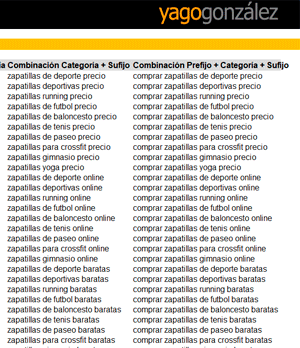
Likewise, we do the same with the rest of the combinations, until we obtain all the queries that are, in principle, commercial. They are already created in the downloadable template:

To finish, we would carry out the same steps with the Brands and Products sheets:

You may think that some of the resulting combinations -especially those in the column that contains prefixes and suffixes- are not relevant, and that is probably true. However, they will be automatically filtered in later steps, so there is no need to remove them from the spreadsheet at this point.
You could also consider adding only the products, brands or categories that my supplier can provide, since you might think it is of little use to know that there is a highly demanded brand if I know that, at least for now, I will not be able to sell it. Even so, I advise against doing this, because knowing the demand for, for example, popular brands that I cannot distribute will give us future context and help us know where we could grow.
Find out the number of monthly searches for each keyword
The next step is to enter these terms into the tool that gives me the number of monthly searches for each keyword on Google in the country or countries where I want to sell. In this case we will use Google Ads keyword Planner, since it is very powerful and free (although it requires adding a payment method during registration).

We click on the access to the search volume query:

We paste all the commercial keywords we have built in Excel and press the button:

On the next screen, we go to the metrics history:

And finally, by sorting the results by Average monthly searches, we will obtain a descending list with the most searched terms, which is exactly what we need:

We can see that Google Ads keyword Planner shows us the trend and the average number of monthly searches over the last year.
In addition, if we want, we can export this data from the tool and add it to the template in a new sheet, so that we have all the necessary information in the same document.

Believe me, it is very convenient to have everything together, since I will not have to go back to the Planner when I want to review the specific monthly searches for a term. In addition, I will be able to filter, sort and tag from Excel as needed.

How to interpret the results
To answer this question, I’m going to draw on my experience in different eCommerce projects: in my opinion, keywords with more than 200 monthly searches already begin to be interesting, so if Google Ads Keyword Planner shows us many terms in the results that exceed this threshold, we can be sure that there is online demand for our products and we would have the green light to continue with the eCommerce launch project.
In this example we are analyzing, we see that quite a few terms exceed this threshold, so we could continue with reasonable peace of mind, but if there were not that many, what would we do?
If this were the case, the decision is a little more complex, bringing another variable into the equation, such as the search trend and the cost of launching the eCommerce. Depending on all this, several cases come into play:
- Case 1: quite a few keywords have between 100 and 200 monthly searches
- If the search trend is upward: in principle we could continue, as long as the costs of setting up the project are not excessive, in which case profitability may not be reached.
- If the search trend is flat: my recommendation is to expand the search terms to analyze (add more categories, more brands and more products). If the added terms have a relevant search volume, I would continue with the project. Otherwise, I do not recommend it.
- If the search trend is downward: I would not recommend moving forward with the project.
- Case 2: few terms exceed an average of 100 monthly searches
- If the price of the products is low: I would not recommend moving forward with the project. It is unlikely that the profits, once the store is set up, will exceed the launch costs.
- An exception to the previous point would be that, if the trend for most queries were upward, it would probably be a new product or service and it is possible that in the future there will be adequate demand, so it cannot be ruled out so quickly. I would expand the term analysis.
- If the price — and therefore the profit margin — of the products is high: I could consider continuing with it, knowing that closing sales will be difficult and that the customer CPA (cost per acquisition) will be high.
- Case 3: few terms with searches
- I see no reason to move forward.
Conclusions
We have seen how to carry out an eCommerce product demand analysis through a simple process that only takes a few minutes. In addition, I provide you with the downloadable template that makes the process even faster. You have it at the beginning of the article.
If you have in mind launching your eCommerce, I’m convinced that this methodology will help you decide or discard it, although there is one more thing to mention:
For example, that the fact that there are many searches for commercial terms related to the products I hope to sell does not guarantee the success of the project. In fact, generally, the greater the number of searches, the more competition and the harder it will be to get sales. However, this case at least offers the opportunity for them to happen. If there is no demand, you will not even have that opportunity.
It is also necessary to add that there are companies with high economic power and large communication and marketing budgets that are capable of creating demand for products that do not have it -Apple and the launch of its iPads could be an example- but for most companies, this is beyond their reach.
To wrap up the article, and as a general rule, it can be stated that mass-market products also have a high volume of searches. Examples such as food, drinks, pet products, technology, health and sports are products and sectors that dominate users’ shopping carts. Unless what you want to sell is something very specific and for a particular niche, it is quite likely that you have a market with enough demand to create a business. The other question is whether your competitors have already seen it before you and launched their services… 😉

Leave a Reply