
Now that the deadline for filing your income tax return is ending, it is worth knowing that there is a fairly simple way to find out which public bodies have accessed or exchanged your data within the public administration.
And although it is not hard to find if you know where to look, it is not exactly in plain sight.
The option is inside Mi Carpeta Ciudadana, that government app for checking procedures, personal data, case files, certificates and a fair amount of paperwork that used to be scattered across a thousand different e-government sites.
The interesting thing is that you can also see a more delicate part: data exchanges between public bodies.
In other words: you can check whether a public body has accessed information that another administration held about you. For example, identity data, traffic records, benefits, housing, municipal register data, criminal records, employment history or any other data available depending on the case.
Watch out, important nuance: this does not necessarily mean that someone is “investigating you”. What you will see are registered administrative queries and exchanges. It may be because of a procedure you started yourself, a grant (for example, the Kit Digital), a scholarship, a verification, a public process or any procedure in which one administration needs to verify data that another one already has.
Because of the crusade I have been waging for some time in favour of our privacy, I think you need to know who is checking your data. Just in case something does not add up.
What you need to see it
To check this, you need to access Mi Carpeta Ciudadana.
You can do it in three ways:
- From the Mi Carpeta Ciudadana app for Android.
- From the Mi Carpeta Ciudadana app for iPhone.
- From the official Mi Carpeta Ciudadana website.
To enter, you will have to identify yourself with one of the accepted systems:
- Cl@ve.
- electronic DNI.
- digital certificate.
- Cl@ve PIN.
- Cl@ve Permanente.
Logically, it is not a public query or something you can view without identifying yourself.
Step by step: how to see who is checking your data
There are only a few steps and it is a quick process.
Step 1. Enter Mi Carpeta Ciudadana
First, open Mi Carpeta Ciudadana, either on the web or in the app, and sign in with the method you normally use.
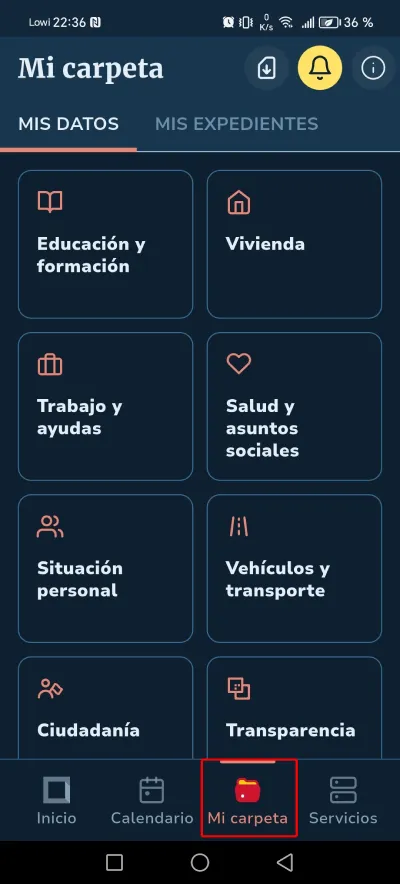
Step 2. Go to the Mi Carpeta section
Once you are inside, you need to go to the section Mi Carpeta.
In the app it appears in the bottom bar.
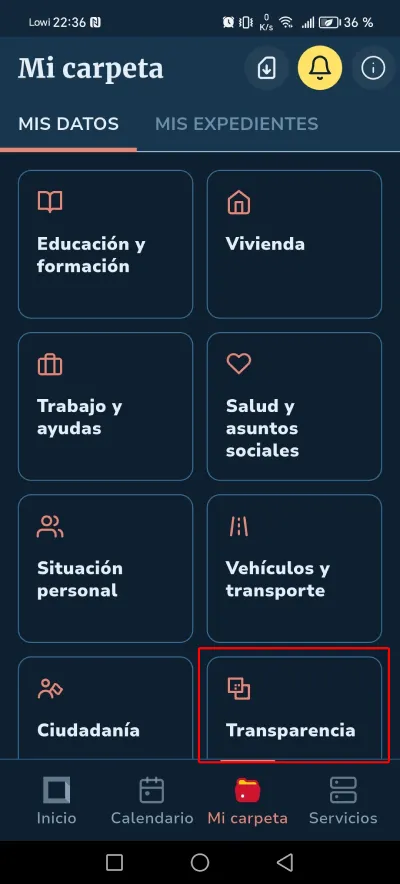
Step 3. Tap Transparency
Look for the option Transparency.
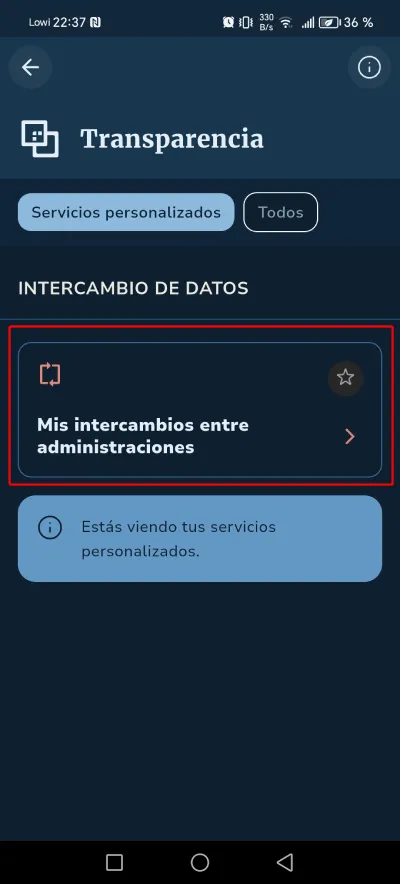
Step 4. Tap My exchanges
Now tap “My exchanges between administrations”.
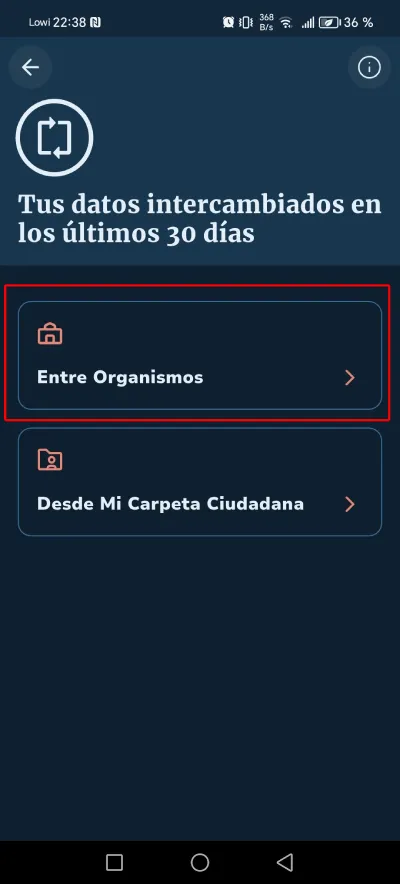
Step 5. Choose Between Bodies
On the exchanges screen, look for the option Between Bodies or Queries between Bodies, depending on how it appears in the app or on the web.
Step 6. Use the filters
You may not see anything by default, but that is because a date filter is already applied.
Expand it to see more, or narrow it if too many results appear.
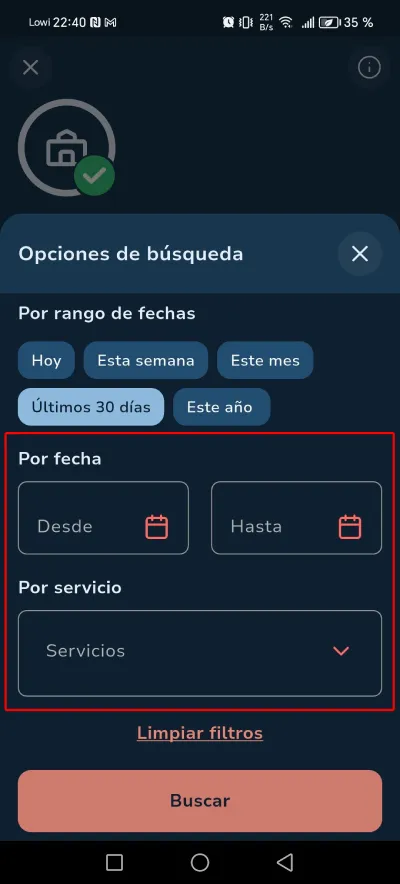
Done. With this, you can now see whether Hacienda (or the DGT) has done anything suspicious. I hope you do not get any results 😉
What you can do if you see a query you do not recognise
Seeing a query does not automatically mean that something strange has happened.
It may be related to a procedure you already completed, an automatic check or a perfectly normal administrative process.
But if you see something you do not recognise, the sensible thing is to do three things:
- Check the date.
- Check the agency that appears (ChatGPT is your friend).
- Try to link it to procedures, grants, fines, scholarships, benefits or administrative processes you carried out during that period.
If it still does not fit, you can save the information and contact the relevant agency to ask for more details.
And if you really think there may have been improper use of your data, then we are already in data protection territory, where it would make sense to consult the AEPD or file the appropriate complaint.
Honestly, I hope I never have to get to that point. But well, the option is there.
Conclusions
It is probably not something you are going to check every week, unless your administrative life is much more exciting than mine, which (for your own good) I hope it is not, but I do think it is a good idea to review it from time to time. Especially in periods like this one.
For years we have assumed that the administration had our data and that was that. That it was a black box.
Now, at least, there is a little window you can peek through. And without having to put up with the grumpy civil servant on duty behind it.
Frequently asked questions
Can I know whether the Police, Hacienda or the DGT have accessed my data?
You can check the exchanges or queries between public bodies that appear registered in Mi Carpeta Ciudadana. If a body has made a query available within this system, it should appear in the relevant section.
Does this help me know whether I am being investigated?
Not exactly. This tool shows administrative data exchanges or queries. It is not a dashboard for finding out whether there is an open police, court or tax investigation against you.
Where is this option in Mi Carpeta Ciudadana?
The path is:Mi Carpeta > My Data > Transparency > My exchanges between administrations > Between Bodies.
Do I need Cl@ve to see it?
You need to identify yourself electronically. You can do it with Cl@ve, electronic DNI, digital certificate, Cl@ve PIN or Cl@ve Permanente, depending on the options available at login.
Can I do it from my mobile?
Yes. You can do it from the official Mi Carpeta Ciudadana app for Android or iPhone, or from the official website.
What should I do if a query appears that I do not recognise?
First check the date, the agency and the context. It may be related to a procedure you carried out. If it does not fit, save the information, ask ChatGPT first and, if what it tells you still does not add up, contact the relevant agency to ask for clarification.

Leave a Reply