
The other day I was reading Himanshu Sharma — whom I recommend you follow if you're interested in analytics and digital business — saying that the reason Google killed Universal Analytics wasn't the need for more servers (“forcing” users to use BigQuery).
That wasn't it.
It was privacy.
In GA3, we could collect all the data needed to create very precise user profiles, which went completely against the GDPR.
And Google has no intention of getting fined again.
So it forces the move to GA4, a much stricter tool in this area and one that those of us who work with it find much worse precisely because of that.
So we're trying to achieve a level of data quality similar to what we had before.
Although it's difficult to get back there (virtually impossible, I'd say), there are approaches such as implementing GA4 without a cookie banner, which is legal in Spain if you meet certain criteria.
These criteria let you increase the accuracy of the data collected, even though we are still far from the golden age of digital analytics, before 2.018 and the infamous cookie banner. I explain them in the article.
In this post, I'm going to show you the system I've set up in my ecommerce businesses and some of my clients' businesses, which lets us get the best of both worlds:
- On the one hand, collect as much data as legally possible in Spain.
- Take advantage of the advanced features with data from users who give us consent. In the best-case scenario, that will be around 70%.
Dual measurement system with Google Analytics
The key to the approach I'm going to explain is to use two GA4 properties:
- The first, configured so that we can fire it every time, without the user having to accept the cookie banner.
- The second will use all GA4's capabilities, but in return it will require the user's acceptance.
If you see where I'm going, you'll understand that we'll have two properties with different data to use in our reporting.
In some cases we'll use the first one, with fewer features but more data. That's the case when measuring channel or campaign performance.
In others, we'll use the second one when we want demographic data about users or to see data in Analytics from other Google tools, such as Google Ads or Search Console.
Time and experience with both will tell us when to use one or the other to extract a given metric.
This is the big picture, now I'll explain how to configure each one.
Bannerless GA4 property
As I mentioned earlier, in this article you'll find the configuration of this type of property explained in detail, together with the relevant legal justifications.
Also, I assume that if you're considering this kind of dual implementation, you have experience with Google Analytics and won't need a guided step-by-step, just the main guidelines, which is what I cover in this post.
That said, I'll go into more detail in the trickier parts .
For example, the implementation.
Implementing the tools
Finding a way to load two GTM containers, one with analytics-cookie consent set to “granted” and another to “denied”, isn't straightforward.
I've tried different methods and, in the end, only two have worked for me. One easier and one better.
The easy method
In this case, the process is:
- Create and configure a bannerless GA4 property.
- Put it directly in the code. You can also do it through a GTM container configured correctly (I'll explain how in a moment) and set to fire every time.
- Create and configure a second GA4 property with everything we need that requires consent (userId, , Google signals, , linking to Google Ads)…).
- Implement it through a new GTM container with the appropriate consent mode.
- We load this second container only when the user clicks the accept button on the cookie banner. This means we won't collect several data points and Google Analytics modelling will be worse.
- Change this second container's permissions to “granted” when the user accepts the cookies.
In short:
- Create two GA4 properties and one or two GTM containers.
- Configure everything to fire in the correct order.
The better method
Let's make life more complicated in exchange for better data collection in the GA4 property that requires consent:
- Create and configure a bannerless GA4 property.
- Create a GTM container that fires when the page loads and configure it with consent mode, with analytics cookies set to “granted”, even though the user may not yet have accepted the cookies. If we've configured GA4 correctly, we're legally allowed in Spain to load these cookies.
- Create and configure a second GA4 property with everything we need that requires consent.
- Create a second GTM container that fires with cookies and analytics and advertising storage permissions set to “denied”.
- Change this second container's permissions to “granted” when the user accepts the cookies.
In summary:
- Configure a GA4 property and a GTM container as you've been doing until now (with consent mode enabled, knowingly or unknowingly, and whatever GA4 configuration you needed).
- Add a new GA4 property and a new GTM container, which load before the previous ones, and configure them as if consent mode didn't exist.
But let's break down this second method step by step.
#1. Configure the first GTM container (the bannerless one)
This was the part that gave me the biggest headache when setting up the whole system. In the end, I got it working with this configuration:
Two tags, the GA4 tag and the consent mode tag. I use Simo Ahava's (of course):
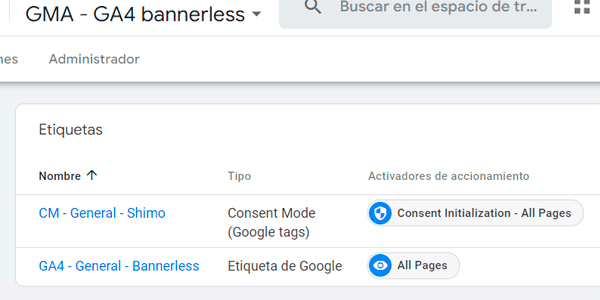
I fire the GA4 one on every page.
The consent mode tag is configured as follows:
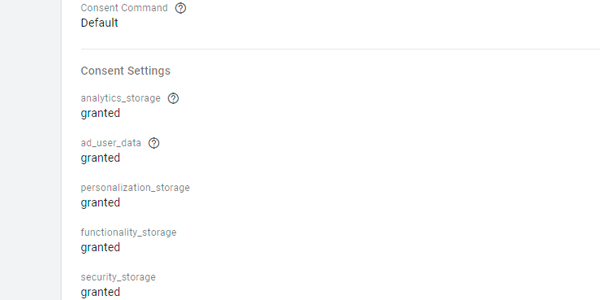
And the trigger is the usual one:

#2. Configure the normal container
There are different ways to configure consent mode depending on your CMP.
Here I explain one, but you can use whatever you've been using until now, as long as you verify that it doesn't affect the bannerless GA4 tag configuration.
In other words, check that the bannerless tag's cookies are always set.
#3. Configure the bannerless GA4 tag
It's clearly explained in the article I linked earlier, but to sum up:
- Do not share data with Google in any way.
- Do not enable Google signals.
- You can leave the data collection and retention period at 14 months
- But you cannot automatically extend it with each user visit.
- You cannot use userId.
- You cannot link the GA4 property to any other Google tool.
- Cross-domain measurement is not allowed between different brands, although, in principle, there should be no problem between regional domains (.es, .pt, .fr) of the same brand / company.
- I'm not sure whether granular data can be used or not. If you don't want to take risks, disable it. Is doing so mandatory for compliance? I'd say no, buuut…
#4. Configure the normal GA4 tag
Here, just use whatever setup you already have:
- With or without userId.
- Linked or not linked to Google Ads or GSC.
- With or without Google signals.
- With the cookie expiration extended on each new user visit.
- …
All those things that require explicit consent.
Verification
Regardless of which method you've chosen, once it's running, this is what should happen when a new user visits your website:
#1. The bannerless GA4 property tag fires.
If you've chosen the better method, the normal GA4 property tag will also fire, along with those of the two GTM containers that hold them:
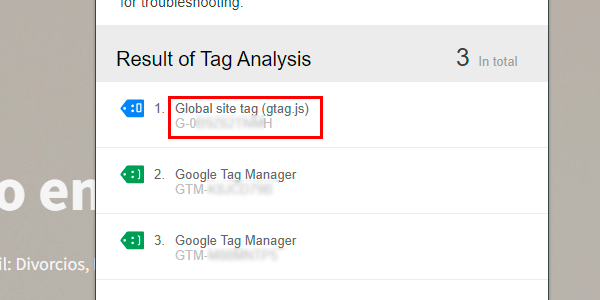
#2. The cookies from the bannerless GA4 property will have been set, but not those from the normal one:
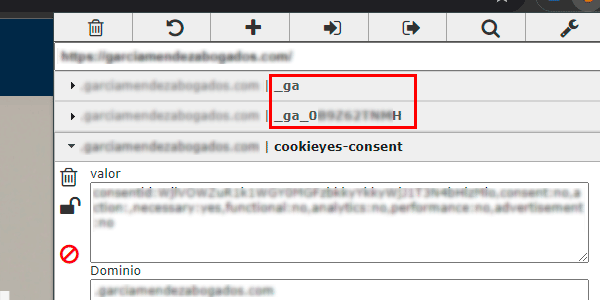
#3. The same thing will happen on every new page load until the user accepts the cookies.
At that point, the normal GA4 property's cookies will load:
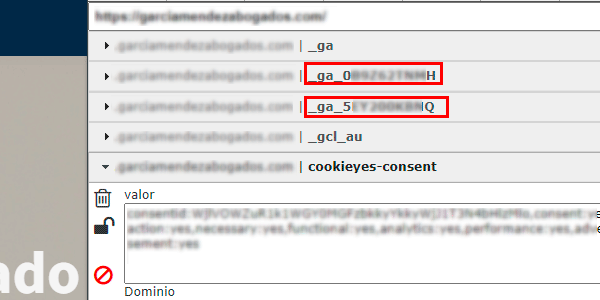
If that's what's happening, congratulations: you're now ready to enjoy the benefits of this system.
Before we look at them, one more note.
Cookie policy
Not having to ask for the user's consent doesn't mean you don't have to inform them.
This is done through the Privacy Policy or Cookie Policy of the website.
In this section we'll have to explain which cookies are set, their expiration date and what type they are.
And you have to do it both for the cookies we always set and for those that are installed in the browser only after the user accepts the banner:
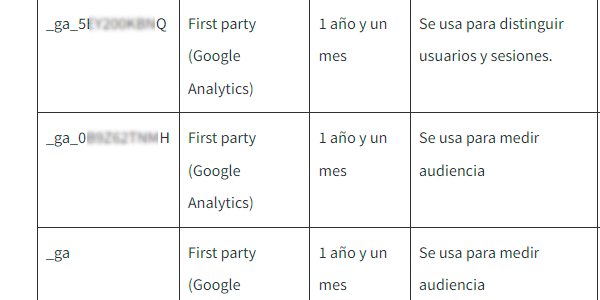
Now, let's get to the good part.
Advantages of the system
Implementing Google Analytics in this dual way lets you improve your data collection enormously.
You won't realise how much it improves things until you test it, especially on medium-sized or small projects.
With the bannerless property you'll be able to capture a very high percentage of your conversions and attribute them to the corresponding channel, so you'll have far fewer blind spots.
For projects that can't benefit from GA4's consent-based modelling, this is pure gold.
On the other hand, the tool's “advanced” features will remain in our normal property, as if the other one didn't exist.
In other words, it doesn't hurt our usual stack and reporting at all. It's simply an extra layer on top.
But of course, it wasn't all going to be good…
Disadvantages
From my point of view, there are three. And they're important.
More complex implementation
The first and most obvious is the double implementation.
The configuration is a bit more complex, yes, but by following the steps I've explained you should have it done in half an hour, depending on your CMP and how your current consent mode is implemented (this part can be a pain).
Future implementation is also more complicated, because you'll have to replicate the same tags -at least those related to GA4-, variables and triggers in two GTM containers. Double maintenance.
If we use the DataLayer, this becomes easier to manage, but it will always take more time than if you could use just one GTM container.
Legal changes
The second disadvantage is legal changes and differences between countries.
This system I'm describing, works for Spain, but, for example, it wouldn't work in Germany because using data to create cohorts isn't allowed there. And, for now, GA4 doesn't let you disable this feature. Although, if I had to bet, I don't think it'll take long to do so…
On the other hand, if you've had to deal with GDPR issues, you'll have seen that there are points that are highly open to interpretation, where it isn't clear what can and can't be done. That's why it's no surprise that things change from time to time and valid use cases get clarified, as happened with the possibility of using GA4 to measure audiences.
This means that if you want to measure something on your website, you'll never be able to relax completely; you'll have to stay on top of every new development.
And yes, it's tiring, I'm not going to deny it.
Challenges in the environment
Being legally allowed to add a cookie to the user's browser without consent doesn't mean we can always do it.
Every day browsers get stricter about privacy and the use of adblockers is increasing..
It doesn't look like the trend will change, so if we want maximum accuracy in collecting and processing our data, we'll have to keep changing our implementation and how we use analytics tools.
Issues such as server-side tagging, exporting data to BigQuery or the need for our own alternative analytics system should be on our radar.
In fact, I'd say they're a must, were it not for the fact that the technical capability required means only large businesses can implement them and make proper use of them.
Tools may appear in the future that make the process easier, but today the cost of a server-side + BigQuery implementation is beyond the reach of 90% of companies in this country.
And I'm being optimistic with that percentage.
That's why I think implementing the system I'm proposing here is the minimum you should aim for in your business.
Conclusions
This is one of the most important articles on my entire blog.
At least if your business is in Spain.
It is because it opens a ray of light in the increasingly dark world of digital analytics.
(Once again) being able to attribute to the correct channel 90-95% of our website's conversions is cause for celebration however you look at it. Especially for small and medium-sized projects, which seemed to have been abandoned by GA4.
When everything is getting worse, small victories like this feel much better.
So read through the system again, test it on your website and enjoy it.
And if after doing that you still want more, take a look at this page with more Google Analytics tips.
One new one every week. And you can get it in your inbox by subscribing here.

Leave a Reply