
In the previous article, the first in this series about collecting and using customer feedback, we saw why collecting customer feedback is essential if you want to understand what works in your business, what raises doubts and what stops your users from becoming customers.
To find out, the second step is to design the data collection form properly: what questions to ask, when to launch it and how to leave the responses ready to analyze later.
In this second article I explain all of this. Before getting into it, here are the links to the four articles in the series:
- Why collecting customer feedback is essential to improve your business.
- How to create a useful feedback form.
- How to use AI to translate and classify open-ended responses.
- How to turn that feedback into dashboards and a monthly tracking routine.
One more note. In the first article we saw that there are different types of feedback:
- About the digital product.
- About the operation.
- About the quality of the product or service you offer.
In this article we are going to focus on the first one: the one that captures the user's experience after converting.
And when I talk about conversion, I don't just mean a purchase. It can be a booking, a contract, a quote request, a registration, a download, a subscription or the submission of an important form. In short: any digital action that has value for the business and turns a user into a customer, lead or qualified contact.
What we are really measuring with this form
Here we are not yet measuring whether the product arrived in good condition, whether the service was good, whether the stay met expectations or whether the training added value. That belongs to another layer of feedback.
In this form we want to understand what happened on the website, app or digital asset that just generated the conversion: what created trust, what held the user back, what difficulty they found and what information would have helped them decide better.
In other words: what helped them convert and what got in their way during the process.
That can include a lot of things:
- The trust the website conveys.
- How easy it was to find what they were looking for.
- The clarity of the information.
- The payment methods.
- The booking conditions.
- The price.
- Availability.
- Other users' reviews.
- The product or service page.
- Mobile navigation.
- Any incident that appeared before finishing.
- The response offered by the help chat.
- …
As you can see, there are quite a few things. That is why it is essential to be clear about the next point.
What questions a conversion feedback form should include
A form of this kind should be short, clear and easy to answer. As a practical rule, between five and ten questions is usually enough if they can be answered in one or two minutes at most.
Not all questions are the same:
- Some will be closed questions and answered in seconds.
- Others will be open questions and will allow the user to explain in their own words what happened.
- At the end there may be some basic segmentation data, as long as it adds something to the analysis.
The structure may vary depending on the business, but the two forms I almost always use share the same logic:
- Closed questions predominate (easier to analyze).
- One or two open fields are included to extract “unexpected” information from users.
- A voluntary option is added so the user can leave their email if they want a response.
A simple example is this form that we have used at Yo pongo el hielo for more than 10 years, built with Google Forms. These are its responses:
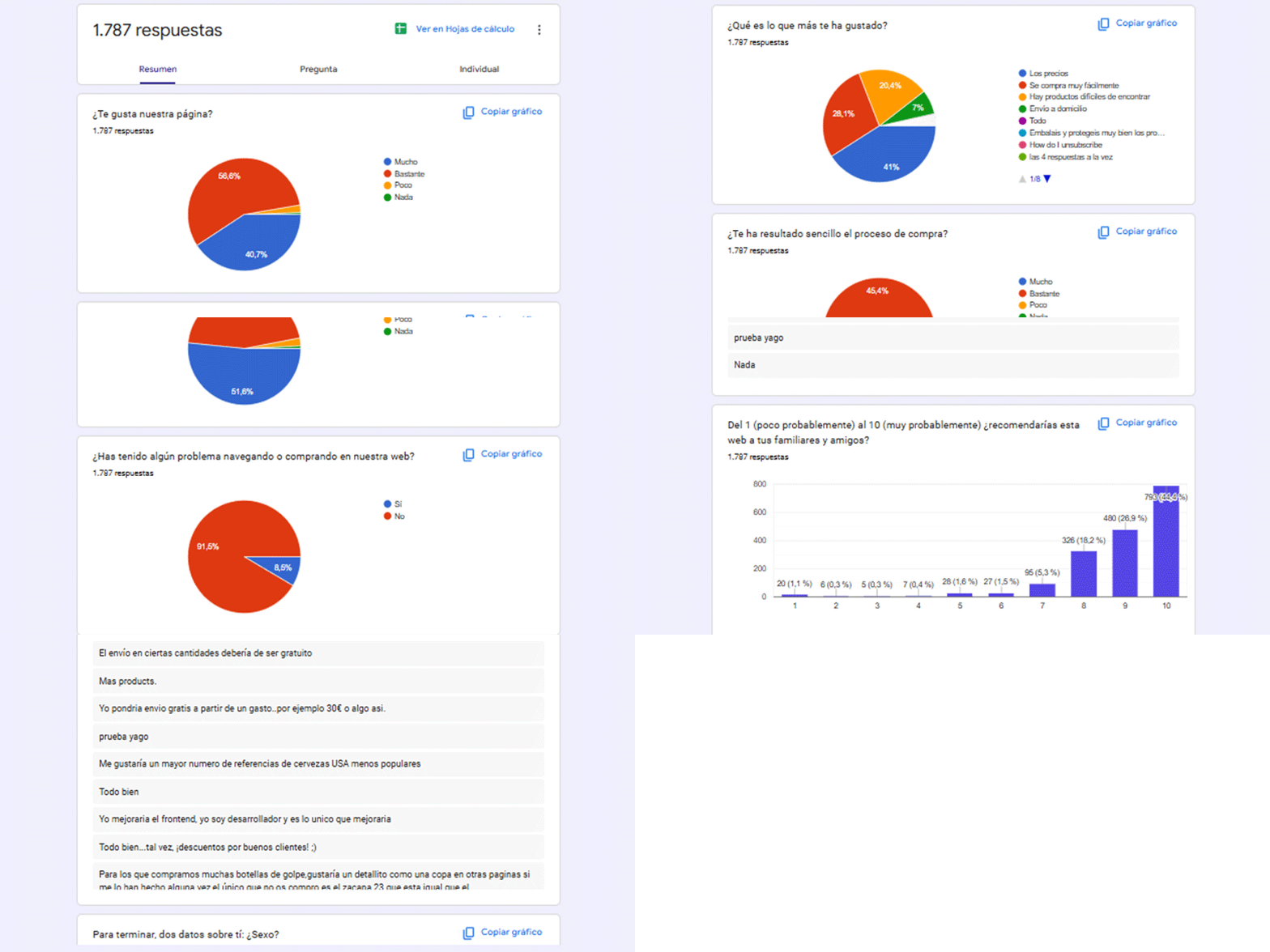
And this is the form itself
Yo pongo el hielo feedback form.
And here is another one I have just set up for an accommodation booking website, which is the one we will use as an example in the next articles:
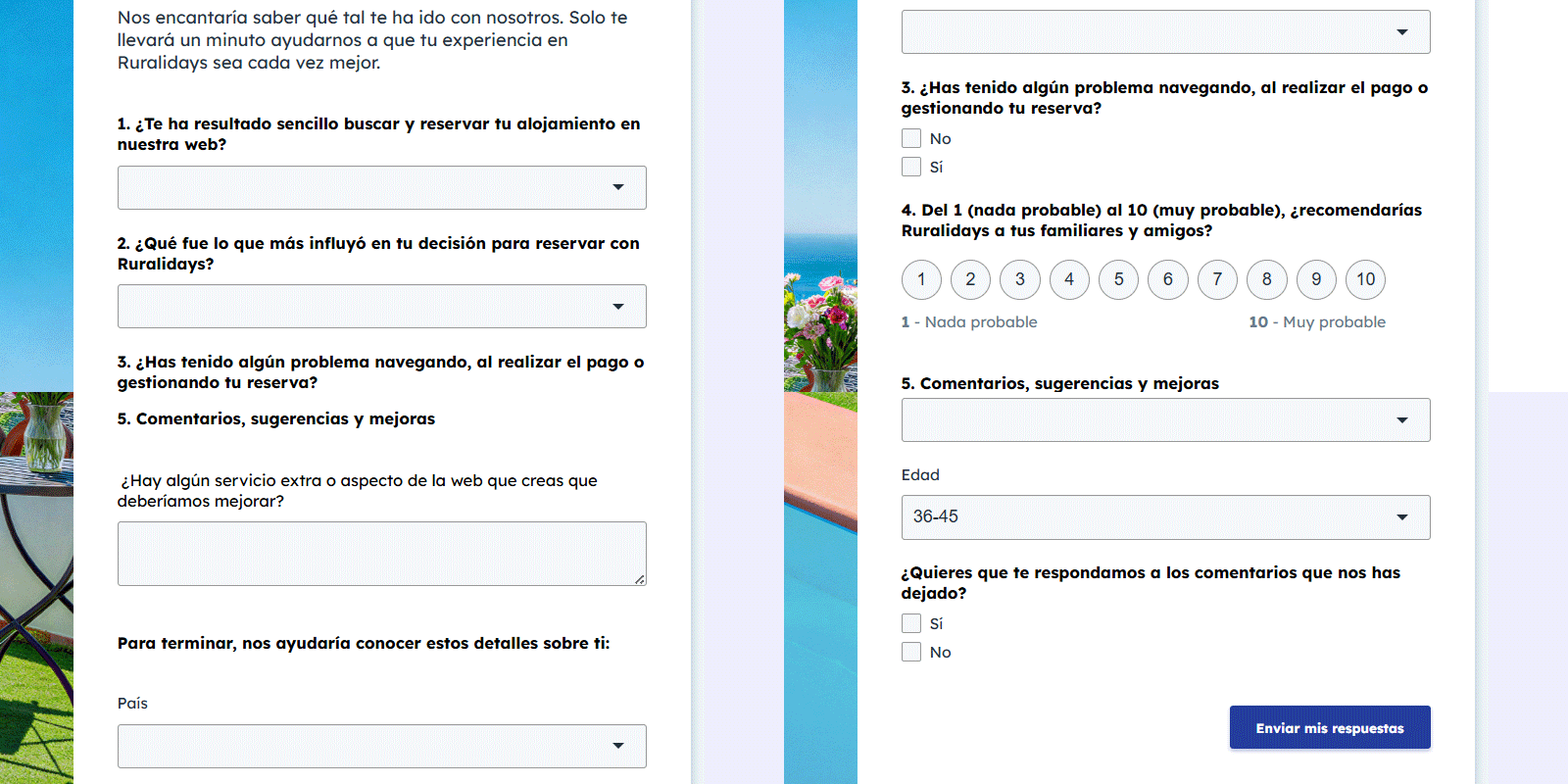
The structure of the form
My recommendation for this type of questionnaire.
The first block
It is the most important. Here we ask for the information we are most interested in extracting.
On the one hand, it should measure the ease or overall experience of the process.
For example: how easy it was to complete the purchase, booking, sign-up or request. This question helps detect whether the digital process is well understood or whether there is friction.
Next it makes sense to ask what most influenced the decision.
You can’t imagine how many businesses have employees who do not know why customers buy from them. Is it price? Catalogue? Raw traffic volume?
This is one of the most useful questions, but it cannot be approached in the same way in every business.
In a multi-brand ecommerce, the options may revolve around:
- Price.
- Product variety.
- Availability.
- Shipping time and cost.
- Trust in the store.
- Or payment methods (with cash on delivery as a differentiating option in certain sectors).
In a case like Yo pongo el hielo, for example, it makes sense to ask about price, ease of purchase, hard-to-find products or home delivery.
In an own-brand ecommerce, perhaps the following matter more:
- Perceived quality.
- Trust in the brand,
- The differentiated value proposition.
- Other customers' reviews.
- The design or clarity of the product information.
- The promotion of the product or service.
In services or bookings, the answers may be different:
- Variety of accommodation.
- Availability.
- Price.
- Booking or cancellation conditions.
- Photos, description or service page,
- Trust in the company.
- Ease of the process.
- Previous customer service.
And in training, the following may matter:
- Who teaches it (institution or person)
- The programme content.
- The price.
- The format (online or offline) and flexibility.
- The qualification or official recognition.
- The duration.
- Testimonials.
- The commercial effectiveness in the registration process.
The structure of the question can be the same, but the options must be adapted to the business.
Incident block
Here it is worth asking first whether they had any problem and, if they answer yes, leaving an open field for them to explain it.
That problem may be technical, such as a payment failure, a loading error, a form that does not work or a mobile difficulty, but it may also be about navigation, understanding or trust: they could not find information, did not understand the conditions, had doubts about the final price, lacked photos, did not clearly see the next step or needed more information before deciding.
Rating / NPS
It is also highly recommended to include a rating from 1 to 10 or from 1 to 5.
There is no need to call it NPS or overcomplicate things with the methodology behind it. A question from 1 to 10 already gives you a signal that can be compared across periods, website changes, channels or markets.
You can ask something like “would you recommend this website to your family or friends?” or “what score would you give the shopping or booking experience?”.
Then, if we want to calculate promoters, passives and detractors, we can do it, but to start with, the important thing is to have a comparable rating.
Before closing
Then it is worth leaving an open field for comments, suggestions or improvements.
This field does not have to be mandatory, but it is usually where the most interesting nuances appear: things you had not anticipated, specific doubts, real customer phrases or problems that do not fit into any closed option.
To close
Finally, we can add some basic segmentation data.
Age and gender can help interpret patterns. Country can also be useful if you work with several markets.
I would not make it mandatory in every case. The important thing is to ask only for what you are actually going to use later to analyze the responses better.
And also as an optional field, we can tell the user to leave us their email if they want us to reply.
The email should not be mandatory, because it may make us lose honest responses or reduce participation. The right thing is to explain it simply: if you want us to reply, leave us your email; if not, it is not necessary.
Closed and open questions: why you need both
A good conversion feedback form cannot be all closed or all open.
Closed questions are the ones that allow you to organize the data. They are easy to answer, generate clean responses and can then be taken very easily to charts, filters and dashboards.
They are useful for objectively comparing periods, markets, segments or specific changes on the website.
That is why they work so well for scales, yes/no, drop-downs and predefined options: ease of process, main decision factor, whether there were problems, age, gender, country or rating from 1 to 10.
Open questions are not so much for counting as for understanding. They provide context, explain the reason behind a score, uncover problems you had not anticipated and let the user tell something in their own words.
The problem is that open responses are harder to analyze by hand, especially if there is volume or if they arrive in several languages.
Precisely for that reason, in article 3 of this series I explain how to use AI to translate, group and classify this type of open comment. Not to replace human judgement when making decisions, but to turn scattered comments into topics or categories, typify incidents and obtain analyzable patterns.
The proportion should normally be this: more closed questions to structure the data and few open questions (no more than two or three), but well placed, to collect real context.
How to write the questions
It is also worth taking care of how you phrase the questions. If a question is badly framed, the data comes in biased.
- Avoid double-barrelled questions, such as “did the process seem clear and fast?”. If you want to measure clarity, ask about clarity. If you want to measure speed, ask about speed.
- Avoid suggesting the answer. It is not the same to ask “did you find it easy to complete the purchase?” as “how would you rate the ease of the process?”. The second leaves more room for an honest answer.
- Use even-numbered scales in qualitative opinion questions. For example, four options instead of five: very difficult, quite difficult, quite easy, very easy. When there is a middle option, many users tend to choose it because it is the easy way out. With an even scale, you force them to lean toward a more positive or more negative perception.
Unlike the first two, this last one is not a sacred rule for every survey, but in short feedback forms it can help obtain clearer responses.
Tools for creating feedback forms
There are many tools for creating forms. The choice should not depend only on which one is prettier, but on how you are going to work with the responses afterwards and how easy it is to implement.
You can use Google Forms, HubSpot, SurveyMonkey, Typeform, Tally orJotform. All of them can work, but not all of them leave your data equally ready for what comes next.
And that is key in this series, because the form is not the end of the process but the beginning. Afterwards, as we will see in the next two articles, we will want to work with those responses, translate comments if necessary, classify incidents and turn the result into a dashboard.
Although in reality it does not matter which tool you use to collect the feedback if, in the end, the data ends up organized in a Google Sheet spreadsheet with one row per response and one column per question.
The issue will be how easy it is to get the data there.
Google Forms: the easiest way to start
It is not the prettiest or the most visual, but to start with, especially if you have no experience building this kind of system, I usually recommend Google Forms.
Why?
Because it solves very well what we need at this stage: create the form quickly and save the responses directly in Google Sheets.
That is its great advantage for this flow:
- Each response goes into a Google spreadsheet.
- Each question generates a column.
- Each submission generates a row.
This saves us steps when we later want to build our dashboard in Data Studio (important for making decisions) or translate and classify open responses with AI.
It also forces a certain simplicity: substance prevails over form. And that, in this type of form, is usually positive.
Its limitation is obvious: it is not the most integrated or the most visual experience. If you want a very polished brand layer, advanced logic, full CRM integration or especially attractive forms, it may fall short.
But I insist: to get started, and to build the full flow of:
Form > Google Sheets > AI (optional, with n8n) > dashboard
It is very hard to find a more direct option.
When you use a CRM, multilingual forms or other tools
If the company already works with a CRM and has experience creating forms, automations and segmentations, the logical thing is to consider that CRM as the first option.
For example, if a company uses HubSpot and already has its contacts, emails, forms and workflows properly set up, it can make perfect sense to create the feedback form there.
The advantage is clear: you can link responses with contacts, automations, emails, lists, segments or sales processes.
The disadvantage is that, for the next steps in this series, you will have to make sure that the responses also end up in an organized sheet.
In a project with a client in the tourist bookings sector, for example, we worked with forms in five languages: Spanish, Dutch, French, English and German.
In that case, it made sense to use the system the company was already using (HubSpot and a multilingual form). The process for unifying the responses in a Google Sheets spreadsheet and analyzing them together was this:
- Connect HubSpot with Google Drive.
- Create a Google Sheet inside Google Drive with a single sheet where all responses will be dumped, adding an extra column with the respondent's language / country (so you can filter later).
- Create a workflow in HubSpot that sends each response from any of the 5 forms to the Google Sheet you created.
If it were not a multilingual form, with this we would get a Google Sheet ready for Data Studio. But since there are 5 languages, one step is still missing (at least), and that is translation. We will look at it in detail in the next article.
Important, which I had not mentioned: in these multilingual projects it is worth keeping the same structure of questions and options in all languages. If each language asks something different, you no longer have a global feedback system.
And the point is to be able to see aggregated data from the whole website and, at the same time, segment by language, country or market when necessary.
This way you can detect global problems and specific problems: perhaps the process works well overall, but the German directory generates less trust, the French one needs to explain a condition better or the Dutch market finds friction in a specific part of the booking.
In articles 3 and 4 we will continue working on this kind of slightly more complex case, and I will better explain the AI, translation, classification of open responses and dashboard part in Data Studio.
Other tools
The same, or something very similar, happens with HubSpot and with tools such as Typeform, SurveyMonkey, Tally or Jotform.
They can give you a better visual experience, more integration options or more pleasant forms, but if you later want to use AI and Data Studio, you will have to take those responses to Google Sheets or to an equivalent structure.
So, before starting with this, think carefully about which tool you choose and the full process from asking for feedback to making decisions with the data.
Where to place the form and when to ask for feedback
Another relevant point.
For this type of feedback, the form should appear while the user still has the conversion experience fresh in mind.
If we want to analyze the website, the app or the digital process, we cannot wait weeks, because by then the user will already be evaluating something else: the order, the stay, the service, the training, the support or the final result.
Here we want to capture what has just happened during the conversion. That is why there are three especially useful places.
The thank you page or confirmation page
The user has just bought, booked, registered or sent a request. The process is fresh and they are still within the digital context.
There is no need to interrupt them or force them to answer. It is enough to place a clear invitation:
“Will you help us improve your experience at [your business name]? It takes less than two minutes”.
And that is it. They have already bought and, if they are not in a hurry, they may not mind answering.
As you can see, it goes without incentive. We already discussed in the previous article the problems that adding one could cause. Only on rare occasions is it worth adding one.
The confirmation email
It can be the order confirmed email, booking received, request sent or registration completed. It is a second opportunity to ask for feedback if they have not answered us before.
The reasons for doing it are identical to the previous step.
The customer area
This third place makes sense when the user returns after converting and continues interacting with the digital asset: checking a booking, reviewing the status of an order, entering their private panel, changing data or accessing a training area.
It is not as immediate as the previous two, but well, maybe we catch a few more responses.
Embedding or linking to the form
In any of the three cases, the form can be an external link, for example to Google Forms, or it can be embedded in the website itself if it is well integrated.
The easy thing is to add a link. The more polished option is to embed the form or open it within a page on the website itself so the user does not feel they are leaving the environment.
Both options are valid, because the important thing is not whether the form is linked or embedded. The important thing is that it appears at the right time, is easy to answer and people actually answer it.
Common mistakes when creating feedback forms
Here are the ones I have come across most often.
#1. Asking too many questions
A conversion feedback form should not feel like a test. If it takes too long, participation drops or responses get worse. And if you ask about everything, in the end you barely know how to interpret anything.
This happens when several teams wanting to ask different things get involved in creating it. Listen to everyone, but let only one person lead the action.
#2. Asking at the wrong time
If you want to analyze digital conversion, ask right after conversion. Not when the user is already evaluating the product received, delivery, accommodation, training or final service.
#3. Mixing what is being assessed
This is especially important in companies that sell products or services from other brands and goes hand in hand with the previous point.
If you are a multi-brand ecommerce, a bad rating may refer to the store, the product, the manufacturer brand, the price, the shipping or the purchasing process. If you do not phrase the questions well, or do not ask at the right time, you will not know which part is failing the customer.
The same happens in bookings, marketplaces, comparison sites or intermediary businesses. You have to make clear, through the questions, whether you are asking about the website, the booking process, the company, the product, the service or the brand being sold.
#4. Not understanding the difference between closed and open questions
Closed questions make analysis easier, but they do not explain every nuance.
Open questions provide context, but afterwards they need a layer of classification. If you do not understand that mix, the form may be weak in some area.
#5. Ignoring the responses or paying too much attention to one specific response
These two mistakes already appeared in the first article, so I will be brief:
Collecting feedback and leaving it abandoned in a spreadsheet is a waste of time.
But overreacting to a single comment can also be dangerous.
This happens a lot when a negative response reaches the CEO, management or someone with a lot of decision-making power. Suddenly, one isolated opinion weighs more than fifty neutral or positive responses.
That is why you have to look at patterns, data and statistics. In short, be an analyst.
Because a response can be a signal, but it is not always a conclusion. Before changing a website, a checkout, a product page, the sales policy or the shipping carrier, it is worth looking at how many people say the same thing, in what context it appears and what impact (positive or negative) changing it would have.
Finally, you also have to think about ease of implementation. Not everything that appears in feedback should be changed tomorrow. You have to assess frequency, impact, cost, difficulty and urgency.
Feedback is useful for making better decisions, not for reacting emotionally to every comment. Even if some of them get on our nerves.
Next step: classifying open responses with AI
We have reached the end of creating the form.
I think it will be clear to you that a well-designed one already gives you a lot of value.
At first, few responses may arrive and you can review them manually every day, week or month. But when comments start arriving in volume, or when responses arrive in several languages, reviewing everything by hand becomes impossible.
That is where the next parts of the series come in.
In the next article we will see:
How to use AI to translate and classify open-ended responses.
The idea is not for AI to decide for us, but to help us organize the noise: detect repeated topics, group incidents, translate comments and prepare the data to analyze it better.
This is optional and will depend on each project.
But what should not be optional is what I explain in the fourth article: how to take all this to a dashboard and a monthly tracking routine.
Because collecting feedback is fine. But collecting it, organizing it, analyzing it and turning it into business, UX, CRO or CRM decisions is what truly improves a website, an app or any digital asset or channel built around conversion.
Frequently asked questions
What does a conversion feedback form measure?
It measures what happened during the purchase, booking, registration, request or any other digital conversion: what helped the user decide and what created doubts or friction.
How many questions should a feedback form have?
Between five and ten questions is usually enough. The idea is that it can be answered in one or two minutes at most.
What questions should it include?
It should ask about the ease of the process, decision factors, possible incidents, an overall rating and an open field for comments or improvements.
Is it better to use open or closed questions?
Both. Closed questions help organize and compare data; open questions help understand nuances, specific problems and things you had not anticipated.
Where should the form be placed?
On the confirmation page, in the confirmation email or in the customer area, always close to the moment when the user has just converted.
What tool can I use to create the form?
You can use Google Forms, HubSpot, Typeform, SurveyMonkey, Tally or Jotform. To start with, Google Forms is usually the simplest option because it saves responses directly in Google Sheets.
Is it a good idea to ask the user for their email?
Yes, but as an optional field. If you make it mandatory, you may lose honest responses or reduce participation.
What mistakes should be avoided?
Asking too many questions, asking at the wrong time, mixing what is being assessed, phrasing questions badly or overreacting to a single response.
Why is it important to save the responses in an organized sheet?
Because later you will be able to analyze them better, create charts, detect patterns, classify open comments and build a tracking dashboard.
Can AI help analyze the responses?
Yes. AI can help translate, group and classify open responses, but it should not decide for you. It is useful for organizing the noise, not for replacing business judgement.

Leave a Reply