
Email marketing strikes me as a curious channel:
- It does not require a big investment (quite the opposite).
- It does not require advanced technical knowledge.
- It can be applied to most digital projects.
- It only asks us to make a small effort to think about what might interest our audience and establish a routine for doing it.
And yet, it is still used surprisingly little.
It certainly does not have the reputation of other channels, especially in ecommerce, where Google Shopping, remarketing and social media always dominate the conversation.
The point is that it is an extremely profitable channel —right up there, fighting for SEO's throne—especially if you use every type of email available to you.
Shall we look at them?
Example of a real ecommerce email flow
Before we begin, and so you can keep your bearings throughout the guide, here is the complete email setup for a real ecommerce business.

Seeing it laid out should make it easier to understand which emails you already use in your store and which ones you could start using.
Download it here in high resolution:
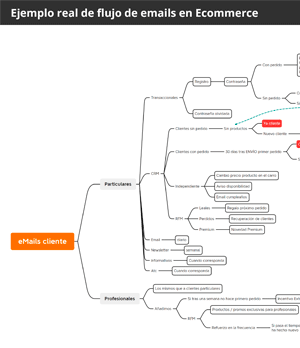
Ecommerce email flow template
Leave your email and get the complete flow that has made Email account for 25% of revenue at Yo pongo el hielo.
And as a bonus, every day in your inbox, a trick or tip to improve your business or digital project.
#1. Transactional emails
If we are talking about ecommerce, the emails I call transactional will probably be the first ones that come to mind.
They are the emails we send at every step that brings us closer to a transaction. They include:
Registration and account creation email
This is the email customers receive when they register an account in our store.
It is the typical welcome message where we introduce ourselves and try to make a good impression. We can add links to the most relevant sections of the site (new products, offers, customer area, etc.).
In fact, this may be the second email users receive from us if your ecommerce requires a double opt-in, because the first one will contain a link to verify the registration.
Obviously, if guest checkout is enabled on your site, the user will not receive it.
Payment completed successfully
When customers pay for an order, it is normal to send a confirmation telling them that the transaction was completed successfully and putting their mind at ease.

Order placed successfully but not paid
Depending on the payment method, there are a couple of cases where the order is placed successfully but remains unpaid.
I mean payment by bank transfer, cash on delivery and payment upon collection at your premises.
If you offer these payment methods, the email your customer receives will differ from the previous one:
- In the case of a bank transfer we will send the amount and the account details where the deposit or transfer must be made. It can be sent again after a few days, if the transfer has not been completed.
- For cash on delivery we should tell customers which payment methods the courier company accepts.
- If we offer payment at our premises we should also explain that they will receive an email when the order is ready for collection, along with opening hours and the available payment methods.
Order shipped
Once the order leaves our warehouse, we will email the customer to let them know.
What it should include:
- The shipment tracking, so they can follow the progress of their order.
You know, that link that takes you to the carrier handling your delivery.
Order delivered
And you may ask: why send customers an email saying we have delivered their order if they have already received it?
The answer is that, in many cases—more than you might imagine—the customer is not the person who receives the order. It could be:
- Their partner
- Their child
- The building concierge
- The reception desk at their workplace
- A neighbour
- The business across the street
- …
Yes, all of those things happen. That is why it is better to send an email confirming that the order has been delivered.
What it should include:
- We can use this email to send the corresponding invoice as a PDF.
- Optionally, a request for feedback about the purchase process and/or the carrier.
Order cancelled
Customers may change their mind and cancel an order that has not yet left our warehouse. If they do, it makes sense to let them know.
What it should include:
- Confirmation that the cancellation was completed successfully.
- Information about when and how the purchase amount will be refunded.
Password change
There is not much to say here. It is the typical email sent when we change the password on any account.
What it should include:
- A notification about the password change, in case the user did not request it.
Abandoned cart
Be careful with this one.
Legally, we may only send this email if:
- The user has given us explicit consent.
- We believe a technical error may have prevented the user from completing the purchase.
What it should include:
- The excuse for why they are receiving the email. A word to the wise…
- The list of products they had in the cart.
- A link to the checkout step where they stopped.
Request for ratings and reviews
The UGC (user-generated content) is useful in every kind of digital project, but I would say even more so in ecommerce.
And at several levels:
Product reviews and ratings
I probably do not need to tell you that those stars and product comments are a (very) powerful conversion tool.
What is more, those stars can appear in Google's snippets , increasing organic CTR:

So getting users to cast their vote is a must.
And the best way to do that is to ask them. An email sent one week after they received their order is a very good option
What it should include:
- A request for a rating.
- Optionally, a reward. You know: “leave a review and you will be entered into the draw for…”.
Company reviews and ratings
This can actually be a standalone email or part of others, such as the order received email or the product review.
What it should include:
- Links to review platforms. Today, mainly:
- Google.
- Trustpilot.
- Facebook.
Right, with these feedback emails we have finished with the most common emails of this type. Apart from the abandoned-cart email and its ambiguous nature, we are allowed—and in some cases even required—to send these emails.
No matter how much a user says they do not want any more emails from us, if they place an order we still have to send their invoice, for example.
#2. Informational emails
These emails are more common for service companies, where conditions change and customers must be notified with a certain amount of notice.
However, they can also be used in ecommerce, for example to announce a new physical store where orders can be collected, a company name change or a new corporate identity.
In short, information that cannot be considered “commercial”. And because it is not considered commercial, we are also allowed to send it without consent.
A final kind of informational email that I hope you never have to send is the one required when there is a security breach in your ecommerce and some user data may have been exposed.
In these cases, you are required to notify people within a short period of time (currently 72 hours).
#3. Customer service emails
These do not need much explanation either. They are the emails we send in response to a customer's question that reaches us through the website contact form or is sent directly to our public address.
A couple of tips:
If your communication style is formal, keep it formal here.
If it is more informal, however, be careful with the tone you use in these emails. Someone dealing with an issue with their order may not appreciate you being overly familiar from the outset.
Personally, I prefer to use a formal tone, especially in the first interactions.
Also be careful if the customer contacted us through another channel, such as social media. The answers need to be identical, because giving different answers to the same question damages credibility.

#4. Commercial emails
Well, I am nearly fifteen hundred words in and we have not even started on the real stuff: emails considered commercial.
Before we begin, I want to warn you that you may only send this kind of email to users or customers who have given you explicit consent. A little later I will explain a couple of ways to obtain it.
Newsletters
They used to be known as bulletins (although you rarely hear that term today).
In ecommerce, these emails are a little different from those used by service businesses. What you normally do is list the products being promoted over a particular period.
That period can recur at a set frequency, for example weekly—which makes it very similar to the supermarket leaflets that land in our letterboxes—or be tied to a specific date: Black Friday, Christmas, Valentine's Day…

The advantages of newsletters
- Ease of execution: if I have already selected next week's offers and their prices, I only need to add them, and this can be done from a CMS module without touching HTML code.
- I choose the products I want: in other words, I can push whichever products suit me for whatever reason, without considering customer behaviour.
- It is a format that is very easy to sell to brands: it is not difficult to agree with a brand on a particular newsletter promotion where, for example, the brand gives our customers a product when they buy certain others. Those other products are the ones I will add to the bulletin, resulting in an exclusive newsletter for one brand, with no products from competitors.
But they also have some disadvantages
- Almost certainly, these messages will go to Gmail's Promotions tab , because of the high number of images and links they contain, reducing their impact.
- Also, in my view, this model is slightly outdated and becoming less effective. At least the recurring version is (one-off sends for sales or Black Friday still work very well). It needs to be complemented by another format that takes user behaviour into account. More on that in a moment.
Daily email
In recent years, particularly among service businesses, an email format based on sending at least one email every day—and sometimes more than one—has become popular.
It is a different style from newsletters, based exclusively on text —with no images—and Storytelling, a copywriting technique that uses stories to sell.
Although it is relatively easy to apply to service sales—just ask Isra Bravo or Luis Monge, true masters of the technique—it may be a little harder for ecommerce.
At Yo pongo el hielo, we approach it as follows:
- One email from Monday to Friday.
- about a product or a brand in particular.
- We tell something we think may be interesting. The idea is never to bore people, because with a daily frequency, dull emails would send unsubscribe rates through the roof.
- In many cases, we add a flash offer on the product, valid until 11:59 p.m. that day. It is a way to create urgency and FOMO.
- The length ranges between 300 and 500 words.
- One or two links at most.
- We add an image at the end of the text. In our case, I think showing the product is necessary (the reader may well not know it, and this gives them a better idea).
- Generally, the approach is from the brand's perspective, although some emails are written from the writer's point of view, to give the whole thing a little more variety.

Advantages of the daily email
- The power of repetition. One of the most powerful sales tools for getting into your customer's top of mind when they think about buying what you sell.
- It has a good chance of landing in the inboxrather than Promotions, which increases its reach.
Disadvantages
- It may take quite a lot of time to produce. Especially at first, while you find the brand voice, the system and the angles on which to base the emails. One way to counter this: write the daily email immediately after writing the product page. The combined time spent on both tasks will be lower than if you do them separately with a gap in between.
- It cannibalises the newsletter to some extent, if the latter is weekly. If you go from one email a week to one a day while keeping the weekly send, sales will rise, but not all daily-email sales will be incremental: they will take some effect away from the newsletter.
Emails based on user behaviour and characteristics
So far, in the formats we have discussed, technology has been almost invisible:
- For transactional emails, the triggers come built into the CMS.
- For informational and daily emails, writing is enough, and any email marketing tool will do.
- For newsletters, you have two options:
- Create them manually using a template from an email marketing tool.
- Find a module or plugin for your CMS that helps you build one simply by selecting the products you want.
But some technology tools let us go one step further and create personalised emails for each customer based on their characteristics, preferences and behaviour.
We move to the next level, because, unlike the earlier tools, not every online store has these systems implemented.
There are mainly two types.
CRM
Customer Relationship Management.
Or the platform that stores all interactions between customers and our store.
It is used for much more than email marketing. In fact, the department that most commonly uses it is Customer Service.
But because it stores all user data, both Sales and Marketing draw on it, making it possible to run queries, promotions and personalised emails.
Let us look at a few examples:
Birthday email
One of the classics: send customers an email on their birthday, or a few days beforehand, congratulating them and giving them some kind of discount coupon.
I think the benefits are obvious, so I will not labour the point.
Cart recovery
Right, among transactional emails we mentioned abandoned-cart.
emails. In fact, whether you call them that or cart recovery , we mean the same thing: emails reminding you that there are products in your basket that you have not bought.
The difference is that, as I said, legally you may only send one email if you believe there may have been a technical error during the process.
Sending four emails about the same thing can no longer be considered transactional email; it is commercial, and you need the user's consent.
What is more, with the right tool you can build a small funnel like this:
- An email one hour after products are added to the basket without a purchase.
- An email after 24 hours.
And for new customers, add these messages:
- An email after 72 hours.
- An email after one week with a time-limited incentive (discount, free delivery…).
Obviously, the email flow would stop as soon as a purchase was made.
This is, without question, the email that will generate the most incremental sales, so if you are not using it yet, it is high time you implemented it.

Similar products
If you know which products a customer has viewed or added to the basket without buying, it makes sense to send an email with the bestsellers, highest-rated or cheapest items in that product category.
Besides reminding them that they still have not bought it—at least not from your site—you offer alternatives that may appeal to them more.
Complementary products
Although this does not apply to every product category, some certainly make upselling very easy.
Think, for example, of a customer who bought dog food from you in April. At that time of year, they will also need an antiparasitic treatment, so you can email the offers available for their type of dog, which you can infer from the food they bought.
I am sure you can think of similar correlations in your business.
Price drop for a product in the cart
When a customer has a product in the cart and its price drops, an email telling them may be the final incentive needed to complete the purchase.
Back in stock
Every online store manages stock differently:
- Allowing orders for out-of-stock products because they will be replenished soon.
- Showing that an item is out of stock and not allowing orders.
- Showing that it is out of stock, not allowing orders, but letting customers leave a contact email so we can notify them when it is available again.

Second-order email
I have read that when customers buy from the same store three times, it becomes fixed in their mind as a valid option for the future.
Well, before there can be a third purchase there has to be a second, and that is what this email aims to achieve.
Each business sets its own rules, but, for example, ours is configured so that if customers have not placed a second order thirty days after receiving the first, we email them a small discount to spend within one week.
This achieves two things: another touchpoint with the customer and a sense of urgency.
And it works quite well for us.
RFM-based emails
There is a customer clustering method that is widely used in ecommerce because it fits so well.
It is the RFM method (Recency, Frequency, Monetary Value), meaning that we classify customers into different groups based on:
- The date of their last order.
- Purchase frequency.
- The money they bring us, historically or per order.
Based on those three variables, we can create countless emails. Here are some examples:
Customer win-back
If a customer used to buy from us every three months on average, but six months have passed without a purchase, it may be worth emailing an incentive to bring them back.
Loyal-customer retention
It is common to have customers who buy from us every month and spend a certain amount, and naturally we do not want to lose them.
Keeping them can be as simple as occasionally emailing to say that their next order comes with a gift.
That is it.
A small gesture that may cost almost nothing but that the customer will appreciate.
Exclusive offers
Customers who buy premium products—in the case of Yo pongo el hielo, several do not mind spending €700 or more on a bottle—will very likely want to know when you add a new product of that kind to the catalogue.
So you can tell them by email, and they will surely appreciate knowing.
You would not, however, send that email to customers whose average order is €25.
You see the benefits of segmenting with this model, right?
The main difficulty is thinking up the rules for each segment. Applying them is not complicated with the right email tools.

Automated tools
They are similar to CRMs, but go one step further, with a set of preconfigured rules where you only choose the sending frequency, the priority among the different rules and weekly limits.
Basically, you tell it:
- I want to send each customer a maximum of three emails per week.
- The priority will be: Abandoned cart. Birthday email. Customer win-back. Complementary products. Second-order email. Weekly newsletter. New products in their favourite category. Bestsellers in their favourite category.
- Email cumpleaños.
- Recuperación de cliente.
- Productos complementarios.
- Email de segundo pedido.
- Newsletter semanal.
- Novedades de su categoría favorita.
- Más vendidos de su categoría favorita.
- …
You add as many email types to the list as you want, knowing that each customer will receive no more than three and that they will be based on behaviour—whether they placed an order that week, added a product to the basket, happen to have a birthday or have not bought from us for more than three months.
And not only will the messages each customer receives differ, but the products shown in each one will also be personalised to their tastes.
You give the tool the rules, and it does everything.
To give you an idea, these are the kinds of emails Amazon, AliExpress and eBay send. I see them as the perfect complement—or evolution—of weekly newsletters, because user behaviour makes conversion more likely.
If I were starting email marketing for an ecommerce business, I would undoubtedly start here.
Buying databases
It is tempting to get access to a database of one hundred thousand email addresses for a modest price.
Especially when you are starting out and your list contains you, your partner, your cousin and your friends.
But it is a mistake.
A waste of money.
For many reasons, but the main one is that it will not be profitable.
Whatever they offer you, do not even consider it, seriously.
Co-marketing
You can run a campaign with another company in which, through contests or prize draws, both brands receive subscribers' email addresses.
Or they send one of your emails to their database and you send one of theirs to yours.
Meh.
When I have done it, the results have not been great, though it was not a disaster either. In any case, I cannot say categorically whether it works because I have not done it often enough.
I would, however, consider it a complement once the pillars of my strategy were already in place.
Email marketing tools for your online store
There are many.
A huge number.
That is why I will not mention them all, only the ones I have worked with directly and my opinion of them.
MailRelay
Perfect for newsletters, daily emails and welcome sequences.
It has an enormous free plan that will let you cut your teeth in email marketing as long as you limit yourself to sending newsletters or daily emails.
Or you apply segmentation with business rules elsewhere and then import it here manually or via API, including the automation tool Make, formerly known as Integromat).
It is a (good) tool for sending emails. No more and no less.

Sendy
Another good tool for sending emails, although setup is more complex in this case and requires someone with technical skills.
Neither the tool itself is free—a very affordable one-off payment of $69—nor are the emails, which are sent through AWS (Amazon Web Services), though their cost is tiny.
If MailRelay becomes too limited for you, it is a natural next step.

ConnectIf
Another automation tool with strong website personalisation capabilities, in addition to email.
It had a slightly steep learning curve when I used it, but I liked what it could do.
We did not implement it after the test because we had already developed much of what it offered, so we would not have got enough value from it. Still, it is one I would consider for new projects, especially to avoid overdependence on the IT team.
It also seemed affordable for everything it offered.
Cartsguru
When we first used it, it was an abandoned-cart recovery tool via email. Over time, it has evolved into an automation tool with many more features.
In any case, when we tested it, the results were similar to our own recovery sequence. Neither better nor worse.
If you do not have your own sequence, you can try it.
Mailchimp
It was very successful at one point because it was one of the first tools to offer a decent free plan and knew how to promote itself well.
Even so, I have used it on several projects and it has not convinced me: neither its usability, nor its capabilities, nor its price once you need a certain sending volume.
Despite its fame, it is not for me.
HubSpot
It is a very complete Inbound Marketing platform.
It is very convenient, easy to integrate and easy to use. It could be the heart of an agency or service company.
It includes a free CRM for an enormous number of customers (one million customers) and also gives you free chat, forms and integrations with Facebook and WhatsApp.
We use it at Yo pongo el hielo to manage Customer Service, but not its emailing service because the free plan is far too small—2,000 sends per month—and although it supports automations, I find them very focused on selling services and working with leads rather than ecommerce.
Probance
I have not actually tried this one; I have only seen a presentation. But it looks so promising that I decided to include it here, as we may test it during the year.
Of all the tools I have mentioned, it is undoubtedly the most advanced for an online store.
It supports all kinds of automations, personalisation and rules , and I see it as highly compatible with our daily-email routine plus a weekly newsletter.
Unlike the others, its cost is not based on the number of contacts or messages, but on a CPA model: you pay a commission for each sale it generates.
That said, because it relies heavily on big data behind the scenes, it is aimed at medium-sized stores. If you have few products and low traffic, the results will not be as strong as in larger projects.
Consent
I have mentioned it a couple of times in this article, but I will say it once more: legally, you cannot send commercial communications to customers who have not given explicit consent.
So what does that consent involve?
Basically, they must have agreed to receive commercial communications from you, and you must be able to prove it.
Ways to collect it
There are several methods, but at Yo pongo el hielo we collect it in three different places.
During account creation
We ask users for it when they create their account and explain what they will receive and how often:

At checkout
Before each order is completed, if the customer has not given consent before, this checkbox appears:

If they have already given it, the checkbox does not appear.
Subscription banner
It does not create an account in the CMS; it simply subscribes the user to a list in our email marketing tool.
We show the subscription form in a banner across the entire site:

And also on the blog:

And ways to withdraw it
Of course, users must be able to withdraw consent if they no longer want to receive our emails.
I also recommend that you make it easy for them, because it is far better for users to unsubscribe themselves than mark you as SPAM in Gmail, which badly harms the reputation of your sending server.
That is why it is advisable to add an Unsubscribe link to every commercial email.
At the bottom, but clearly visible:

I also recommend giving users the option in their customer area:

As you can see, at Yo pongo el hielo we let users subscribe or unsubscribe from different email types: daily emails, newsletters and personalised messages (the CRM ones).
We are pleased with our unsubscribe figures, particularly given our high sending volume and frequency.
Email marketing analytics
I do not want to end the guide without giving you a couple of tips on analysing campaign performance.
Relevant KPIs
There are many, and everyone has their favourites. Personally, I only look at:
- Number of sends: it should be growing.
- Traffic: it should be growing.
- Number of transactions: it should be growing.
- Revenue: it should be growing.
That is what I monitor for each email type—newsletter, daily, CRM and transactional, basically.
If I could see it easily, I would also monitor deliverability by ISP, but it is not easy, so I do not.
Honestly, I pay little or no attention to open and click rates.
Campaign tagging
That said, to see those figures, every link in your messages must be tagged correctly.
You know, the utm_source, utm_medium and utm_campaign parameters in Google Analytics.
Tools generally do this for you with minimal configuration, but it is worth adding the tags to transactional emails—which CMS platforms do not usually include by default—and informational emails you create yourself.
That will let you see the performance of each campaign in Analytics.

Closing
That is the end of the guide. I hope it has been extremely useful.
Of course, we could go deeper into the subject and talk about deliverability by ISP, more tools, the ratios considered good…
But I think this is more than enough to start implementing.
In any case, if you want to improve email marketing in your ecommerce business and feel this guide is not enough, you can always look at my email marketing course for ecommerce, or we can talk and see how to approach the strategy in your business.

Leave a Reply