
When you talk to someone about playing video games, if they are not part of this little world, they immediately picture the typical gamer with a PC with lots of colorful LED lights.
Or the teenager who stays up at night hammering away on the PS5. Or, if you have children, maybe you have heard of the Nintendo Switch.
And that is it.
But the truth is that today there are many other possibilities, suitable for all ages, all budgets and, above all, every kind of gaming preference:
- Current games or retro (the ones you played when you were a kid).
- Competitive games like Fortnite or single-player ones like GTA.
- There are handheld consoles and desktop PCs. And your phone works too.
- In fact, you can play on your own device or via cloud streaming.
And within each of these ways to play, there are multiple variants.
That is why, because of the huge range of possibilities, I have published this article, where I want to explain what each one involves, so you know the pros and cons of each and, if you feel like playing for a while, you do not rule it out in advance just because you do not have the right device.
All the ways to play video games today
The article has two very distinct parts.
In this first half, I am going to explain these different ways you can currently play a few games.
Then, in the second half, what I will do is classify each of these possibilities according to several criteria:
- By the money you want to spend.
- By the type of device.
- By the catalogue of games you like to play.
- By the power needed to play what you want the way you want.
- By the portability you are looking for: killing time on the metro or bus is not the same as playing all afternoon in your living room.
- Lastly, one relevant point: we will classify the possibilities according to which are more easy to install and use and which require a bit more knowledge.
Once you read it, you will know which route you should choose if you want to spend some of your free time in this little world.
I will leave you with two summary tables before starting the explanation of each route, ordered by popularity.
Playing with devices (console, PC…)
| Way to play | Specific option | Approximate price | New / second-hand |
| Current video game consoles | PlayStation 5 Slim | 550 € | New |
| Current video game consoles | Xbox Series X | 600 € | New |
| Current video game consoles | Nintendo Switch 2 | 400 € | New |
| Retro video game consoles | PlayStation 4 | 60 € | Second-hand |
| Retro video game consoles | PlayStation 3 | 30 € | Second-hand |
| Retro video game consoles | PSP | 30 € | Second-hand |
| Retro video game consoles | Official mini versions | 80 € | Second-hand |
| PC | Basic gaming PC | 200 € | Second-hand |
| PC | Mid-range gaming PC | 500 – 1000€ | New |
| PC | High-end gaming PC | + 1000€ | New |
| PC | Basic gaming laptop | 700 € | New |
| PC | Old PC you already have for retro/emulation | – € | PC |
| Mini PC for emulation or light games | 150 € | New | PC |
| Fightcade | – € | PC handheld | Steam Deck OLED |
| 800 € | New | PC handheld | ASUS ROG Ally |
| 800 € | New | PC handheld | Lenovo Legion Go 2 |
| 1.000 € | New | Modern retro consoles and emulation | R36S |
| 25 € | New | Modern retro consoles and emulation | Anbernic RG35XX H |
| 70 € | New | Modern retro consoles and emulation | Retroid Pocket 5 |
| 230 € | New | Modern retro consoles and emulation | Raspberry Pi 5 as a retro console |
| 150 € | New | Modern retro consoles and emulation | Android TV Box for emulation |
| 40 € | New | Modern retro consoles and emulation | Home arcade machine |
| 300 € | New | Phones and tablets | Phone or tablet you already have |
| – € | Phones and tablets | Apple Arcade | from €6.99/month |
| Phones and tablets | Netflix Games | from €6.99/month | Smart TV and living-room devices |
| Compatible Smart TV you already have | – € | Smart TV and living-room devices | Fire TV Stick 4K |
| 20 € | Web browser | HTML5 games and casual games | – € |
| Web browser | Browser-based emulators | – € | Web browser |
| Cloud services from the browser | from €0/month | Virtual reality | Meta Quest 3S |
| 320 € | New | Virtual reality | PlayStation VR2 |
| 350 € | New | Virtual reality | Virtual reality on PC |
| from 300 | New | 320 € | Nuevo |
| Realidad virtual | PlayStation VR2 | 350 € | Nuevo |
| Realidad virtual | Realidad virtual en PC | desde 300 | Nuevo |
Playing without dedicated devices
| Cloud gaming or streaming | Xbox Cloud Gaming / Game Pass Essential | from €8.99/month | |
| Cloud gaming or streaming | Xbox Game Pass Ultimate | from €20.99/month | |
| Cloud gaming or streaming | Amazon Luna included with Prime | from €4.99/month | |
| Cloud gaming or streaming | NVIDIA GeForce NOW | from €0/month | |
| Cloud gaming or streaming | PlayStation Plus Premium on PC | from €18.99/month | |
| Cloud gaming or streaming | Remote Play from your own console or PC | – € |
Now, yes, let us briefly explain each option.
Video game consoles
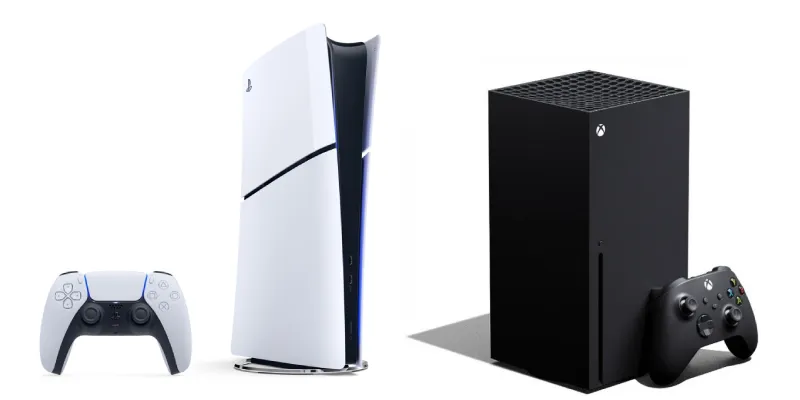
The concept that popularized video games and brought them into the living room… and everywhere else. Because there are several branches.
Current home consoles
This is the most common option: you buy a console, connect it to the TV, plug in the controller and play. Here you mainly have PlayStation 5, Xbox Series Xor S, but also slightly older options such as PlayStation 4 (in its standard or Pro version), which can still give you plenty of good sessions.
In fact, I have just bought a PS4 for next to nothing to play WipeOut.
The advantages of these devices are several:
- Simplicity: you barely need to know anything. You do not check minimum requirements, update drivers or wonder whether your graphics card can run a specific game. You buy the game for your console and it works. Like any “appliance”.
- You can play most major games and with better performance than a similarly priced PC.
The drawbacks are important too:
- You enter the walled garden of each brand. If you want to play PlayStation exclusives, you need PlayStation. If you want to make the most of Game Pass on console, Xbox makes more sense. If you already have friends on a specific platform, you will probably end up there, because playing online with other people still depends a lot on where they are.
- You also cannot tinker. What they sell you is what there is: no changing or upgrading parts to extend its useful life.
- Although the device is cheaper than a similar PC,its games are more expensive, there are far fewer free quality ones, and you may even need to pay to play online, which balances things out.
As I say, it is the most comfortable route, but not necessarily the most flexible.
Current portable or hybrid consoles
This includes consoles you can use without always depending on the TV. Nintendo Switch 1 and 2 are the clearest examples: you can play handheld, take it to another room or connect it in the living room whenever you feel like it.
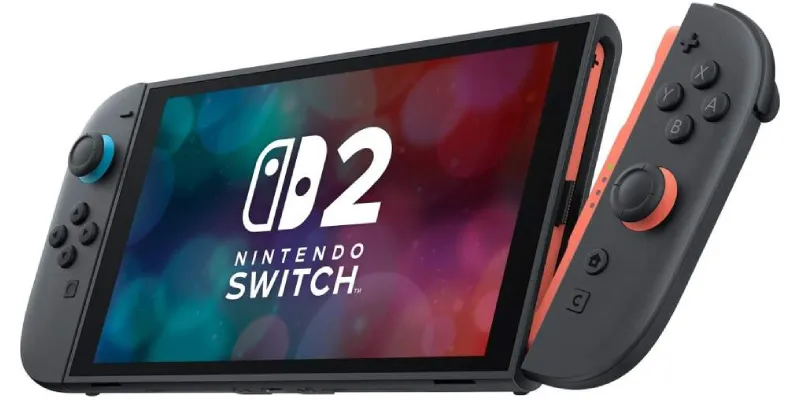
This type of console makes a lot of sense if you want something simple, family-friendly and easy to share. Also if you do not care so much about having the most powerful graphics in the world and prefer being able to play a game in bed, on the sofa or while traveling. For children, families or people who play in short bursts, it is a very interesting option.
The disadvantage is that they usually do not compete in power with a large home console or a PC.
But depending on what kind of player you are, that may not matter. If you want to play Nintendo’s legendary series—Mario, Zelda, Pokémon, Animal Crossing—or indie games anywhere, raw power takes a back seat.
“Official” retro consoles
Another possibility is to play on the original consoles from years ago: PlayStation 2, PlayStation 3, PSP, Nintendo DS, Wii, Xbox 360, Game Boy Advance and so many others. This has a special charm, because you play on the real machine, with the real controller and, if you use physical games, with the whole ritual—no emulation.
In this sense, PS3 has one of the best game libraries in history and its games sit right at the point where they do not feel “too old”.
If we combine that with how easy it is to mod, you have unlimited hours of play for €30 on Wallapop. Even if you want to buy originals, for €5–10 you can find gems. I speak from experience, because I spent €30 on a PS3 with a controller and another €60 on the 15 games that interested me most on the system.
That said, you need to find consoles that work well and, above all, controllers in good condition.
That is if we are talking about PS3; if we are talking about older consoles, add cables compatible with modern TVs (SCART, component cables) and, if you want originals, some games have become absurdly expensive.
Lastly, and importantly, most old consoles look only so-so on modern TVs, and you have to rely on adapters or upscalers. Or on a second-hand CRT TV with 25 years behind it.
It makes sense if you like the original process or you are a collector. If you just want to play an old game without complicating things, there are probably more practical ways.
But if you want to recover exactly how it was played back then,no emulator can fully reproduce that feeling of taking out the disc—or cartridge—putting it into the console and hearing it boot up.
To this we should add a notable example: SNK has launched its new Neo Geo AES+, compatible with old cartridges and with HDMI—and an analog connector—to maximize compatibility, which makes it virtually identical to its predecessor.
Official mini versions
Mini consoles were a great idea that came out some time ago: small, official machines with a closed selection of classic games and HDMI connection for modern TVs. NES Mini, SNES Mini, Mega Drive Mini, PlayStation Classic or Neo Geo Mini are the clear examples.
Their advantage is that they are very easy to use: you connect them, choose a game from a menu and that is it. No configuring emulators, hunting down odd controllers or fighting with old cables.
For someone who wants to revisit several specific games without getting into a mess, they work very well.
The drawback is that the catalogue is what it is. They are not expandable. If the game you want is not included, that is the end of it.
Also, some of these consoles are no longer easy to buy new and can have (very) inflated second-hand prices. They are nice, convenient and official, but limited.
And on top of that, unlike the new Neo Geo AES+ they do not replicate the original experience 100%, since they are emulators.
Modern retro consoles and devices, and emulation
Unlike “official” retro consoles, which are just old consoles, in recent years a new wave of consoles has appeared that lets you play old games through emulation.
Most come from China, and we can find a wide variety of handhelds and also some home units, usually with lower power.
Retro handhelds with emulators: R36S, Anbernic, Miyoo and similar devices
In recent years, retro handheld consoles from brands such as Anbernic, Miyoo, Retroid or cheap models like that little wonder, the R36S. They are small little machines, with a screen and buttons, designed to emulate old consoles.
Their charm is obvious: for very little money you can have a handheld dedicated to classic games.
For old 8- and 16-bit systems, they all work very well. Many models also handle PlayStation 1, classic arcade games and other machines of that era properly. Others reach Nintendo 64, Dreamcast or PSP with variable results and the most powerful—and expensive—ones can emulate up to PS2, which is no small thing.
The key here is not to promise magic. A €20 retro console will not behave like a Steam Deck, but for 8, 16, 32 and even 64 bits it may work for you.
The good thing is that, if you are old enough to have some grey hairs, you probably grew up like me with many of these systems, and you surely still have real gems like Final Fantasy VI, Chrono Trigger, Sonic 2, Panzer Dragoon or Blazing Star that you never even tried.
Plenty of fun without needing today’s cardboard-cutout 3D graphics.
Modern retro console for the TV
Very similar to the previous ones, except it is no longer handheld: it comes with controllers and connects to the TV.
There are a thousand and one options, but be careful what you buy. Read the reviews carefully first to make sure it does what you are looking for.
Raspberry Pi as a living-room retro console
The Raspberry Pi is a small, cheap and very versatile board that many people use to build a living-room retro console.
You install a system such as RetroPie, Batocera or Recalbox, connect it to the TV, pair a controller and you have a machine dedicated to classic games.
The advantage over a retro handheld is that here you are thinking more about playing on the TV. It is the typical option to leave connected in the living room with two controllers and use it as if it were an old console packed into a little box. For 8-bit, 16-bit, classic arcade games and PlayStation 1, it is usually a very pleasant route.
The drawback is that it requires assembly. It is not complicated, but you have to download an image, write it to a card, configure controllers, tweak a few things and have a minimum idea of what you are doing.
Come on, it is not open-heart surgery, but it is not taking a PlayStation Mini out of the box either.
If you like tinkering a little, it is a fantastic option. If you want zero setup, choose another route.
Mini PC and Android TV Box for emulation
Another option similar to the Raspberry Pi is to use a mini PC or an Android TV Box.
A small mini PC can be connected to the TV and serve as an emulation machine, for old PC games, indies or even cloud games. An Android TV Box, if it has enough power, can also emulate classic systems or play from compatible apps.
The advantage of the mini PC is that it is usually more powerful and flexible than a Raspberry Pi. The disadvantage is that it is usually more expensive and feels more like having “another computer” at home. By contrast, an Android TV Box can be cheap and convenient, but its performance varies enormously depending on the model.
Here you have to be careful and analyze things properly. There are dirt-cheap Android TV boxes that promise 4K, 100,000 games and much more. And maybe it is true, but it comes with bad controllers, lag and horrible menus.
On the other hand, there are good options that you will have to configure yourself, even if it is simply by downloading an app.
Home arcade machines
This is the least practical option and probably one of the nicest if you like retro. It consists of building an arcade cabinet at home: cabinet, screen, joysticks, buttons and an internal system that runs the games.
It takes up space, costs money and requires assembly—or buying it ready-made—so it is not for everyone, but the experience is very different from playing with a controller on the sofa.
If you grew up with arcades, putting your hands on a joystick and six buttons completely changes the feeling. Especially if both joystick and buttons are good quality.
Of course, you have a simpler option, which is to get an arcade stick and connect it to the PC, to a Raspberry Pi or to a console, but above all, the issue of modern screens versus a CRT monitor means the experience will not be the same as you remember.
PC
The second formula anyone thinks of. You know: RGB lights, headphones, keyboard, mouse and a can of Monster… Or not.
Because within the PC world there are many, many different ways to play.
The PC is the most flexible platform of all. You can play current titles, old games, indies, strategy games, simulators, mods, emulators, free games, browser games and practically anything you can think of.
But it is also the option that raises the most doubts for people who are not into the subject: “will I know how to set it up properly?”. Although the truth today is that it is quite a bit simpler than it used to be.
In any case, before starting, you need to consider two questions.
Desktop PC or gaming laptop
A desktop PC makes sense if you want more power for your money, better cooling and the ability to change parts over the years. In other words, you can expand the memory, change the graphics card or add more storage.
A gaming laptop, on the other hand, makes sense if you need to move it around, do not have room for a tower or want a single machine that works for everything (studying, working, connecting to the TV and gaming).
The downside is that the PC demands more knowledge. Not every computer can play everything.
A cheap laptop can run simple, old or indie games, but do not ask it to run a demanding modern game with graphics maxed out. Here you really need to do your homework. At least if you do not want to go all out and buy a €3,000 machine that can indeed handle everything.
PC by budget: entry-level, mid-range, high-end and ultra-high-end
Because what you pay matters.
With a basic PC you can play undemanding titles, retro games, indies, light strategy, narrative adventures, old games and many free options.
With a mid-range you are already in very comfortable territory for playing almost everything at reasonable quality, that is, at 1080p.
With a high-end you can raise resolution, graphics quality and frame rate.
And with an ultra-high-end we are already talking about a serious indulgence: unrestricted 4K, lots of FPS, expensive monitors and components that almost nobody needs, even if we all like them.
The important thing is to buy for your actual use: if you are going to play Stardew Valley, Hollow Knight, Age of Empires II, emulators and the odd game from a few years ago, you do not need the same machine as someone who wants to play Cyberpunk 2077 with everything on ultra.
So, think carefully about what you are going to want to play and also whether you want it for work, although I am very much in favor of compartmentalizing how we use our devices.
In my case, to play eFootball, old single-player RPGs, fighting games and several indies, a normal little graphics card such as a GTX 1650 or the RX 580 is enough, and their second-hand price is laughably low.
Thinking before buying seems obvious, but when you start looking at graphics cards and benchmarks, we tend to forget it.
PC for retro games, emulation and mods
Here we lower the requirements even further. Because a somewhat old PC is a magnificent machine for playing old stuff.
You can emulate classic consoles, install games from decades ago, apply fan-made patches and improvements, connect modern controllers and adjust the image to your liking.
Here the PC has a huge advantage over almost any other route: you can adapt the experience enormously. You can play an old RPG with a translation that never officially came out in Spain, improve the resolution of a PlayStation 1 game, load a mod that lets you play with a control pad instead of keyboard and mouse, or use filters so a 2D game looks more like you remembered it on a CRT TV.
Here we will need practically no machine at all, though we will need time to get things the way we like them.
Fightcade and retro online arcade
Fightcade deserves a mention because it is a very specific way to play retro: it is not so much about playing old games alone, but about playing online against other people.
It is mainly used for arcade fighting games and competitive classics, such as the Street Fighter classic 2D games or SNK gems such as King of Fighters or Garou: Mark of the Wolves.
Fightcade itself defines itself as a matchmaking application for playing retro games online, with built-in emulators.
Put simply: if you want to play old arcade games against other people over the internet, Fightcade is one of the big options.
And on top of that, it is free, you just need to provide the ROMs.
Steam Deck and other handheld PCs
At this point we are talking about the trend of turning PCs into handheld consoles.
Basically, it is putting a computer under the hood of a Nintendo Switch. And yes, it is as cool as it sounds, but it is not without drawbacks.
Steam Deck
Steam Deck is the leader here. It looks like a larger Nintendo Switch, but inside it works like a computer designed to play your Steam library.
Its great virtue is that it makes the PC feel less like a PC. In many games, you go in, press install and play.
You do not have to sit at the desk, connect a keyboard and mouse or turn every gaming session into a small chore. For anyone who already owns games on Steam, it is an extremely comfortable way to use them on the sofa, in bed or away from home.
The drawback is that not all games run equally well.
Steam Deck has slightly more power than a PS4, but it is restrained so it does not drain the battery in two minutes.
This means that sometimes you have to tweak settings, lower graphics or accept that a particular game does not run smoothly. Even so, as a balance between comfort, catalogue and price, it is one of the most interesting machines of recent years.
And being able to play the gigantic library accumulated over years on PC comfortably from bed is something we could not even dream of not so long ago. Thankfully AMD had the bright idea with its APUs…
Other handheld PCs with Windows or SteamOS
Besides Steam Deck, there are other portable PCs shaped like consoles: ASUS ROG Ally, Lenovo Legion Go, MSI Claw and similar models.
Many use Windows, which has a clear advantage: you can install practically any PC store or service, from Steam to Game Pass, Epic Games Store or GOG.
The problem is that Windows is not always designed to be used on a small screen with built-in controls. It can work very well, but it can also force you to deal with menus, updates, windows and settings that do not even exist on a traditional console.
These machines make sense if you want more power, more freedom or access to specific services that can be less direct on Steam Deck, since it uses a customized version of Linux.
Handheld PC as a portable retro machine
Both Steam Deck and its cousins have a very interesting use as retro machines, allowing us to emulate all kinds of consoles up to PS3 almost without breaking a sweat, increasing resolution and improving graphics thanks to their power.
The appeal is clear: you can have AAA PC games, lightweight current games, indies and retro systems all in one machine.
It is not the cheapest option (especially because, due to the RAM shortage, their prices have gone up), but it is one of the most complete.
Phones and tablets
With the numbers in hand, they are the ones calling the shots when it comes to playing. The massive adoption of these devices has brought gaming options to almost anyone in the world, enormously expanding the universe of potential gamers.
By the way, if the subject interests you, here are the best gaming tablets you can get.
Native games for mobile and tablet
The phone is the most widespread console in the world, even if many people do not think of it that way. You already have it in your pocket, it has a screen, an internet connection and a store full of games. From simple puzzles to fairly ambitious titles.
The advantage is that you do not have to buy another device. The drawback is that the catalogue is full of junk: free games that live off ads, in-app purchases, timers and a thousand tricks to slowly take your money.
There are good games, of course, but you have to separate the wheat from the chaff.
For short sessions, mobile makes all the sense in the world. For a long, comfortable and precise experience, it depends a lot on the game.
Touching a screen is not the same as using physical buttons, especially in action, platform or driving games, so you can do one thing…
Phone or tablet with a controller
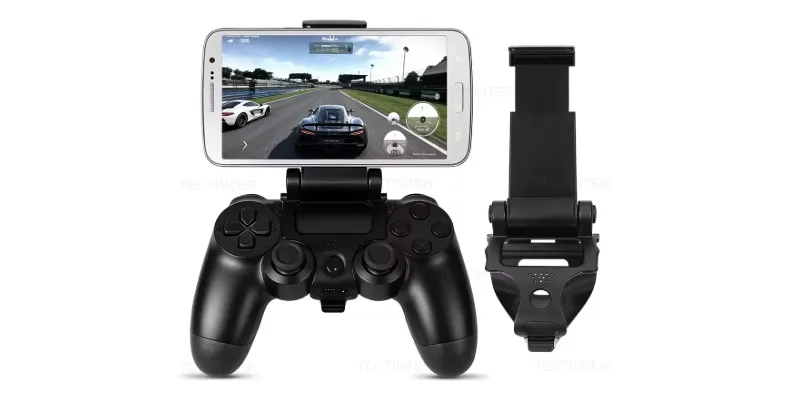
The experience changes quite a lot when you add a controller. You can use a normal Bluetooth controller or accessories such as Razer Kishi and similar devices, which turn your phone into something very close to a handheld console.
This makes games much more comfortable, because it stops being “touching glass” and becomes a screen with physical controls.
For me, this is one of the most underrated ways to play. Especially because many people already have a powerful phone, but do not consider buying a controller. And this €20, €50 or €100 accessory changes the experience more than buying an entire other machine.
Even if you already have a control pad, you can get a grip like this for barely €3 and build yourself a handheld console.
Services included in a subscription: Netflix Games, Apple Arcade and similar
There are also gaming services included in subscriptions you may already be paying for.
Apple Arcade is the clearest example on Apple devices.
Netflix Games also exists and is not limited to mobile: Netflix has an official page dedicated to games available on TVs and on PC/Mac through its website.
These services are interesting because they go beyond free games and, at the same time, somewhat break the idea of “buying games”.
The nuance is that these catalogues do not replace a console, a PC or Steam. They are something else. Smaller, more closed and more casual. But for someone who barely plays, they may be exactly the entry point they needed.
Emulation on mobile and tablet
A phone or tablet can also be used to emulate old consoles, especially with a controller, which improves the experience enormously.
On Android, setting up your retro system is very simple. On iPhone and iPad it depends more on Apple’s restrictions and on what is available in the App Store at any given time.
In any case, for old systems, a current phone has more than enough power.
Smart TV and living-room devices
Yes, your TV is also a device you can play on. And more things than you think.
Games directly from Smart TV
Some current TVs allow you to play without a console, running apps or cloud services. You open the app, connect a controller and play.
This route is interesting because it removes devices. You do not buy a console, build a PC, have a tower or extra cables. Just a USB or Bluetooth controller.
For someone who wants to play now and then, it makes a lot of sense.
However, the drawbacks are important. The first is thatyou depend entirely on the TV model, the available apps, your internet connection and whether the service exists in your country. It is not as universal as “I buy a console and plug it in”.
It is more convenient when it works, but sometimes you simply cannot.
The second issue is the catalogue. You will not be able to play everything you want, only what the service offers you.
And speaking of services, there are quite a few: Amazon Luna, Xbox Game Pass / Cloud Gaming and Nvidia GeForce Now. On top of that, some of these have free or very cheap plans. For example, at home we pay €2.50 a month for Amazon Prime, which includes Luna.
You also have Netflix Games. It deserves its own mention because its idea is quite simple: youplay from the TV and use your phone as a controller.
This fits very well with party games, simple games or family-play options, so if this vibe appeals to you, take advantage of it.
HDMI devices: Fire TV, Chromecast, Android TV and similar
In addition to the Smart TV itself, you can use small devices connected by HDMI: Fire TV, Chromecast with Google TV, Android TV, Apple TV and similar devices. Some allow you to install game apps, cloud services or simple emulators.
The advantage is that they are cheap and discreet. You connect them to the TV and expand what it can do without changing screens. For game streaming or light options, they can work quite well.
The drawback is that they are not all good for the same thing. A Fire TV may work well for certain services like Amazon Luna, an Android TV Box can be more flexible for emulation, and an Apple TV fits better within the Apple ecosystem.
Look carefully at which games or services you want to use because, although they can be used for gaming, that is not their main focus and you could get an unpleasant surprise.
Streaming from another device to the TV
Another possibility is that the game runs on another device and you watch it on the TV.
For example, you can have a PC in one room and send the image to the living room, or use remote-play features from a console.
This makes sense if you already have a powerful machine but do not always want to play in the same place. The PC or console does the heavy lifting, and the TV acts as a comfortable screen.
Here, quality depends on your network. If you have a good Wi-Fi connection or, better still, Ethernet cable, it can work very well. If your Wi-Fi is rubbish, you will have image or sound dropouts, controller lag and a desire to throw the controller at the TV every five minutes.
Web browser
Although it is similar to the previous route in that the game runs in the browser, in this case it is not streaming; the browser itself runs the game.
Playing from the browser is probably the simplest route of all: you open a website on any of your devices (phone, PC, tablet, smart TV) and play. Without installing anything, without buying hardware or software.
HTML5 games and casual games
This includes casual games, puzzles, simple platformers, educational games, indie experiments and thousands of small proposals.
For years this was associated with shabby games to kill five minutes, but that is not always the case. There are very decent browser games, especially if what you want is something immediate. Not everything has to be an 80-hour blockbuster.
Browser-based emulators
They allow you to play old systems without installing programs on your computer or buying consoles.
You enter a page like this one, load the game or choose from available options, and play.
For old systems such as 8-bit, 16-bit consoles, Game Boy, classic arcade machines, PlayStation 1 and even Nintendo 64, they can work well on a computer or phone that is not ancient.
That said, running Super Mario World or a PlayStation 1 game well is one thing; expecting Nintendo 64’s Perfect Dark to run perfectly from a Smart TV browser is another.
By the way, here I explain how to play with your controller when the browser does not detect it.
Virtual reality
I have left for the end la crème de la crème.
Virtual reality is the most complex way to play, both in terms of technical requirements and the hardware and devices needed.
You need good graphics power and also a special headset. Special controllers are optional in many cases, although recommended.
These are some of the options you have if you want to play this way.
Meta Quest and standalone headsets
Meta Quest is the easiest example because it works standalone,without necessarily needing a PC or a console.
It makes sense if you are looking for a different, more physical and more immersive experience. Rhythm games, exercise, exploration, light simulation or first-person experiences work especially well.
The drawback is that not everyone tolerates virtual reality equally. Some people get dizzy, some are bothered by wearing a headset, and some simply do not want to be isolated from the living room with a helmet on their face.
It is spectacular, that is clear, but it is not the most comfortable way to play every day for everyone.
PlayStation VR2 and console virtual reality
PlayStation VR2 is the virtual-reality route within the PlayStation ecosystem. It makes sense if you already have a PS5 and want a more closed VR experience without building a dedicated PC.
The advantage is that it greatly simplifies access compared with PC virtual reality. The disadvantage is that you depend on the catalogue, which is not the largest.
Virtual reality on PC
Virtual reality on PC isthe most flexible and powerful option, but also the most demanding.
You need a capable computer (with a suitable GPU), a compatible headset, space to move around and more patience for setup.
In return, you have more possibilities: simulators, mods, very specific experiences, experimental games and advanced configurations. If you enjoy tinkering as much as playing, this is your option.
Cloud gaming or streaming services
To finish with the different options, let us put devices aside and talk a little about these services that we have already mentioned in passing. Let us go a bit deeper and see what they consist of.
Xbox Cloud Gaming / Game Pass Ultimate
Cloud gaming means the game does not run on your console, phone or PC, but on a remote server. You receive the video over the internet and your inputs travel back. It is like watching Netflix, but being able to control what happens on screen.
You can play both from a browser on mobile or PC and from the apps enabled for it.
Xbox Cloud Gaming is one of the clearest options in this area.
The advantage is excellent: you can play without owning a physical Xbox and without owning the games, as long as you have a subscription, a compatible controller, good internet and are in a region where the service works.
The drawback is also that if the connection fails, the experience suffers.
For slower-paced games it can work very well. For competitive games where every millisecond matters, playing locally is preferable.
Also, since it is a monthly subscription, the annual price is something to consider. And you do not buy the games, so you cannot resell them later.
But if you have time and feel like trying lots of games, it is probably one of your most cost-effective subscriptions.
Amazon Luna
Amazon Luna is another cloud-gaming solution.
It makes sense if you already pay for Amazon Prime or if you want a simple option to play from living-room devices.
Also, every month they give you new games that are yours forever, which makes it a real bargain.
The doubt, as with any service of this kind but especially in this case, is the catalogue, which is not as broad as would be desirable.
GeForce Now
GeForce Now works somewhat differently.
It is not “I give you a closed catalogue and you play what is there”; what it does is allow you to play PC games in the cloud (provided they are compatible with the service) that you own in certain stores such as Epic or Steam.
This is interesting if you already have a PC game library but your computer is not powerful enough. Instead of buying a new graphics card, you can use the power of external servers.
It also has a limited free plan.
The drawback is that it requires understanding the system a bit more: not all your games will be compatible, and image quality depends on the subscription and your connection.
For anyone who has already built up a good handful of games on PC, it is a very good option, because you will be able to play them on the living-room TV, on any machine (however weak), on your phone, on the iPad…
PlayStation Plus Premium via streaming
PlayStation also has game streaming.
It does not work from the browser; you need to use the PlayStation Plus app for PC, log in, connect a compatible controller and select a game to stream.
That brings this section to an end. Now let us talk about practical classifications.
Classification according to different criteria
Right, now that you know all the possibilities, to help you decide which one(s) best fit your case, I am going to classify them according to six criteria:
- Cost.
- Type of device.
- Game catalogue.
- Power.
- Portability.
- Ease of use.
#1. By how much money you want to spend
Free (or almost)
If you do not want to spend anything, you can start by playing on devices you already have (phone, PC, tablet, Smart TV, Chromecast…).
On all of them you have two options to start playing:
- Install free games or emulators.
- Play from the browser without installing anything.
Do some preliminary research by checking in ChatGPT “the best free games for X”, so you will avoid a lot of free junk.
And remember, get a controller or a mobile grip if you already have the phone, because the whole thing improves a lot.
Very cheap ways (under €30)
Any subscription, but especially the basic Amazon Luna one (€5 a month, which can become €2.50 with certain discounts) is ideal. Especially if you already pay for Amazon Prime. The same can apply to Netflix games, but with a much more limited catalogue.
If you are into retro but want to try first, buy the R36S for less than €30. You have slightly more expensive options such as Anbernic consoles with better overall quality, or retro consoles to plug into the TV (beware: on current 4K TVs they will look worse than you remember).
Affordable ways (€30 to €100)
Here are two plus one options:
- Old second-hand consoles (PS3, PS4, NDS, PSP…). Check the catalogue and bear in mind they are all very easy to mod. Or, if you only want two or three games, the cost is usually minimal (€5 to €20 per new or second-hand game).
- You can also get a secondary phone or a second-hand tablet. Phones like Redmi Note that are a few years old, but with Snapdragon CPU can be surprisingly good for emulation. And if you want something larger, here are the best gaming tablets.
- If you want simplicity, you have the Mini consoles (SNES, Mega Drive, PlayStation), but I do not recommend them when you have the free route above, because with a good controller you get a similar experience for less money.
Decent ways (€100 to €500)
We raise the level. With this budget you can already play anything you want, in better or worse quality:
- Second-hand mid-range gaming PC.
- Second-hand PlayStation 5.
- Second-hand Steam Deck (until recently you could buy it new for this price, although it is going up because of RAM).
- New mid-range phone or tablet.
- Some new retro console such as the new NeoGeo AES+.
Ways that cost real money (€500 to €1,000)
One step higher, with several years of enjoyment ahead, we have:
- New mid-range PC.
- PlayStation 5.
- New high-end phone or tablet.
The top option (over €1,000)
If budget is not an issue and you want the best, a high-end gaming PC new or second-hand, with a latest-generation graphics card, is your best option.
#2. By type of device
If you prioritize one device over another—or not having a dedicated device—these are your options:
Computers
- Desktop.
- Laptops.
- Handhelds.
Consoles
- Plugged into the TV: PS5, PS4, PS3, Neo Geo AES+, mini versions.
- Portable: Nintendo Switch 1 and 2, PS Vita, PSP, Nintendo 3DS, Nintendo DS…
Tablets and phones
- High-end.
- Mid-range.
- Low-end (retro and little else).
Smart TV, similar devices and streaming
Check the apps and services for your device:
- Apps, native games and emulators (especially on devices with Android TV).
- Streaming services (Luna, Xbox Game Pass, PlayStation Plus, GeForce Now, Netflix…)
Virtual reality
- Meta.
- PlayStation.
- Headsets for PC.
#3. By catalogue
This point is very relevant because, depending on what you want to play, not every route will work for you.
The largest catalogue
A PC, without a doubt. You will only miss a few Sony and Nintendo exclusives, and most of them you can play through emulation if you have a powerful machine.
PlayStation exclusives
If you prioritize Sony exclusives, you can play with:
- PS5.
- PS4 (standard or Pro).
- Some have PC versions.
- Or the PlayStation Plus streaming app for PC with a subscription.
Nintendo exclusives
There is no way around it:
- Officially: Nintendo Switch 1 and 2.
- Emulators: PC or Steam Deck.
Retro games
If you want to play old games, practically any device can work, but especially:
- Retro consoles.
- Browser.
- PC or Steam Deck.
- Raspberry Pi
- Neo Geo AES+.
- Mini consoles.
Virtual reality
- PC, if you want a larger catalogue but everything more complex.
- PS5, simpler but with fewer possibilities.
#4. By the power required
Playing Vampire Survivorsis not the same as playing Fortnite or GTA VI with everything on ultra is not the same. Depending on what you want, you need different machines.
Playing the latest top games
- Gaming PC (at least mid-range).
- Current home consoles (PS5 or Xbox Series X).
- Steam Deck-style handhelds with graphical compromises.
- Nintendo Switch 2.
Playing competitive games
- Less powerful PC.
- New or previous-generation consoles (PS4 would work).
- Handhelds.
Casual gaming
- Any console.
- Any PC.
- Phones or tablets.
- Nintendo Switch (1 or 2)
- Retro or mini consoles.
- R36S.
#5. By portability
Generally, more power implies a fixed setup, while gaining portability is associated with lower graphics power or a higher price for similar results. That is why it is important to be clear about where and how you want to play.
Desktop devices
- Tower PC.
- Consoles plugged into the TV.
Portable devices
- Laptop PC.
- Steam Deck-style handheld PC.
- R36S and similar devices.
- Phones and tablets.
#6. By ease of setup
If what you want to prioritize is “plug in and play”, without complex installations or unnecessary complications, here are the devices ordered from simplest to most complex:
- Playing in the browser: open a website and press play. Done.
- Old consoles: PS3, PSP, N64, mini consoles. Plug in, insert the game and play. The way it has always been.
- New retro consoles, such as R36S or Anbernic (home or handheld): they come with everything ready to turn on and play. If the microSD gets corrupted, things get a little more complicated.
- Phones or tablets: install a game in an emulator and play. Better with a controller.
- Smart TV and similar devices: compatibility with the desired services or apps can be a pain. Otherwise, it is install and play.
- Current consoles: although still easy, they already require updates, installation… They are basically PCs with stripped-down operating systems.
- Steam Deck and other handheld PCs: halfway between current consoles and PCs. They are not as simple as the former nor as complex—if you do not want them to be—as the latter.
- PC: although they have become simpler in recent years, they are still not the same as a console. There are always more variables that can fail. In return, their potential and possibilities are much greater.
Conclusions
As you can see, playing video games today is not about choosing between buying a PlayStation 5 or building a PC with lights.
That still exists, of course. And if you want power, big releases and to play the latest games at good quality, they are two very reasonable routes. But they are not the only ones. They do not even have to be the best for you.
If you just want to play now and then, maybe the phone you already have is enough, or a Smart TV compatible with a service you are already paying for (Netflix or Amazon), or the browser on your tablet or work PC.
If your thing is revisiting old games, a second-hand PS3, a PSP, an R36S, an Anbernic or a Raspberry Pi can give you hundreds of hours for very little money.
And if what you want is to play something more serious, comfortable and modern, there are current consoles, PC, Steam Deck, handhelds, cloud services or even virtual reality.
The key is not to start with the device, but with the right question: what do you want to play, where do you want to play, and how much do you want to spend?
- If you want zero hassle, console.
- If you want the biggest catalogue, PC.
- If you want to play sprawled on the sofa or in bed, Steam Deck, Switch or a retro handheld.
- If you want to spend as little as possible, use your phone, browser, old PC, subscriptions or second-hand options.
- If you want to relive classics, retro is better than ever. And I assure you that you can already play with one of the devices you already have.
- And if you prefer to try what gaming is like today without buying hardware, cloud gaming is starting to be a real alternative, as long as your connection keeps up.
My recommendation is simple: start with what you already have.
Before spending 500, 800 or 1,500 euros, ask yourself whether you can play with your phone, your TV, your old laptop or a subscription you are already paying for.
That said, buy yourself a decent controller because it COMPLETELY changes the experience, try several games and discover what kind of experience you really feel like having.
Then, if you get the bug, there will be time to complicate things.
Because from a certain age—which can be 20 or 25—the hard part about gaming is not having the most powerful machine, the newest handheld or a flashy setup.
Not at all.
What matters is being clear whether we want to devote part of our leisure time to this, finding a little time, picking up a controller—or a keyboard, or a handheld, or the phone—and recovering feelings we had forgotten.
In my experience, stumbling upon surprises like Vampire Survivors (which I played on mobile with the Xbox controller) took me back to certain moments of my youth.
That led me to install the KoF 2002 UM that I had bought on Steam and had never played. And I started giving it some online play now and then.
At the same time, and without rushing, I installed the legendary Final Fantasy VI, on my R36S, which I had not tried back in the day and whose fame I now understand. God, what a great game.
Same with WipeOut Omega Collection for PS4, which I keep recommending.
You can see that in my case almost everything I play is more or less retro.
I have reached this point because, after spending many hours on video games throughout my life, in the end what I am looking for is to have fun the way I did in my teenage years, and I prioritize the genres and games I like.
I have no need for next-generation graphics with soulless games, even though I was very impressed at the time by the technical side of The Witcher 3.
What I mean is that playing today is more a matter of attitude and choice than of device or budget. With today’s range of possibilities, playing or not playing depends exclusively on how we prioritize our leisure time.
So, if you have the itch, start with something basic and try to see whether this is for you. I hope at least I have helped you decide how to do it with this very long article.
And if you want, tell me how it goes.
Frequently asked questions
What is the best way to start playing video games today?
The best way is to start with something you already have: phone, tablet, old PC, compatible Smart TV or browser. Before buying a console or an expensive PC, try several games and check whether you really feel like devoting part of your free time to this.
Do I need a PlayStation 5 or a gaming PC to play?
No. They are two very good options if you want power and big releases, but they are not mandatory. You can play with old consoles, phones, tablets, browser, cloud services, retro consoles, Steam Deck, Raspberry Pi or even from some Smart TVs.
What is the cheapest option for playing video games?
The cheapest option is to use a device you already have and look for free games, emulators or browser games. You can also use subscriptions you already pay for, such as Amazon Prime or Netflix, or buy a cheap retro console like the R36S if you want to play classics.
Which console is worth it if I do not want complications?
A current home console or a Nintendo Switch-style handheld is the simplest. You connect it, install the game and play. You do not have to think about requirements, drivers, graphics cards or odd settings. In exchange, you have less freedom than on PC.
What is better for gaming: console or PC?
It depends on what you are looking for. The console is more comfortable and direct. The PC has a larger catalogue, more possibilities, mods, emulation, free games and more room to tinker. If you want zero hassle, console. If you want freedom, PC.
Can I play well with a phone or tablet?
Yes, especially for casual games, indies, emulation and cloud services. The experience improves enormously if you add a Bluetooth controller or a grip, because touching glass is not ideal for action, driving or platform games.
What is the best option for playing retro games?
You have many: original consoles, PC, Steam Deck, Raspberry Pi, browser, mini consoles, R36S, Anbernic, PSP, PS3 or home arcade machines. If you want convenience, a modern retro handheld. If you want the original experience, an old console. If you want flexibility, PC.
Can you play without buying a console?
Yes. You can play from a browser, phone, tablet, PC, compatible Smart TV or cloud-gaming services such as Xbox Cloud Gaming, Amazon Luna, GeForce Now or PlayStation Plus Premium on PC. In some cases you only need a subscription, a controller and a good connection.
Which option is best if I want to play away from home?
The best portable options are Nintendo Switch, Steam Deck, other handheld PCs, phones with a controller, tablets and retro consoles like R36S or Anbernic. The choice depends on whether you want current games, retro games, power or simply to kill time.
What should I check before buying any device for gaming?
First, what you want to play. Then, where you are going to play, how much you want to spend, how much power you need and how much setup you feel like doing. Buying on impulse is easy; getting it right means thinking first about whether you need a simple console, a flexible PC, a comfortable handheld or a cheap solution to try.

Leave a Reply