

This isn't the first time I've talked about the subject. In an earlier article I already explained one way to remove the bot traffic collected by our Google Analytics.
But on that occasion, I focused on Universal Analytics.
Although much of what I said there is still valid, everything relating to Universal and its filters has obviously become outdated.
That's why I want to update it, focusing on Google Analytics 4 and a very easy way to remove bot traffic that may be affecting your metrics.
And not by a small amount.

Before we start, I think this might interest you
Sign up and get my 66-page guide to the Best Free Digital Tools for:
- Marketing
- Analytics
- UX
- Project management…
Plus, every day you'll receive a useful trick or tip in your inbox to improve your business or digital project.
Now, let's get to those bots…
Effects of bot traffic in GA4
Look, this is what I mean:

This image shows all the traffic a website collected in Google Analytics 4 over one month.
Now look what happens if we remove the bots:

Again, same period. With and without bots.
Things change, at least in terms of traffic. Specifically, it changes by almost 50%.
I'll repeat that: 50%.
I don't know what you think, but to me that seems very, very relevant.
Because we're fooling ourselves about the traffic we're acquiring.
And not by a little, either.
Obviously, what doesn't change is revenue. Bots don't pay, after all:

In the image above, the unfiltered conversions. Just below, the filtered ones:

In fact, since it's all bot traffic, there shouldn't be any difference. And although the system I'm going to explain isn't infallible, there almost never is.
So what do we need to do to achieve this?
Bot filtering system in GA4
In GA4 I haven't seen the spam-domain bots that used to artificially inflate your session metrics by attacking the tool's measurement protocol. At least not yet.
It looks like that stayed in Universal.
What I am seeing, however, is real traffic, but from bots.
In other words, bots that actually access your website for whatever purpose -if it's an online store, probably to crawl prices- and even browse through it.
But there's nobody behind them, so you'll get little useful information from analysing these sessions.
Quite the opposite: they'll ruin your metrics such as bounce rate, engagement rate or conversion rate because, sadly, they don't buy:

Going from a clearly improvable 0,7% CR to a fairly acceptable 1,24% gives us a different perspective on the improvements the website needs.
So how do you apply this filtering?
With just two steps:
#1. Edit the report
Open the GA4 Traffic acquisition report you're interested in and click this icon at the top right:

#2. Create the anti-bot filter
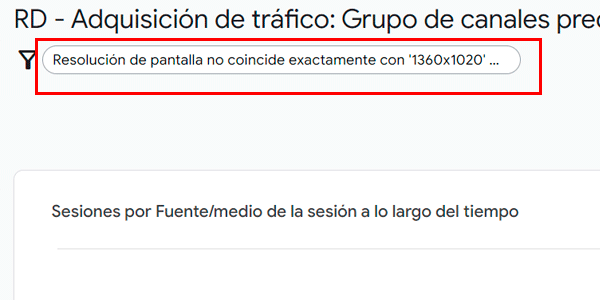
Create the filter like this:
- Parameter: "Screen resolution".
- Match type: Does not exactly match.
- Value: 1360×1020 and 680×510 (bots from Selenium and Pupeteer).
It will look like this:

Accept the changes and you'll have your filtered report:
Done. We can now view reports free of (some) bots.
Compare your revenue to make sure you're not leaving anything out.
If everything is OK, you'll see things such as:
- Direct traffic has decreased.
- Traffic from countries such as India / Bharat has also decreased.
- And the aforementioned changes in traffic-based metrics (bounce rate, CR…).
If you want to compare the segments for "All traffic" and the segment with bots filtered out, simply click the icon on the left and repeat the filter creation process:

Done. We’ll now have a more realistic picture of our users’ behaviour.
Conclusions
Very few, really, beyond the obvious one: what do you want?
The red pill or the blue pill?
Would you rather be fooled by huge amounts of traffic that never buys — there will always be someone to blame — or face reality, however harsh it may be?
In this example I've shown you a case where 50% of the traffic is bots. Crazy.
So what are you going to do from now on?
Are you going to check whether it affects you?
Are you going to work to get more real traffic or are you going to make excuses?
No further questions, Your Honour.

Leave a Reply