
Now that I’ve stopped working at the consultancy, I’m taking the opportunity to do two things: write more articles and keep working on the video game I started developing.
For both tasks I have a machine with a relatively powerful CPU, but it came with an R7 430, a low-power AMD graphics card whose biggest virtue is having two 4K outputs at 60 Hz via DisplayPort.
Until now, that was enough for my tasks, because when I process video I rely on CPU threads. The R7 only fell a bit short when upscaling images with AI, as I explained here, because that method uses the GPU.
And since lately I’m writing more articles, I’m having to upscale quite a few of the images that lead them, since they are relatively large (1920 x 1080 px). And of course, the waiting time with the AMD GPU bores me.
Add to that the fact that I like tinkering, and I started looking into options to upgrade the graphics card.
Points to consider when choosing it
In this case, choosing a new graphics card is not as easy as on “normal” PCs, for several reasons I’ll explain.
#1. The form factor
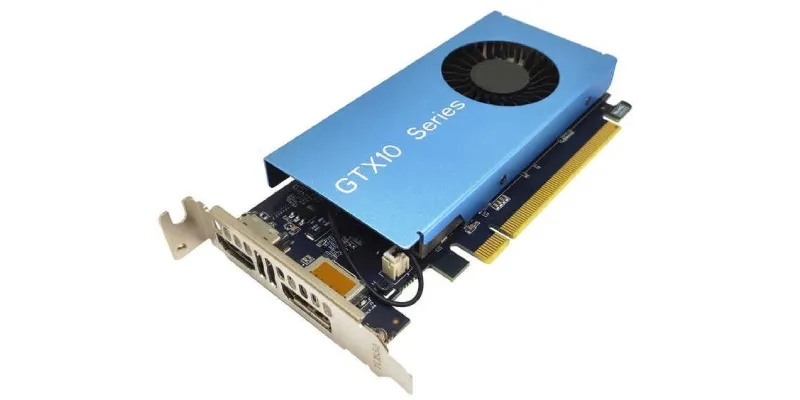
My PC is an SFF (Small Form Factor), and the GPU that fits in it has to be low profile and single slot. In other words, it has to be specific for narrow cases and not be thick, because otherwise it doesn’t fit and hits the power supply.
Basically, I need a tiny GPU. And there aren’t that many available in this size.
#2. The power supply
The next thing to consider is the power supply. My workstation has an HP proprietary-format power supply and motherboard, so not just anything will work.
The one it comes with offers only 180W of power, which doesn’t leave much room for the graphics card’s power consumption.
On top of that, the power supply does not have a GPU power connector.
Yes, I could use an adapter from one of the SATA connectors and get power from there, but I preferred to avoid that unless I had no other choice.
So I need a graphics card that, besides being small, consumes little power. Options start dropping out.
#3. Performance
Of course, if I’m going to change the graphics card, it has to be for one that clearly beats the R7 430.
Considering that the latter only gets 1100 points in Video Card Benchmark, this part wasn’t exactly difficult.
Even so, I wanted one that was powerful enough to play the occasional match of eFootball, Street Fighter or some PC game if I ever felt like it.
#4. Codecs
One of the worst things about the R7 is that it only natively supports decoding with H264, a certainly popular codec but one on its way out, because it was focused on Full HD content.
What I wanted from the new card was, ideally, that it had H265 encoding and decoding at 10 bits. Both to speed up video conversion via GPU (not just CPU) and in case at some point I replace the card and put it in a media center in the living room.
#5. Price
Lastly, I didn’t want to spend anything crazy, because as I say, this is not a gaming PC and the use I’m going to give it is very limited. That said, I was always looking for the best performance per euro spent.
Options and rejections
With all these criteria, the search became fairly narrow.
The best
On the one hand, I looked at the best I could get.
In this case, the best thing I could buy that would work in the machine is an NVIDIA RTX 3050, which in its 6 GB version has low profile and single slot models from MSI, Yeston and Maxsun, or a very similar 4 or 8 GB NVIDIA RTX A1000, although with lower performance on paper and also lower power consumption.
The problem with both: their price, since we’re talking about €300 to €600 new. And for the use I’m going to give it, that didn’t fit.
Besides, there was another unknown: the power supply. With the A1000 I was sure it would be fine, but with the 3050, I wasn’t so sure. Although I did see people on Reddit saying it worked well for them.
In any case, I preferred to spend less on this machine.
Older gaming or semi-gaming cards
I say older because, except for the RTX 3050 models mentioned above, none of the new ones come in compatible formats.
Looking at older cards, in low profile and single slot versions we have several examples:
- NVIDIA GT 1030: not the most powerful, but quite a bit faster than my AMD and compatible with the H265 codec.
- GTX 750 Ti: without being anything wild today, it is much more powerful than the previous one, but being older, no H265.
- GTX 1050: this was the model I started my search with, since I’ve had it in several machines and know what it can do. The problem is that there are very few low profile and single slot versions and, secondarily, it only has 2 GB of VRAM. Its Ti version would be ideal, but I don’t know of any single-slot models.
- GTX 1650: an even better option than the previous one. A very competent graphics card in every scenario, but more expensive and harder to find in low profile and single slot format.
- I know less about AMD, but I did see there are models like the RX 560 and the RX 6400. The latter was too expensive for me and, on top of that, is PCIe 4.0, so I wasn’t going to extract all its power. The former was an option, but I discovered a better one.
Professional graphics cards
NVIDIA’s Quadro range was a much better option for what I needed across the board:
- Form factor.
- Power consumption.
- Performance (depending on the model).
- Included codecs.
- Price (although they are a bit more expensive than comparable GTX cards, models that are a few years old are quite affordable).
Within this group, I considered several options:
- The “P” generation, with the P400, P600 and P1000.
- The “T”, with the T600 and T1000.
- I’ve already mentioned the RTX A1000, which is excellent, but far too expensive for my use.
My choice: NVIDIA Quadro P1000
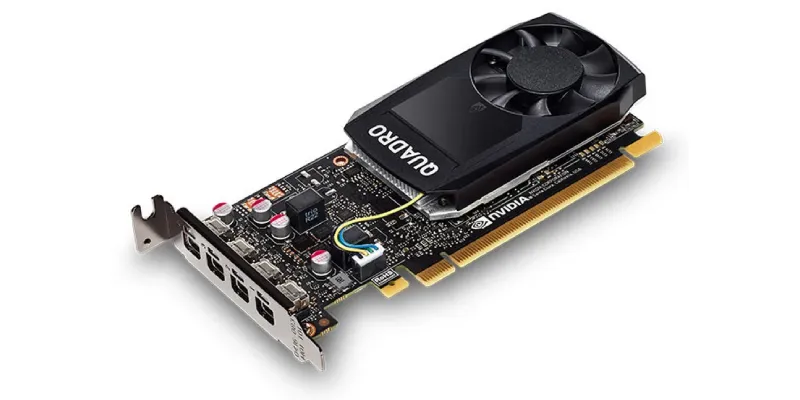
Why did I choose this one and why am I very happy with the decision?
Well, because as I said above, it ticks every box:
- Single slot and low profile format.
- 47W power consumption and no need for a PSU connector.
- Acceptable performance: 4500 points in Video Card Benchmark, which is a tiny bit below the GTX 1050, but in return it has 4 GB of video memory, which balances things out in certain scenarios.
- H265 codecs included.
- Price: I found it on Wallapop for €35. Honestly, I think it was a very good buy.
Results
Well, for my usual use of Upscayl, this graphics card completes image upscaling in a third of the time of my ancient R7 430, so that’s pretty good.
On the other hand, when I’m using this app and the GPU hits 100% usage, the fan makes considerably less noise, which is another thing that, without being too annoying, is appreciated.
I still haven’t had to convert any video, but sooner or later I’ll make use of this feature.
I’m not so sure I’ll get much use out of the following, but it’s also an upgrade. Because I’ve gone from being able to connect two 4K monitors at 60 Hz to having the option of plugging in four. I doubt I’ll ever need it, but the option is there.
Lastly, it’s not like I’m going to play games with it — at least that’s not what I have in mind right now — but I have seen that for what I ask of it, it is more than enough:
Conclusion and alternatives
Why did I pick this one instead of a T1000??
Well, look, I’ve worked with the T1000 and I know what it can do. It’s a very good graphics card, with 150% better performance than this one, but it was around €100 second-hand.
If I had found one for about €60 I probably would have bought it, but since I didn’t and I saw the deal on my P1000, I didn’t think too hard about it.
And for that reason, and given the performance and capabilities it’s showing me, I recommend that if you’re looking for a small graphics card for work, you go for this one.
If your machine can fit a card that takes up two slots, my recommendation would be to go for the GTX 1050 Ti, which is a better GPU overall and you’ll find it for around €30.
Likewise, if your machine needs a single-slot card but not a low-profile one, I would probably recommend its bigger sister, the Quadro P2000 (better and more powerful) or the plain GTX 1050, which in some OEM models is nice and narrow.
Honestly, few GPUs give you this much room to play for so little money as the ones I’m recommending.
Long live NVIDIA Quadro!
Frequently asked questions
Is it worth buying an NVIDIA Quadro P1000?
Yes, if you need a small, low-power and cheap graphics card for work. It is not a modern GPU nor one meant for serious gaming, but for around €35 second-hand it can be a very interesting purchase for a compact PC.
Why choose a Quadro P1000 instead of a gaming graphics card?
Because in SFF systems you need something low profile, single slot, with no extra power connector and low consumption. In that scenario, many gaming graphics cards are ruled out by size, power draw or price.
Is the Quadro P1000 good for a small PC?
Yes. That is one of its biggest advantages: it is low profile and single slot, so it can fit in narrow cases where many normal graphics cards do not.
How much power does the NVIDIA Quadro P1000 consume?
The article highlights a consumption of around 47W, with no need for an additional power connector from the PSU. This makes it very useful for systems with small or proprietary power supplies.
Is the Quadro P1000 a big improvement over an AMD R7 430?
Yes. In the use described in the article, upscaling images with Upscayl, the Quadro P1000 completes the job in a third of the time of the R7 430.
Is the Quadro P1000 good for upscaling images with AI?
Yes. For tasks such as upscaling images with Upscayl, it is a clear improvement over old low-end cards, especially if you are coming from a GPU like the R7 430.
Is the Quadro P1000 good for gaming?
It can work for undemanding games or occasional matches, but it is not a graphics card designed for gaming. The purchase makes more sense for form factor, power consumption, stability and price than for gaming performance.
What codecs does the Quadro P1000 support?
The choice was also made because it includes H265 support, which matters if you want to accelerate certain video tasks or reuse the graphics card later in a media center.
How many monitors can the Quadro P1000 drive?
It allows you to connect up to four monitors, compared with the two 4K monitors at 60 Hz offered by the previous graphics card in the machine. You may not always need it, but it is a useful upgrade.
What alternatives does the Quadro P1000 have?
If a double-slot graphics card fits, a GTX 1050 Ti may be a better general option. If you need single slot but not low profile, a Quadro P2000 or some OEM GTX 1050 cards may also make sense.

Leave a Reply