
Today, like every day, I was reviewing yesterday's website data when I came across this surprise. Suddenly, in ninth position, I see an unknown source “evbevb” with medium “email”:

Well then, let's investigate what this is about.
How to know if an email provider is obfuscating my campaigns
The first thing we see when looking at the source landing page is that it looks like it has something to do with our daily email (that “from=EmD” parameter you can see at the end is exclusive to that campaign):

Knowing which thread to pull, the second thing I did was investigate whether it might be some Google Translate effect: it's a long shot, but it could be the case that (quite a few) users from a country were using it to translate emails they receive in a language other than their own. Something similar happened to us when our website was posted on a Finnish forum -apparently quite popular- and our Analytics filled up with Finnish gobbledygook (search terms, names of internal marketing campaigns…). For that to be the case, users would have to be using the provider's web version and not the app, so it's pretty unlikely, but it was worth taking a look and ruling things out.
We did a bit of searching on Google and nothing suggests that this is the translation of “diario” into any language:

Ruling out that idea, the third step is to go to the server log to see exactly which URL it accessed, since by default Analytics doesn't show you the utm parameters. Here we confirm that this is a “translation” before reaching the website:

Looking at the IPs of the cases where this happens, the penny drops: they all start the same way, which makes us suspect we are dealing with an action by a free email account provider.
To confirm it, we look up several of those IPs to see who they belong to:
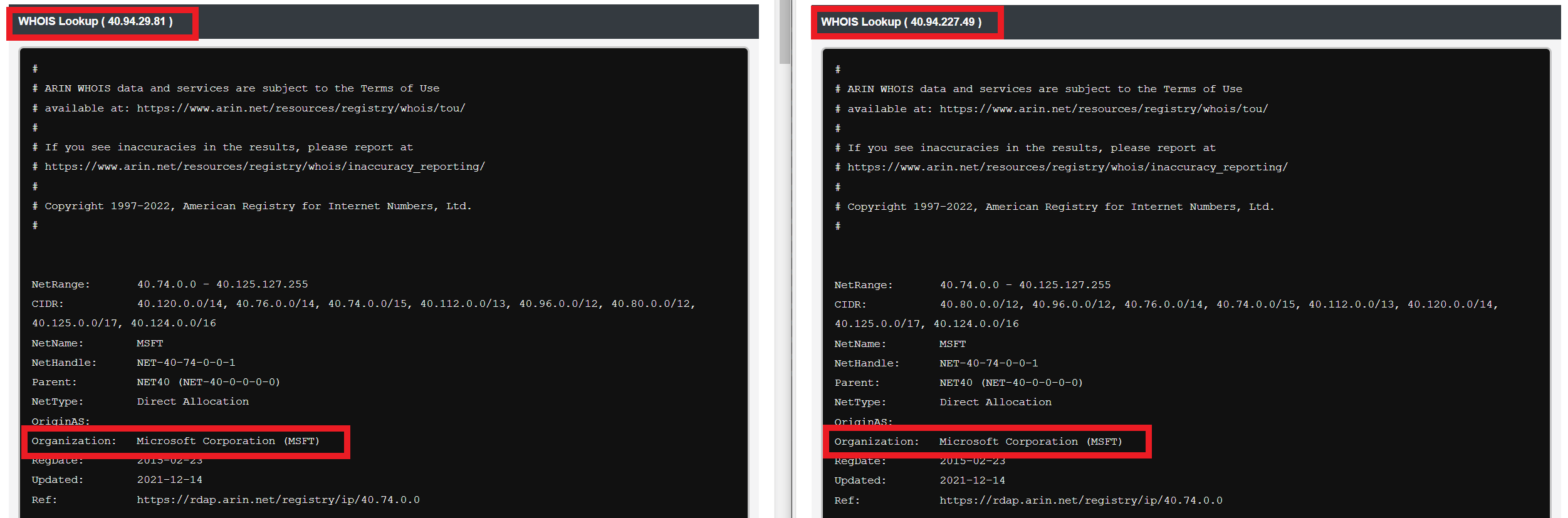
So we infer that our friend Microsoft is obfuscating our campaigns in Google Analytics through its email accounts. How nice of it to worry about our privacy. 😒😒
In any case, it doesn't hurt to check, so let's review the email address in these cases. It's easy to do because each daily email campaign URL is customized with the userID of each registered user:

Checking the user IDs in question, we see that they are indeed all Microsoft accounts (Hotmail, Outlook, MSN…), so the fact is more than confirmed:

How to “avoid” campaign obfuscation in Microsoft emails (or others)
Well, once the fact has been established, we'll have to fix it, right? While we can't really change the fact that Microsoft “obfuscates” our campaigns, we can see the correct data in our Analytics.
To do that, we get down to work with two very simple actions:
Create filter
The first is create a substitution filter that can pick up the original source and put all the traffic where it belongs. This would be the filter:

Very simple: we replace the obfuscated text string (which, for now, is always the same, “evbevb” in our case) in the “campaign source” field with the original string (“diario”).
Note that it is not retroactive, meaning that all traffic with source “evbevb” before the filter was created will stay there forever. However, we can do something to place that previous traffic where it belongs, as we'll see now.
Create segment
To view “evbevb” traffic before the filter was created as traffic belonging to the daily email campaign, we only need to build a segment like this:

And that's it, we check that with this filter we can keep analyzing the campaign performance as usual, since it includes the normal traffic and the tweaked:

That said, one note: in our case, Microsoft also obfuscates the campaign utm (but not utm_medium), so analyzing a specific campaign (an email) becomes quite complicated. I'm sure there's some way, but at first glance, receiving traffic from that day's campaign and from previous ones on the same day makes it quite complicated:

However, if you stay one step higher and only want to see the full campaign performance, the previous segment will be enough.
Clearly, in the digital world you can't have a single quiet day, at least not if you want your data to make sense.

Leave a Reply