
Starting point:
- Ecommerce or a multinational website with local domains (.es, .pt, .co.uk, .fr…) for each country.
- One Google Analytics property for each of them.
- No global property containing all the data.
This, which happens more often than it seems, strikes me as a basic mistake.
In some cases it comes from inherited Universal Analytics setups where properties were created for each country as the project grew.
Maybe so the people responsible for each area could access only their own data, or because some part of the setup needed to be different, or to link different Google Ads accounts, or who knows why.
The thing is that this structure is now being replicated in GA4, probably with the intention of maintaining data continuity, and it is incredibly inconvenient on many levels.
Whether for daily reporting, a global business analysis, or to see how a specific advertising platform performs overall, you have no choice but to keep exporting data from each GA property and merging it in another tool, such as Excel or Looker Studio.
In both tools, basically what we’ll do is create a report that groups the data from all the Analytics accounts. And modify it or create another one whenever you need a specific global figure.
Another drawback comes when you need to create new filters or conversions globally, or change some aspect of the Analytics setup: you have to repeat the steps in every account.
As I say, in general, having multiple properties in one project is pretty inconvenient.
So, if you want to unify all your project data in a single property as I personally always recommend —except in extremely specific cases— you have two options:
- Do it properly from the start and create different streams (or not) for each domain.
- Create a Roll-up property that includes them all. With standard Analytics or, much more easily, with the paid 360 version.
Let’s see what each option involves.
Create a global GA4 property from the start
The first thing is to consider whether you really need different streams or whether a single one together with country filters is enough.
Same stream for several domains
Looking at the big picture, in most projects a single stream will be the best option.
The thing is that sometimes out of necessity and other times for convenience, we create different streams.
In fact, Google warns you about this when you try to create a second web stream:
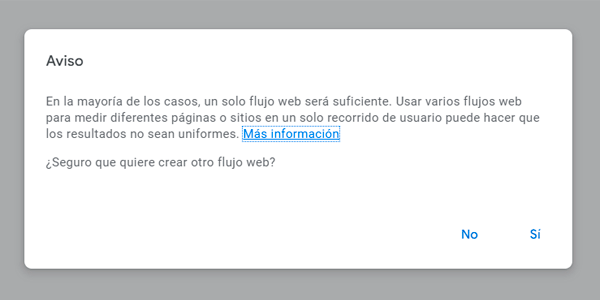
So, if you listen to Google —and to me— and decide to use a single stream for every website in the project, once you’ve created the stream and added it to all of them, all you need to do is configure cross-domain measurement like this:
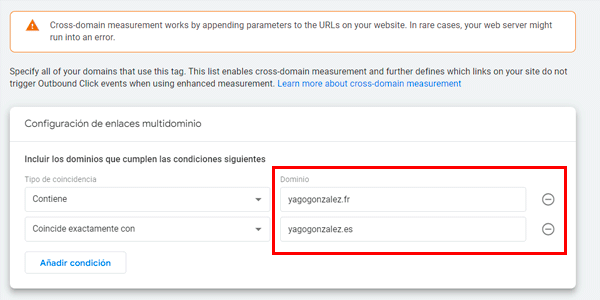
This means that when a user moves between several domains, Google knows it is the same user and makes the relevant adjustments to the session source and medium.
You get to this section from Admin and the path is a little long, but it’s straightforward:
Data collection and modification > Data streams > [open the stream] > Configure tag settings > Configure your domains.
I add the project’s domains, save, and that’s it.
In short: several domains, same property and same GA4 stream. Ideal for a single multinational project with local domains.
Multiple streams within the same property
Now imagine I have a network of blogs that have nothing to do with one another and I want to group them all in one account to see, for example, the total revenue they generate for me.
In this case it makes more sense to create one stream for each domain.
There’s not much to it. Inside Admin, you create a different stream for each domain:
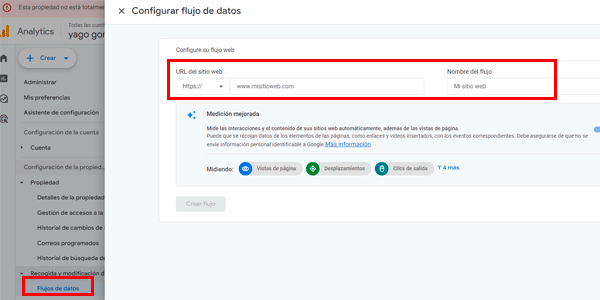
Then, when viewing reports, whenever you want to see the data for a specific stream / domain, all you have to do is filter by the corresponding stream.
You can even compare several of them.
Create a separate global Roll-up property
If you’re in the situation I described at the start (an existing project with multiple GA4 properties) and want to create one that groups them together —usually called a “Roll-up” property— you again have two options: paid and free.
Let’s start with the paid one, which is logically simpler.
Roll-up account with Analytics 360
Because these situations do happen, the paid version of Google Analytics already includes a Roll-up property type:
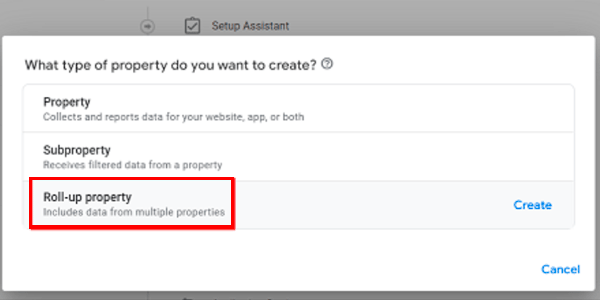
When you create it, this property will inherit:
- All data from the GA4 properties we choose (up to 50).
- All data from the integrations linked to each of them (Google Ads or GSC, for example).
Ideal.
Standard Roll-up account
For most mortals whose projects can’t justify or afford Analytics 360, there’s also a solution, although it’s a little more roundabout, as you’d expect.
It takes three steps instead of one, but once you know the process, they’re quite simple:
- Create a new GA4 property that will be our Roll-up: the one that groups all the data together.
- Here we’ll have the same two options as at the start: one stream (same project, several domains) or several streams (different projects grouped together).
- Copy the stream ID and add it to the relevant website. Normally you’ll do this by firing a new GA4 tag in GTM on every page of the site.
The result is that, on each domain, you will now be firing two GA4 tags: the original one —which keeps sending data to the “old” property— and the new tag, which will send data to the new Roll-up property:
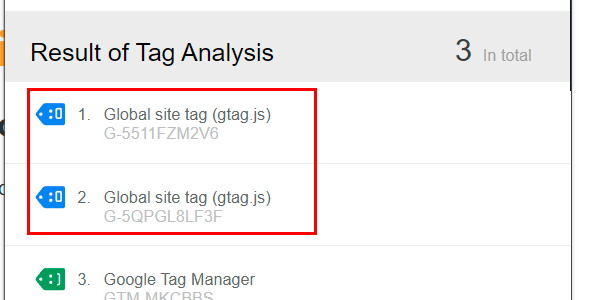
Obviously, there will be no retroactive data, so you won’t have historical data. That’s why, if you’re considering it, I recommend doing it as soon as possible.
That said, there are a few points to consider:
- If you have linked some Google products to your old properties, you’ll need to link them again (without removing the previous link) to the Roll-up property.
- You’ll also need to replicate the configuration changes (internal traffic filter, conversion window, session timeout, conversions…) you made in the original properties.
- If you import or send data manually via the Measurement Protocol, you’ll also have to send it to the Roll-up property.
- If you use different streams within the Roll-up, the number of unique users will not be accurate. Remember that cross-domain measurement is configured for a single property and stream.
In return, you’ll have everything centralized. And both your daily reporting and your project analyses will have gained quite a bit in speed.
What’s more, I’ll bet you an Alhambra verde that, sooner rather than later, the Roll-up account will be almost the only one you use.
Wrapping up
If you’ve ever had to deal with an Analytics account with multiple properties, you know how inconvenient it is.
Here I’ve explained the options you have either to avoid it from the outset or to fix it in a project that’s already underway.
The system means understanding the consequences from the start or doing a bit of extra work once the project has begun, but without a doubt the benefits outweigh the (few) disadvantages.
That said, if you have questions about your business analytics, we can review it.
Or, if you just want to learn a few more Analytics tricks, here’s a list of the GA4 tricks you should know.

Leave a Reply