
I find this curious. Very curious:

So I open Google's Keyword Planner to see how people search for information about ecommerce filters, so I can answer their questions in this article. And what I find is that there are no related searches for the terms “ecommerce filters”, “online store filters”, “faceted navigation” (as PrestaShop calls filters) or “ecommerce facets”.
This means that few people—if any—search for these terms in Spain.
Because the “similar” results it suggests are photo filters.
You know, to look better on Instagram.
Those we do search for.
The thing is, these results surprise me. And, at the same time, they don't.
They surprise me because I believe filters are a crucial aspect of online stores with large product catalogues.
They are one of the best ways to bring the user closer to conversion, because they narrow down what the user is looking for and make it easier to decide.
So I find it rather surprising that nobody searches for ways to optimise filters in their store.
But then I think about it for a moment and realise that, in my experience as a user, very few ecommerce sites really get this right.
They prioritise other things.
And that mediocre experience matches the low search volume on Google: people are not researching how to improve them.
Later, though, I will show you a store that I think does it brilliantly. In every respect—and there are quite a few.
Filters mainly affect UX, but they also have a major impact on SEO and the product team.
Let me explain.
The importance of filters for an online store's UX
Let's talk a little about how we find products in an online store.
One way is to search on Google, look at a few results in Shopping and buy the one that best matches what we are looking for.
With barely any comparison.
We usually do this for low-cost, functional products.
Those where we do not care about the brand, for example.
Think of:
- A nut for the kitchen tap.
- A cable for your phone charger.
- Or a silicone popcorn maker for the microwave.
If they do what we need, are cheap and have positive reviews, we buy them without thinking too much—especially if we have bought from that store before.
That is one way of buying: one in which filters do not matter. But there are other purchase journeys, especially when the product costs more.
That is when we tend to research and compare.
And not only between different stores, but also between different products within the same store.
Of course, some stores have dozens of similar products—and even more if they are marketplaces.
The first one that comes to mind is Amazon and the sheer number of [] it has in its catalogue.
Or EBay.
Or Shein.
Or AliExpress.
Or Tiendanimal.
Or our competitor Drinks&Co.
Huge ecommerce sites with thousands of products, where users can easily get lost.
So there are two ways to narrow down the results:
- A proactive one, which requires an action from the user.
- An automatic one, handled by the store itself.
In both cases, what we are trying to do is help users make a decision and move them closer to conversion.
Well, filters, together with search and product sorting, are the three main proactive tools users have when trying to find what they are looking for in our store.
We will leave search for another article, but we will talk a little more about sorting in this one, even though the main focus is on filters.
I will not cover the automatic route in this article either, but I do want to give you an idea of the features I mean: do modules such as “similar products” or “other customers also bought” sound familiar?
They are other ways of bringing users closer to the product they want without requiring them to do anything: they do not need to think; just by looking, if the results offered by the store are relevant, they will be one step closer to deciding.
When implemented well, modules like these are subtle details that increase conversion bit by bit.
But we are here to talk about filters, so it is time to get into them.
General filters and product-category filters
Although there are a few filters we could call “universal” because they always apply to any online store, it seems obvious that each product category should have its own filters.
Besides the universal ones, several categories will share others (sector-specific, we could call them), while some will be specific to each product category.
Even in single-sector ecommerce sites, such as drinks retailers (which I know well, unsurprisingly).
Here is an example:
Besides dividing drinks into alcoholic and non-alcoholic—an obvious distinction—there are also differences within the former, which will lead us to use different filters in each category.
Think, for example, about wine and whisky. They share some attributes, such as alcohol content and brand. The “Alcohol content” and “Brand” filters therefore apply to both categories.
But if you think about their differences, one thing that will surely come to mind is the Designation of Origin.
If you like wine, you may prefer Ribera del Duero or Rioja, but you almost certainly know this concept does not apply to whisky.
Therefore, it makes sense for the wine category to have a “Designation of Origin” filter that will not appear in the whisky category.
Makes sense, right?
So this is the first point to consider when tackling filtering in your store. You will need to distinguish between general filters—which apply to all categories—and those exclusive to each one.
So the general filters are the combination of these two types:
- The universal ones:
- Price.
- Brand.
- On sale.
- With free shipping.
- Rating.
- The sector-specific ones. Following the drinks retail example, we have:
- Alcohol content.
- Bottle volume (35 cl, 70 cl, 75 cl, 1 L…).
- Country of origin.
We will use both the universal filters and these three sector-specific filters in every category.
If you are wondering what the sector-specific filters might be in your case, you can start by looking at the ones your competitors use.
Right, to these eight filters (five plus three), we will have to add the final group: those exclusive to each category. For example:
- Wine category: Designation of Origin.
- Grape variety.
- Type (Blended, Single Malt, Bourbon…)
- Variedad (ahumado, picante, aromatizado)
- Packaging (boxed or unboxed)
Thus, in this example we would end up with a total of 10 filters in the wine category and 11 in the whisky category:
- 5 universal filters.
- 3 sector-specific filters that apply to every category in the store.
- 2 exclusive to the Wine category and 3 exclusive to the Whisky category.
This exercise, , which moves from the general to the most specific through category-specific filters, should be repeated for every category in the store.
You have to put yourself in the user's shoes and think about what doubts they may have when choosing between two products in the same category and consider whether or not it is worth adding that filter.
Because it is not just a matter of creating the filter: categorising the products so that it works properly takes time and, depending on whether the filtering is dynamic or static, can have SEO implications, as we will see now.
All in all, defining filters is not especially complex or costly for medium-sized projects.
On huge ecommerce sites with many very different product categories, things do get more complicated—mainly because category-specific filters will far outnumber the other two types.
Filter design
Although it is a few years old now, this excellent article from the equally excellent Smashing Magazine —my go-to publication for digital products—highlighted several usability problems.
If you are interested in the subject, I recommend reading the whole thing, as it is a study of the 50 largest ecommerce sites in the United States.
If you would rather get straight to the point, I will tell you that, except in very specific sectors where it does make sense, offering 10 or more filtering options in a category is an invitation for users not to use them.
No, because it is presented as a complex block that makes people look away as quickly as possible rather than engage with it.
Are you familiar with the paradox of choice? The one that explains why an ice-cream stand with only three flavours sells more than the one next door with ten.
And it is also why you can spend forever deciding what to watch when you open Netflix with no clear idea.
The same goes for filters: you have to offer the ones that will actually be used. No more. Otherwise, you risk the same thing happening as with forms that have lots of fields: absolutely nobody fills them in.
Primary and secondary filters
And if you have a lot of them, I suggest the approach we took at Yo pongo el hielo: split them into two levels: “standard” and “advanced” filters.
First, we show the most common filters. This makes the feature much easier to scan and encourages people to use it:

We also give users who need it the option to filter more precisely, simply by clicking a link:
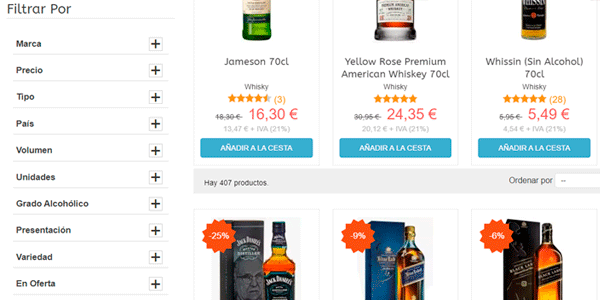
Bear in mind that this is another, different way of classifying filters: primary vs secondary. And it does not go hand in hand with universal, sector-specific and category filters.
In each category, among the primary filters shown at first glance, there will be some universal ones, some sector-specific ones and some exclusive to that category.
All right, understood, but how many should be shown at first glance?
Well, it will depend on each project. In our case, there was a considerable difference in the use of the first four compared with the rest, so we showed four and moved the remainder to the second level.
In any case, in my opinion four or five is about right. I think most stores can adapt well to this model. But that is my opinion and, in reality, it should be backed up with data, as we did with Yo pongo el hielo.
So, since I am talking about data, you may have a perfectly legitimate question: how do you know which ones are used the most? You will have to wait until the final section of this article, on analytics, to find out.
Watch out for filters on mobile
Another advantage of this two-level system is that it makes designing the filtering system for mobile much easier, which, because of the screen size, is usually more complex to implement than on the desktop version of the site.
If you show all the filters at once, they will probably take up the entire mobile screen, and that is not what we want.
That is what happens when you click the filter link on the mobile version of Amazon's website: they all open one below another:

In fact, you even have to scroll, because they take up more than the height of the screen.
It is overwhelming.
In my opinion, a better option is the two-level system used by eBay..
At first, we see the most common filters:

If we scroll to the right, we see the link for accessing all the filters:

Which opens up an enormous number of possibilities:

In the end, you get the same thing as on Amazon, but only for those who want to filter thoroughly. Many of us mere mortals will stop at an earlier point.
More filter actions
There is one more detail about filter design that I should mention, one that can arise if we custom-build the filters instead of using the CMS’s standard functionality or modules.
Besides implementing the filters themselves, you have to think about two more actions/states:
- How users will see which filters are active at any given moment.
- How they can remove filters they no longer want.
As I said, if you use standard filter features, this will already be handled. But when you build custom filters, it is something you can overlook.
Believe me, it has happened to me.
To avoid it, once you have implemented the filters, you only need to test them and see how they are displayed and whether you can change their state easily.
That is it.
By doing so, you will notice whether you have overlooked anything and can correct it before a user points it out.
Other usability considerations
To finish the design section, it is worth considering a couple more issues regarding the use of filters.
Two issues that may, in fact, be related.
Using several filters at the same time
The first is to consider the use of several filters at once.
The answer seems simple, doesn't it?
Who would not want to offer the option of using two or more filters together in their online store?
And yes: everyone does.
But not everyone pays attention to two details:
Combinations with zero results
The first is that, if we offer the option of using several filters at once, we run the risk that the user selects a combination that returns 0 results, because our website may not contain any product with that combination of features.
Here we have two options:
- Leave it as it is and return a list with 0 results to the user. And let them take care of removing filters.
- Use a system that restricts the remaining filtering options whenever a filter is added, preventing the user from choosing combinations that return 0 results. This way, only options that produce results will appear.
Although somewhat more technically complex, this second option seems much better to me, especially if filters are used to return static pages.
We will talk about SEO now, but wasting crawl budget on pages with lists returning 0 results is absurd. And you should avoid it.
Automatic filtering or an Apply button
One final aspect to consider here is offering the option to choose several filters at once or forcing the user to select them one by one. This happens when there is no “apply filters” button; instead, every time the user changes a filter, the platform recalculates the results automatically.
In my opinion, it is preferable to have a button, but this usually goes more hand in hand with the option of returning lists with 0 results, while automatic recalculation tends to make it easier to restrict subsequent filtering options.
This is a good point to think about. For what it is worth, Amazon, Decathlon and AliExpress use automatic filtering, while Zalando and eBay use buttons.

Loading speed
The second reason to think carefully about using multiple filters is loading speed.
I say this because, for example, PrestaShop's native filtering feature works relatively well when returning results if we use just one filter.
But it takes a very long time to return the results when we add a second one.
And it is unusable with a third.
Unless you have a seriously powerful server or have optimised the default code (or developed a different one).
If that is not the case, this is when you should test your site and consider whether it is worth offering the option of using several filters at once.
Whether the user gains more than they lose.
And whether the impression your website creates inspires more or less trust.
It is not so clear-cut any more.
Pages on which to use filters
Now that we know a little about the possibilities and problems posed by filters, it is worth talking briefly about the pages where we should apply them.
In my opinion, three are essential and, in some cases, there are a few more:
- Category or brand pages.
- Pages showing results from our website's search engine.
- Commercial landing pages.
Category or brand listings
Category product listings are, in essence, very similar to brand listings.
In fact, in terms of filtering, we could summarise their differences in two main points:
- On a category page you can have a “Brand” filter, while on a brand page you can do the same with a “Category” filter.
- In addition, if the brand offers products from different categories, you can decide whether to show the filters specific to each category in which that brand has products—the third type in the classification I gave at the beginning.
These are the first kinds of pages we think of when applying filters, so I have little to add here.

Search results
It is less common to find the option of filtering within the search-results pages returned by a website's internal search engine.
That is because the most common CMSs do not offer it by default.
And that means resorting to paid platforms.
However, all major ecommerce sites offer it. There must be a reason.

Commercial landing pages
Yes, category or brand listings are commercial landing pages.
Of course.
What I mean here are pages that are not part of the store’s usual structure, but are created for a campaign such as Black Friday or a sale.
Pages without a permanent link in the menu.
Well, these kinds of pages will not be categories or brand pages, but I cannot think of a single reason why they should not have the same filters:
- The universal ones.
- The sector-specific ones.
- One for “Categories” and one for “Brands”.
- And, if you push me, category-specific filters for the main categories.
Obviously, if the landing page's product list is small—say, ten items or fewer—the user will not need any kind of filter to find the product they are looking for.
But when the promotion covers many products, they absolutely should be filterable:

And when you create landing pages with a product list, do you add filters?
Other pages
The three we have just mentioned are the most common page types on which to implement filters, but there are a few others where they could also fit.
I do not know about you, but I have more than 100 products on my Amazon “buy later” list. And when I want to find something, I want to tear my hair out.
Wallapop is even worse.
Because on Amazon you at least know that everything will arrive by courier and shipping costs vary little, whereas on Wallapop you may not know whether the products are in your city and you can meet the seller in person, or whether you will need shipping.
And that changes things.
A lot.
Because on a product costing, say, €100, the difference can easily be €20. Where I come from, that is 20% (and it can be more). That is no small thing.

The only option you have here is to remember… or open each product one by one to check.
Terrible.
Even though it would be so easy to apply the four filters the platform has (there really are only four).
It is almost as if they do not want us to buy.
Product sorting: common options
I mentioned at the beginning that we would talk a little about product sorting. Alongside filtering and search, it is one of the tools we give users to help them find what they are looking for.
I will not go on at length; I will simply mention the sorting types I consider essential and desirable.
Let us start with the essentials:
- Default. Whatever suits the business, for whatever reason. It is what users see when they open the listing. You can change the label to “Featured” or “Relevance”. Same thing, but it sounds better ;P
- Price: low to high. We like saving money. So let us make it easy for the user.
- Price: : high to low. Within the price range I have set, which are the (supposedly) best products? Let us see whether the investment is worthwhile.
And now the ones that will be useful depending on the project:
- Highest rated. That is great, but it is only valid for projects with large volumes of sales and reviews. Otherwise, it is not useful.
- New arrivals. It does not work for every sector, but it does for many. Think fashion, furniture, games, music, books, drinks…
- Biggest discount. We all like to feel clever. And this is a good way to achieve that.
- Number of orders. Again, it will only be useful for stores with a certain sales volume. But between two products that seem the same to me, if one has sold twenty times more than the other, I think “there must be a reason”. Even if I never find out what it is.
- Lowest total price, including shipping. Useful if I have variable shipping costs, which happens mainly on marketplaces or in stores with products that have free shipping.
- Alphabetical order. If I cannot find a product through the filters or search, I appreciate being able to sort this way and go to the relevant page. Or, in the absence of a brand filter, sorting this way lets me see all the products from one brand.
Decathlon, for example, offers several of the types mentioned:

They go hand in hand with filters, so we should use them on the same pages.
SEO considerations when developing filters for your ecommerce store
Right, everything up to this point has been fairly easy to follow.
Now it is time to get a little more technical. Not too much, mind you—do not get carried away.
Just enough to explain that, technically, filters can be applied in several different ways:
- Without changing the URL.
- By changing the URL and adding a parameter (dynamic URL).
- By changing the URL to another static one.
- A hybrid of some of the above.
Let us look at examples of each case.
Filters that do not change the URL
Tiendanimal is a good example.
If you go to the “Dog food” category, you will see that its URL is:
https://www.tiendanimal.es/perros/pienso-para-perros/

If we add a filter, for example “Age”, and select “Puppy”, we see that the products change to match the filter, but the URL remains the same:

The SEO advantage of doing it this way is that we do not have to worry about anything: only the initial URL will be indexed, and there will be no possibility of duplicate content or cannibalisation.
However, with this system you lose the opportunity to target the long tail more specifically.
Continuing with the example, we would lose the opportunity to target keywords such as “puppy food” with a dedicated page.
I assume they weighed both options and decided that the risk of indexing thin pages outweighed the long-tail opportunity.
Filters that modify the URL by adding a parameter
In this case, unlike the previous one, using a filter modifies the URL by adding one or more parameters that indicate the filtering.
These parameters can be of two types:
Static filter
This system is essentially the same as the next one, where the entire URL changes. The only real difference is that this version does not use a friendly URL..
One example is Bodeboca, where the “Wine” category has this URL:
https://www.bodeboca.com/vino

However, if we filter by “White wine”, we find that the following is added:
https://www.bodeboca.com/vino?page=0&sort=rating-desc&wine_type=373
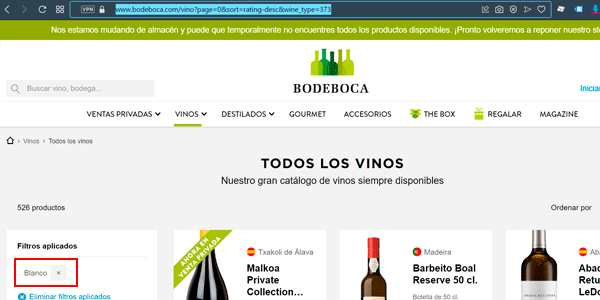
In my view, this is the worst system from an SEO perspective, because it has all the drawbacks of each one:
- Possibility of indexing pages with thin content (that is, with few or no products), wasting crawl budget.
- Greater possibility of indexing duplicate content. You only need to change the “Price” filter and set the minimum to €1 in any category to see that the content does not differ at all from the original unfiltered URL.
- Difficulty targeting the long tail: because both the URL and the content are poorly optimised, although with care this problem can be mitigated slightly.
Honestly, I cannot think of a single advantage to doing it this way. If you can, please explain it to me in the comments.
And be warned: it is by far the most widely used system. Probably because it is technically the easiest to implement.
With a dynamic parameter
Let us look at another system similar to the previous one, but better.
If you visit La Sirena's website and go to the “Hake” category, you can see that the URL is:
https://www.lasirena.es/es/1019-merluza

However, if you add a filter, the URL changes slightly by adding a parameter like this:
https://www.lasirena.es/es/1019-merluza#/precio-8-10

The difference from the previous case is that the parameters are preceded by the symbol # instead of ?. And that is good.
It is good because Googlebot does not index this filtered URL.
As far as Googlebot is concerned, it does not exist.
So we are in a case identical to the first one, where the URL did not change:
- We do not have to worry about cannibalisation, duplicate content or anything else.
- But we will not optimise for the long tail.
Curiously, this system is used less than the previous one.
In fact, it is used less and less.
And I cannot understand why.
Filters that completely modify the URL
This is one of the best filtering systems from an SEO perspective.
If it is implemented well, of course.
PcComponentes is a good example.
Let me tell you what they do.
When you open a category such as “TVs”, you will see that the URL is:
https://www.pccomponentes.com/televisores

If you filter by size and choose 55-inch models, the website redirects you to this URL:
https://www.pccomponentes.com/televisores-55-pulgadas
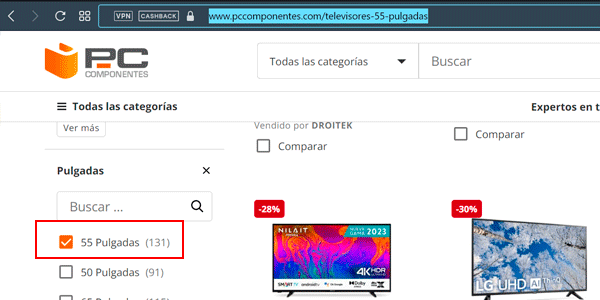
It has excellent on-page SEO—URL, headings and copy—designed to target the long-tail keyword “55-inch TV”.
But wait, there is more.
If you add a second filter, for example “Brand”, and choose “LG”, the resulting URL is:
https://www.pccomponentes.com/tv-lg-55-pulgadas

Once again, it is fully optimised for an even more specific long-tail keyword: “55-inch LG TV”.
Simply wonderful.
Nothing is left to chance, either. For example, the filters have a priority order when constructing the URL. It does not matter which one you select first and which second: the constructed URL will prioritise one filter type by always placing it first.
In this example, the “Size” filter will always come before “Brand” in the URL.
With that in mind, I think you can see that for large projects with products and categories that receive many searches, this is the system I recommend.
The only downside I see is the cost of development and maintenance, as it looks as though many redirects are added manually.
Hybrid URL system
Finally, on projects that are not quite so huge, there is the option of using a hybrid system that combines a couple of the previous ones.
That is what we have done at Yo pongo el hielo.
On the one hand, if you enter the “Whisky” category, you will come across this URL:
https://www.yopongoelhielo.com/es/3-whisky
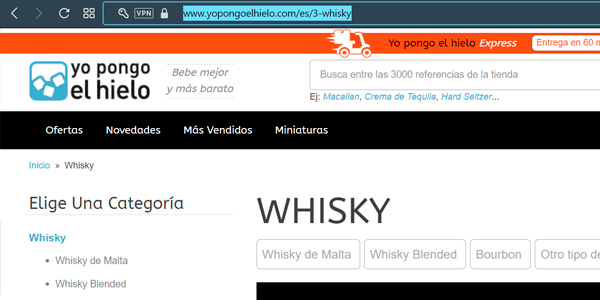
If you use a single filter, such as “Country”, you end up at a URL with a dynamic parameter:
https://www.yopongoelhielo.com/es/3-whisky#/pais-japon/

We have already seen that doing it this way means we do not have to worry about duplicate content.
But we miss out on the opportunity to target the long-tail keyword “Japanese whisky”.
And we wanted them.
So what we do is:
- Create this page: https://www.yopongoelhielo.com/es/3-whisky/pais-japon/, whose products are the same as when we use the dynamic filter.
- We optimise it—up to a point—for the long tail.
- We get it indexed by adding links to it.

I say we optimise it relatively because more could be done, as I explain in the next section.
Optimisations
In addition to this system, at Yo pongo el hielo we add a series of extra filter-related SEO optimisations.
Redirects
The most basic step is to create a few redirects.
Let me give you some context:
- In each category, we have a “Brand” filter with its own static page.
- In addition, each brand has its own page listing its products.
Put these two facts together and you will realise that both pages—the brand page and the brand-filter page—will be very, very similar.
That means duplicate content and keyword cannibalisation.
How do we solve it?
By creating a 301 redirect from the static filter page to the brand page.
In other words, we redirect
https://www.yopongoelhielo.com/es/3-whisky/marca-chivas/
to
https://www.yopongoelhielo.com/es/15_chivas
And that avoids the problem.
Similarly, filters such as “Type” redirect to subcategories in some cases. For example, we redirect this static filter page:
www.yopongoelhielo.com/es/3-whisky/tipo-blended/
to
https://www.yopongoelhielo.com/es/89-whisky-blended
This is the “Blended Whisky” subcategory page.
That makes sense, right?
I will explain later why this duplication problem can arise between filters and categories, but for now it is enough to explain how we solve it.
Shortcuts
On the other hand, keyword research shows that people search for certain types of whisky, for example:
- Malt Whisky
- Blended Whisky
- Bourbon
But there are also searches by origin:
- Scotch Whisky
- Japanese Whisky
- Irish Whisky
And of course, we want to target all these possible keywords.
The easy solution would be to create a Whisky subcategory for each of these keywords.
This approach has several advantages, but ultimately it seemed inconsistent to us to use more than one criterion when creating subcategories. For example, where do you put a Japanese blended whisky? Under “Japanese whisky” or “blended whisky”?
In the end, we use a single criterion across the site: subcategories are always “types” of their parent category.
But of course, there is still search volume and interest by origin, so how do we target it?
By adding menu shortcuts to the country-filtered pages:

This lets us treat these static filter pages as though they were subcategories when distributing the site’s link juice , helping them to rank while also helping users who want to access them directly.
But because they are not true subcategories, they have a few little problems…
Content
They mainly concern content.
In particular, to two aspects:
The H1 and H2 headings
The H1 remains the same as the parent category’s—in this case, “Whisky”:
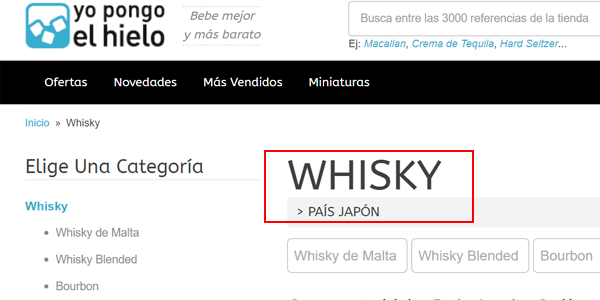
An H2 is added, which partly solves the problem, but ideally the full target term should be in the H1.
Furthermore, “Whisky – Country: Japan” is not the same as “Japanese Whisky”, even if it looks similar.
The description
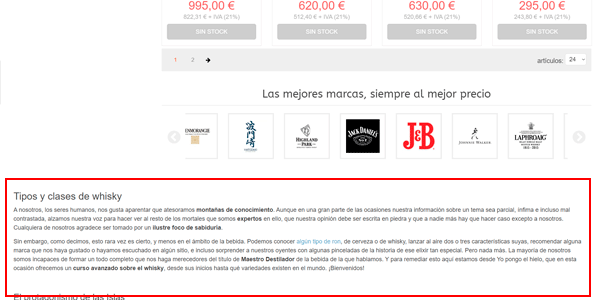
Because these are filtered category pages, the SEO description from the parent category remains at the bottom for ranking purposes. It should not: it is duplicate content.
We should choose:
- The easy solution: remove it from the HTML (hiding it is not enough).
- The difficult one: replace it with an optimised description for the keyword “Japanese whisky”.
Right, neither issue—the heading nor the description—is especially difficult to address in development, so we will fix them sooner rather than later.
Filters or subcategories
I mentioned that at Yo pongo el hielo we had to turn some filters, such as “Blended whisky” or “Bourbon”, into subcategories within the Whisky category. That means extra work at every level: creating the category and its copy, recategorising products, adding SEO redirects…
And you might say, “you could have saved yourself all that if you had categorised the website properly from the start”.
In this case, though, I do not think you would be right. Let me explain:
An ecommerce site is an extremely dynamic website: products are created every day, categories are added, others are discontinued, suppliers change, public tastes change… and you have to adapt to all these changes.
Furthermore, when you launch, the product catalogue is usually much smaller than the one you have after a year.
And it will be even larger after two.
At some point in the future, recategorisation may make sense. That is when filters can become categories or subcategories.
Because if we only had a couple of Bourbons when we launched, creating a subcategory for them makes no sense. Even if there are searches and you want to target them.
A category with only two products looks sad. That is why they are better off as a filter within the parent category.
However, if one, two or five years later you have forty bourbon products instead of two, then perhaps it is time for them to have their own space.
And that is what happened to us.
Think about whether something similar is happening in the largest categories of your ecommerce store and consider making the leap. It has to be worthwhile both in terms of SEO and UX; if you do not improve on both fronts, do not devote effort to changing it.
How filters affect product creation and uploading
Speaking of effort, be aware that having and maintaining filters that work will require you to spend extra time when uploading products.
Assuming you have already done the initial study and are clear about which filters apply to each category, every time you upload a product you will have to fill them in correctly.
And be very strict with naming to avoid things like this:

Two filters that should really be one, because they refer to the same value. But it was entered in two different ways, so two filters were created.
It happens a lot.
If you are used to browsing with filters, you will have noticed it.
And it is not a matter of store size: even the biggest ones get it wrong.
Because, as I have been saying since the start of the article, the subject is not given the importance it deserves. In many cases, someone with no experience is assigned to create and upload products and, of course, they make mistakes because it is not always easy.
Of course, it happens to us too. That is why, from time to time, you have to stop, review things and check that everything adds up or whether a value needs changing.
It is a bit of work, but in my view it is worth it.
So when creating a product, do not rush and take the time needed to assign the right values to each filter.
Also, an Excel file listing the values available in each category is especially useful when creating a new category:
- Analyse which filters it should have.
- Add them to the Excel file, together with their possible values.
- Check that you have completed all the fields correctly when uploading the new products.
Managing filters in CMSs: WooCommerce and PrestaShop
I will be very brief here, because the aim of this article is to clarify the strategic approach to filters in an online store, rather than explain how to implement it.
If you are looking for a tutorial explaining how to configure them in the two most popular ecommerce CMSs for medium-sized projects—PrestaShop and WooCommerce—you will see that quite a few have already been created online.
They can be configured using the CMSs’ basic features or free and paid external modules/plugins. The usual, in other words.
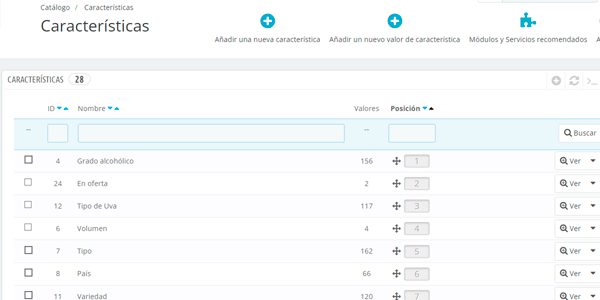
In any case, I will tell you that configuring filters is relatively straightforward, as long as you do not get into models with friendly URLs (PcComponentes) or hybrid ones like the system we use at Yo pongo el hielo.
That is where things can become a little more complicated and you may need to bring in a developer.
How to measure filter use in your store
Well, I will finish with my favourite aspect of everything related to filters: analytics.
And I like it because it shows you whether your classification and filtering strategy works—or not—and whether users use them—or not.
Filter use can be measured in different ways, but we essentially have two tools:
- A digital analytics tool such as Google Analytics.
- A heatmap and session-recording tool such as Hotjar.
Measuring filter use with Google Analytics
If you have an online store, I am fairly sure you know how to use this tool. At least in broad terms.
I also assume I do not need to explain what an event or a page view is in Google Analytics.
Right, if you understand those two concepts, I will tell you that they are the two ways to measure filter use. And there are differences between them.
Using events
This is the most common way to do it.
It consists of sending an event by whichever method you prefer (onclick, js, GTM) to your Google Analytics property every time a user uses a filter.
We will then see it here in Universal Analytics:

This is a custom report I created that displays the Category, Action and Label of all events and filters by the “filter” category, if you will excuse the repetition.
We could add, for example, the page where the filter was used:

Or view it in GA4:

Also through another custom report.
Advantages
This method has several advantages:
- The first is that it works on all kinds of websites, unlike the method of pageviews.
- The second is that it makes it easy to know which page the filter was used on .
- And the third is consistency: using a filter is an event and not necessarily a pageview. But that one is for analytics geeks like me.
Disadvantages
But it also has a disadvantage, namely that it requires some technical implementation.
It will be easier or harder depending on the website and the method chosen but, although it is generally not too complicated, it is extra work on top of the standard Analytics implementation.
You have to send the events to Analytics; it does not collect them by itself. At least not these ones.
Using pageviews
This is another method.
One that I would use only as a secondary option if event measurement had not been implemented—or I did not trust the implementation—and I needed data on filter use.
Advantages
The main advantage of this system is that it works with the standard Google Analytics implementation.
You do not need any additions to extract and analyse the data.
This means you will definitely have data from the first day you add Analytics to your website—probably the day you open it to the public.
Disadvantages
There are quite a few:
- It does not work for every website. If your ecommerce site does not change the URL when filters are used, or uses dynamic parameters, Analytics will not collect the data. If, on the other hand, using a filter changes the URL or adds static parameters—those separated by “?”—then you can use this system.
- It is not immediately obvious which page the filter was used on. You have to look at the referrer (the previous page) to find out. And that is not always convenient.
- Once you have extracted the pageview data, you have to process it in Excel to quantify its use. And that can take a while. It is not simply a matter of looking at a number as in the previous case.
If, despite all that, you still want to obtain the data using this method, what you need to do is:
Go to the Analytics pageviews report (Universal or GA4):

Export the data:

Open the exported file in Excel:

Create pivot tables to quantify its use:

As you can see, this process is that is considerably longer and more awkward than the previous one, but sometimes there is no alternative.
Measuring filter use with heatmaps
Another different way to analyse it.
Certainly a more visual one:

But of course, you have to examine it URL by URL instead of getting all the aggregated data in a single table, as Analytics provides.
So this system is genuinely useful and very quick when you want to analyse a specific URL, especially those we called “commercial landing pages”, referring to the URLs we create for a specific campaign such as Black Friday.
It has another problem too, especially on mobile: if the filter is hidden (as with our secondary filters), there is no way to display the heatmap and see the clicks.
To offset this drawback, another advantage of this system is that implementation is extremely simple: a preconfigured tag in GTM, with no code, so you can get it running from day one.
Whichever system you use, as I mentioned before, a website is a living thing. A time will come when you have to change something about the filters: add new ones, remove those that are not used, turn one into a subcategory…
That is why, if you do not already have one, you need to implement as soon as possible a system that lets you collect and analyse data on their use. If it can be through events in Analytics, great; if not—or as well—use either of the other two methods.
Conclusions
I hope I have made it clear that filters are more involved than they seem in an online store, especially one with a large catalogue.
If you are not paying them much attention—you are not the only one—the first thing you should do is look at what data you have. And see whether it is sufficient or you need to capture more.
The next step is to think about what to do with what the results show you and make decisions: decide whether things are fine as they are or need changing.
Finally, if you make changes, you will need to check the results again and verify whether the changes have had the desired effect.
Add a manual check of the most frequently used filters in the main categories and observe how they work: do they return what you expect? Do they work quickly? Do they produce any errors?
Finally, once you have approved everything above, think about SEO: are there any complications? Can you get more out of it? Then get to work.
This is the process I suggest you follow. It is the one we use at Yo pongo el hielo, and the results show that we are on the right track.
Any thoughts on the subject? I am all ears.

Leave a Reply