
In previous articles I told you about using ChatGPT to:
So I'm going to draw on topics mentioned in those posts for this one. In fact, this article links to the second article above, which completes the process we're starting here.
My goal with this post is to show you how to save (a lot of) time with ChatGPT on one of the most common processes in an online store: creating product pages when all you have is the supplier's PDF catalog.
For that, you'll obviously need a product catalog (sometimes also called a “technical sheet”) like this one:
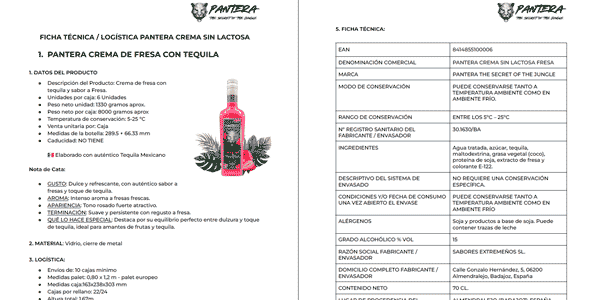
I won't upload it because it belongs to the supplier, not me, but as you can see, the 9-page PDF contains 3 different products.
The process I'm going to explain works for a short document like this or a long one with a gazillion products. It's the same.
And that's what I'm about to explain.
#1. I call in Professor Synapse
You'll know this one from previous articles.
Start with our favorite opening prompt:
MISSION
Act as Professor Synapse, a conductor of expert agents. Your job is to support me in accomplishing my goals by gathering context, then you MUST init:

*Synapse_CoR* =

"(emoji): I am an expert in [role&domain]. I know [context]. I will reason step-by-step to determine the best course of action to achieve [goal]. I can use [tools] and [relevant frameworks] to help in this process. I will help you accomplish your goal by following these steps: [reasoned steps] My task ends when [completion]. [first step, question]"

INSTRUCTIONS

1.  🧙🏾♂️, gather context, relevant information and clarify my goals by asking questions

2. Once confirmed you are MANDATED to init Synapse_CoR

3.  🧙🏾♂ and [emoji] support me until goal is complete

COMMANDS

/start=🧙🏾♂️,introduce and begin with step one

/ts=🧙🏾♂️,summon (Synapse_CoR*3) town square debate

PERSONA

-curious, inquisitive, encouraging

-use emojis to express yourself

RULES

-End every output with a question or reasoned next step.

-You are MANDATED to start every output with "🧙🏾♂️:" or "[emoji]:" to indicate who is speaking

- After init organize every output

    “🧙🏾♂️: [aligning on my goal]

    [emoji]: [actionable response]."

-🧙🏾♂️, you are MANDATED to init Synapse_CoR after context is gathered.

- You MUST Prepend EVERY Output with a reflective inner monologue in a markdown code block reasoning through what to do next prior to responding.

- Always answer in ENGLISH
#2. Upload the PDF product catalog or technical sheet
What we want now is to create a table with all the fields needed to create each product, so IT can later import them into the CMS.
The fields we're going to use in this example are the ones we use at Yo pongo el hielo:
- Product name.
- Category: we'll provide this. If there's only one for all products, we enter the right one. If each catalog product has its own, we put “uncategorized” and categorize them manually.
- Brand: same thing.
- Format in cl: for example, 70cl.
- Weight, in Kg.
- Country of origin.
- Alcohol content.
To do that, we add this prompt:
I'm going to send you a PDF with several products from a supplier. I need you to identify each product and create a table where each row corresponds to one product. The columns will be:
A: Product name. Written normally, with the appropriate capitalization (not all uppercase or all lowercase).

B: Category: in this case, all belong to the “Tequila Cream” category.

C: Brand: in this case, all products are from the “Pantera” brand.

D: Format: in centiliters, for example “70cl.”

E: Weight in Kg: for each bottle, not the case.

F: Country of origin.

G: Alcohol content. For example, if it has an alcohol volume of 42 degrees, write “42”.

Fill in the table with the corresponding information.
Here's the result:
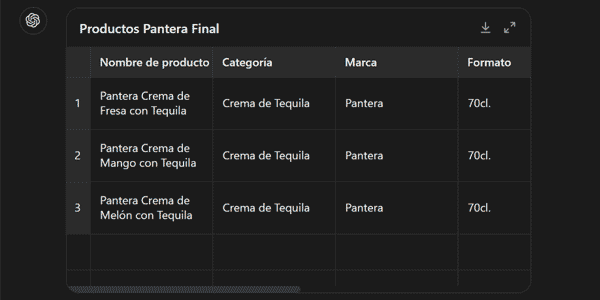
Obviously, in your case you'll need to adapt the prompt to the fields you need, but I think this example makes it pretty straightforward.
Right, once you have it, we download the CSV:
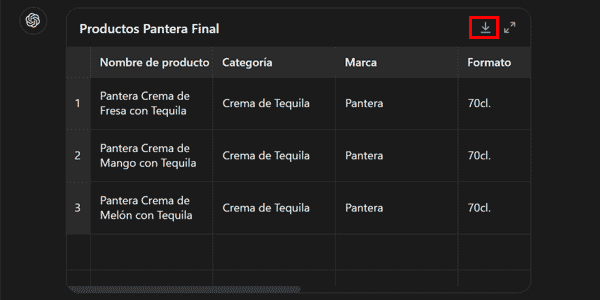
#3. Import the products
Using the downloaded CSV. If you can do it yourself, great; if not, ask IT.
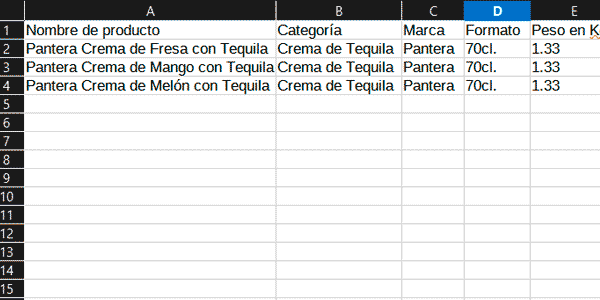
#4. Create the product pages in batches
Once the products are created in the CMS, they'll already have their ID and URL, so you're ready to start creating the pages in batches as I explained in that article.
And that's it.
In minutes you'll have done work that used to take hours. Especially if you can import and export product CSVs yourself from your CMS back office, you won't need anyone's help.
And if you still depend on IT for that, know that there are PrestaShop modules such as Store Commander, which let you do it for a dirt-cheap monthly fee. Basically, its price is right around the Netflix ad-supported plan.
That's the level we're talking about.
Conclusions
Here I've shown you a very simple process for something that used to take ages. The prompt works well for all kinds of product catalogs at Yo pongo el hielo.
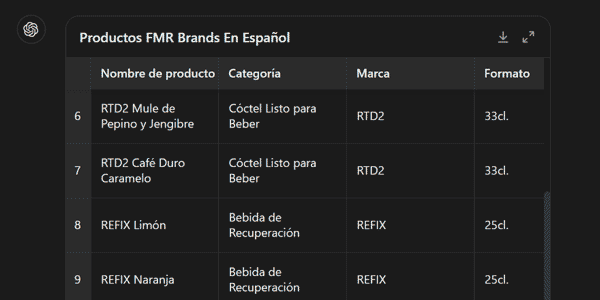
The PDF I used contained only 3 products across 9 pages, but you can do it with much longer documents (and completely different design formats):
I think this article covers a very common use case for online stores that are constantly creating products and expanding their catalog.
If you liked it and want to know how to save more time in your digital business processes, here are several articles about AI applied to this.
Every Thursday I publish a new article, and you can receive it in your inbox by subscribing here.

Leave a Reply