
Taking advantage of the fact that this week I was consulted by Consumidor Global about some practices involving Temu prices, I'm taking the opportunity to talk about an aspect of ecommerce that, like filters, I don't think gets the importance it deserves.
And it does.
Boy, does it.
Even if we don't see it at the start of our launch.
That's why in this article I want to clarify just how far its influence on the business reaches.
But before we start, if you have an ecommerce site, take a look at this because I think it will interest you:
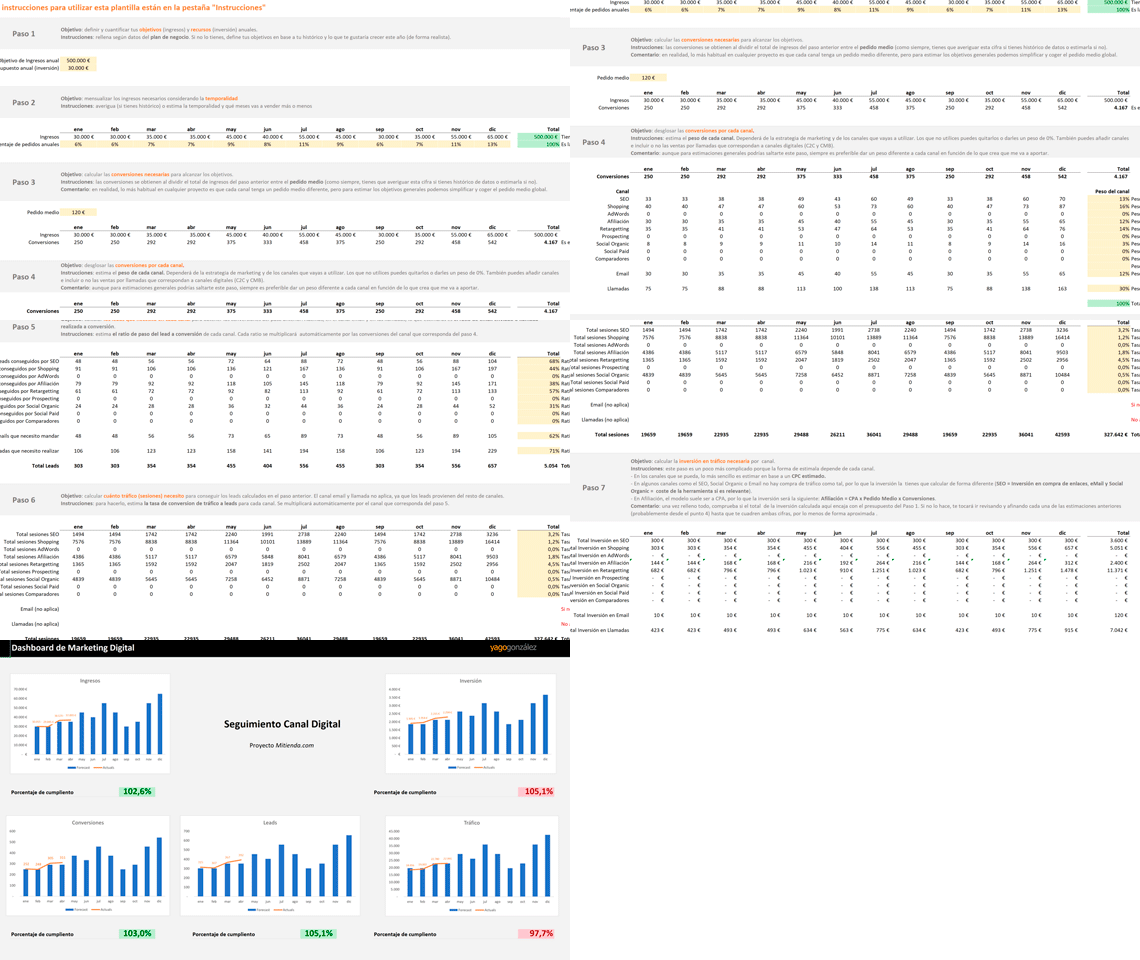
Split the budget and create different scenarios very quickly
Putting together the annual Marketing plan for an online store is a pain in the ass. Whether it's a new store or one with a track record.
And if on top of that you have to make the budget fit the investment you need, even more so.
That's why I use this template: I enter a project's data and it gives me the required investment with the figures updated. Without having to change formulas and calculations.
Not a bad way to start with your ecommerce analytics.
Plus, besides the calculator, you'll get a tip or piece of advice (a good one) in your inbox every day to improve your business or digital project.
Now, let's get to those attributes…
Definition of product attributes
We could define product attributes as selectable characteristics of the same product.
It's very easy to understand with the example of a T-shirt:
As a user, I might be looking for a basic Nike T-shirt to wear to the gym.
I search on Google, which takes me to a store where I find it.
On the T-shirt's product page I see that I can choose two options:
- Color.
- Size.
Each option is what we call a product “attribute”.
So I select the right one for me (for example, the black Nike T-shirt in size M), pay for it and wait for it to arrive.

When used well, attributes really help users choose the right product, as in this case.
But of course, they're not always used correctly. We'll see a couple of cases later where their use is forced.
And I'll also add a series of recommendations based on my experience with them.
Before that, let's look at what using them means for our store.
Using —or not using— product attributes
When we're setting up an online store and start uploading the catalog, this will be one of the crucial decisions: whether or not to use attributes for products.
So if you're on the fence, I want to lay out the main advantages and disadvantages I see in using attributes, so you're clear about what each route involves.
After that, as I said, I'll add some of the extreme uses they can be put to.
Let's start with what is perhaps the most common case.
Using product attributes in an online store
Although I think it's pretty clear, when I talk about “using product attributes” I mean giving store users the option to choose between several options with different characteristics of the same product.
For example, at Yo pongo el hielo the user can choose the bottle volume:

In this case, the price varies depending on bottle size, but with the earlier Nike T-shirt, all sizes cost the same.
In other words each attribute can have a different price or the same one.
On the other hand, the number of attributes can vary:
We may find between one and three attributes per product, with more being unusual (and not very advisable). Except in very specific cases of extreme customization, such as when buying flyers or posters from online printers, where you choose every detail of the product.
Advantages of using product attributes
There are quite a few, but one stands out above the rest.
#1. Convenience for the user
For me, this is their main advantage.
If the customer knows exactly what they want, they just need to reach the product page and select the attributes that suit them best
Imagine a picture frame: if you want a plain black one, you just search for it on Google, click the one you like and choose the right size on the product page.
Done. No fuss.
It's an example of a fairly common, frictionless flow.
#2. Filtering options
Although they're actually two separate things and you can filter without necessarily using attributes, you can only do it if you've added the relevant characteristic to the product page.
If you use attributes, you've had to add it anyway, and you can tell your CMS that you want to use a filter based on attributes:

#3. We avoid duplicate content
I didn't explain this earlier, but the opposite of using product attributes would be creating a different product page for every possible combination.
In other words, there would be a URL for the black Nike T-shirt in size M.
Another different URL for the black one in size L.
And another for the red one in size M.
And so on.
So, knowing that Google penalizes duplicate content, do you really see yourself writing different product descriptions for every combination of the same T-shirt model?
Sounds complicated…
And it is.
Using attributes, you can write a generic description of the model that works for every combination, making catalog uploads much easier.
Disadvantages of using product attributes
There are those too.
And not just a few.
#1. Display in product listings
What I mean is that when a user enters a product category on a website, if we use attributes, normally only the default attribute is shown in the listing.
With a T-shirt, not seeing the different sizes may not matter, but when you're buying spirits, the price difference between 70cl and 1L formats matters a lot.
Especially for bars.
For example, we needed to show both product attributes in listings and, by default, PrestaShop 1.6 doesn't do that.
So we had to resort to custom development:

This is perhaps, the biggest drawback of using attributes.
#2. Product feed
Careful, this one's a long one.
Again —as with almost everything in this issue— we're facing a technical drawback.
And this particular one is more common than it seems. It happens to us at Yo pongo el hielo when we advertise on different platforms.
That said, the solution is relatively easy. At least easier than the solutions to the other disadvantages.
Let me set the scene:
On platforms where you advertise several products —such as Google Shopping, comparison sites or some affiliates— the usual thing is to upload a spreadsheet-type file (“feed”) with all your products.
Here's an example of the feed for Google Merchant:

In theory, in this file, each row is a different product, that is, with its specific attributes.
The red Nike T-shirt in size M will go in one row.
And the red Nike T-shirt in size L will go in another.
Each product will therefore have a unique identifier, a specific price, its own photo and a specific URL that the user reaches when clicking the ad.
That's the theory.
The problem is that if we're using attributes on our website (as with Yo pongo el hielo), the normal thing is for the user to access a URL and choose there, as we saw earlier:
The problem is that, even if the price varies between two attributes of the same product in the feed, for example, we may not be able to provide a unique URL —or other values such as the image— for each attribute in the feed.
So some of these values get sent repeatedly in several rows.
The result is that each product attribute may have:
- The same product title.
- The same image.
- An identical URL.
And of course, in these cases advertising platforms get confused because the product photo and title (repeated) get mixed with the price of any of the attributes.
If, on top of that, attributes are used incorrectly (adding products that aren't actually attributes), you get the AliExpress case we'll see later, where Shopping takes the image and product name and combines them with the price of a fake attribute.
And this happening can be encouraged by the advertiser to attract the user to their store.
Additional measurement problem
Since I'm talking about the difficulties of generating a correct product feed when working with attributes, I'll dig a little deeper into a specific but fairly common case.
So imagine this scenario:
- A website that uses attributes.
- Those attributes have their own image, price and URL.
With those characteristics, you might think you can send these platforms a correct feed and everything will work as expected, right?
Well, no.
On Google Merchant / Shopping, yes.
On the rest (most of them), no.
At least not if the URL is like this:

In other words:
https://www.yopongoelhielo.com/es/whisky/91-johnnie-walker-black-label.html#/volumen-1l
With a parameter separated by the “#” symbol indicating the attribute you're going to have problems on most platforms.
Why?
The URL tagging.
Yes, UTMs.
And why are these kinds of parameters going to be a problem if we mix them with UTMs?
Because these “#” parameters have to go at the end of the URL for everything to work correctly.
In other words, the correctly tagged URL would look something like this:
https://www.yopongoelhielo.com/es/whisky/91-johnnie-walker-black-label.html?utm_source=afiliado&utm_medium=display&utm_campaign=retargeting#/volumen-1l
Look at the order and the symbols (“?”, “&” and “#”) separating each parameter.
This is the correct order and it will always work properly.
However, these platforms can't “split” the URL and send the parameter that indicates the attribute (the one separated by “#”, in this case #/volumen-1l) to the end.
It usually ends up more like this:
https://www.yopongoelhielo.com/es/whisky/91-johnnie-walker-black-label.html#/volumen-1l?utm_source=afiliado&utm_medium=display&utm_campaign=retargeting
With the UTMs after the attribute parameter "#". Which is wrong.
What errors can it cause?
It's quite possible that the link doesn't redirect to the correct attribute and then the user sees a different price and/or image in the ad from the one they find when they reach the landing page.
Or, what is certain GA4 won't pick up that traffic correctly.
It can't read those attributes correctly, so it's as if you hadn't tagged the campaign.
Or worse, as if you'd tagged it incorrectly.
So if you use GA4 to verify the conversions from campaigns on different platforms, you'll find they don't match.
Well, the traffic won't match either, but that's less important than conversions. Especially if you have affiliate on CPA or CPL.
And why doesn't this happen on Google?
Well, it doesn't happen on Google if you have auto-tagging enabled. You give it the correct URL, with the attribute parameter but without UTMs, and forget about it.
It handles all the tracking itself, which makes sense since it owns Google Ads, Shopping and Analytics.
So why use these kinds of parameters if they can cause errors?
Because it's a (good) way to avoid duplicate content. Google's bot keeps the URL before the parameter, which is always the same for all attributes.
Is there a solution?
Yes. Well, more or less, actually.
At the end, in the recommendations section, I'll tell you.
#3. Link the images
Another thing not all CMSs include is that when you click an image for a specific attribute, the selector changes to the correct attribute:
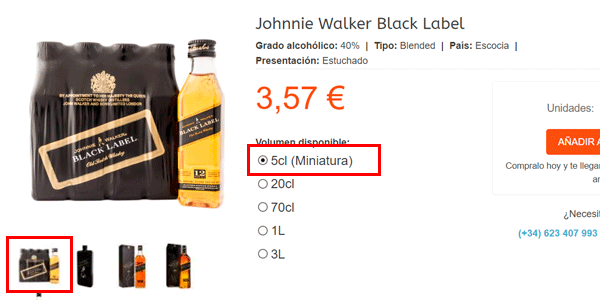
If your CMS doesn't do this and you want to use attributes with different images for each one, you'll have to implement the functionality.
If you want to avoid customer complaints, of course.
#4. Multiple attributes
Continuing with the UX problems, let's say having one or two types of attributes is more or less easy to manage.
The problem comes when we have three (or worse, more than three).
With three types of attributes, it's very common for not all the possible combinations to exist.
So what do you do when a user changes one of the three attributes and creates a combination that doesn't exist?
Do you tell them that combination doesn't exist?
Do you take them to the closest possible one that does exist?
And how do you decide which combination is the closest?
And what if it's out of stock?
I'll tell you later how we solve it.

#6. Description changes
Besides the image and price, changing the attribute should also change parts of the description like this one:

I have to admit that we still haven't developed this at Yo pongo el hielo. A matter of priorities.
#7. Coupons
Your CMS will almost certainly let you apply coupons to specific products.
What's less certain is whether it lets you apply them to specific attributes of a product.
And if those attributes have different prices, then we have a problem.
So either you dig around in the CMS beforehand to find out, develop the functionality, or don't use coupons on certain products:

#8. Analytics tools
Right, let's get to the last disadvantage.
In this case, it's not so much technical as conceptual.
If you use products with attributes, the way you send them to your digital analytics tool (probably Google Analytics) may be by using the Product variant.
Something like this:

Right, that's how we had it in Universal Analytics ourselves.
It makes sense because this way you can see exactly which specific product, with its attributes, generates sales.
It's a little more problematic when you want to count packs, or isolate an attribute such as “Can”, but in general it was the most suitable option at the time.
However, in GA4 we're measuring it like this:

With the attribute inside the name.
Although there was some debate, one of the main reasons is that when we started implementing GA4, there was no way to view the product variant.
The other related problem comes when you add the view or click of a product in a list (or promotion)
The events view_item_list and select_item_list in GA4 gave us problems if you added the same product twice with different variants, so we cut the problem off at the root.
So, for both reasons, what we did was:
- Put the variant inside the item name.
- Also send it as the variant.
This way, the only thing we lose is, for example, immediately getting total sales for an item including all its attributes (all sales of any format of Johnnie Walker Black).
To get them, you have to create a filter or export the data.
Between two bad options, this seemed preferable to being unable to see the specific attributes of a product, only the aggregated ones, and also not knowing the clicks generated in lists.
Summing up the use of attributes
Although there are more disadvantages than advantages, almost all are technical and, in general, relatively easy to solve.
I say that because the reasons for using them are more about business, which is what matters in the end.
And also because not using attributes has its own drawbacks.
Avoiding the use of product attributes
As I mentioned earlier, what we'll find here is one product page for each attribute of the same product.
It's as if you considered that every barcode (or SKU, if you prefer) needs its own page.
One example is this website, where each Black Label format has a different page.
In this case, you can see the one for the 4,5L bottle:

There is no selector to choose the others. You have to go to the category listing or the search box to find them.
Got the system?
Then let's explain the advantages.
Advantages of not using attributes
Obviously, they avoid the disadvantages of using attributes, so I won't go on about the ones we've already covered.
#1. All options are shown in listings
Without having to do anything, our CMS will show each attribute as an independent product because that's really how we're managing it, with no need to program anything.
Here we can see the two Dewar’s, the 70cl format and the 1L format:

#2. Better search
If you're using the CMS's default search engine, it will almost certainly work better and return all relevant results if you treat attributes as products and search for things like “Red T-shirt” or “size M trousers”.
Here's an example searching for a brand:

#3. You can target the SEO long tail more
If your product catalog is small, multiplying the available URLs will let you return more precise results.
So, if we go back to the Nike T-shirt example, by not using attributes you'll be able to have URLs with these titles:
- Black Nike T-shirt size M.
- Red Nike T-shirt size L.
- Blue Nike T-shirt size XL.
Obviously, when someone searches for those very specific terms, your website has a much better chance of appearing in the top positions.
Here we see an example with “Dewar’s White Label 1L”:

Always, of course, provided each URL has unique content (description) and you're not generating duplicate content.
#4. Easier product feeds
You can forget about all the problems involved in building product feeds for advertising platforms.
Here, unequivocally, each product is one row.
Disadvantages of not using attributes
Well, really, they're the advantages of using them:
- The convenience for the user.
- When it comes to using filtering I need to have categorized my products properly from the back office (adding their corresponding attributes, even if users can't select them).
- At SEO level, the line around duplicate content is blurry and easy to cross.
We'll also add a couple more drawbacks:
#4. Showing the whole catalog
In stores with a large catalog, it's harder to show the user all the options on offer that might fit what they're looking for better.
#5. Showing the whole product family for one model
Related to the previous point, showing all the options for the same model of T-shirt / trainers / glasses / computers / … on a single URL is very difficult.
Imagine a brand hires a banner from you and asks you to link it to a page with all the variants of the advertised product model.
You have to rely on tags, the search engine, or create custom landings with selected products (if your CMS even gives you that option).
As I say, it's neither convenient nor quick.
Forcing product attributes
Right, now that we've talked a bit about attributes and how they're used, I want to focus on what I consider misuse of them.
There are more cases, but I want to focus on two that I consider abuses of attribute use.
Let's start with the case of AliExpress.
Abuse of product attributes on AliExpress
Although I'm talking about AliExpress, it also happens on Temu and, in general, it's more common to see this in Chinese online stores than elsewhere.
Let me give you an example:
Imagine you're looking for a graphics card for your PC.
It's perfectly normal to go to Google and browse Shopping prices.
So, searching for the AMD RX 580 you reach these results. Look at the price difference between the two items, supposedly the same one (look at the title):
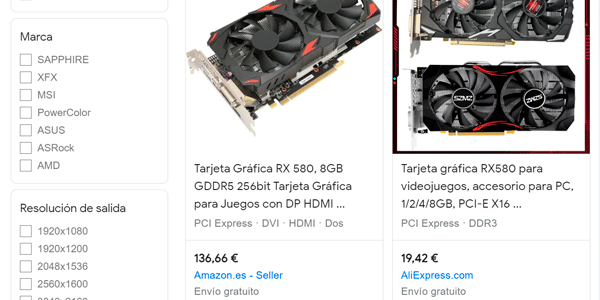
The model on the right has a ridiculously impossible price in Google Shopping. But if you're not used to this, you might think it's an offer or something.
So you click and, although you see a different one when you land there (21,90€), it's still a great price:
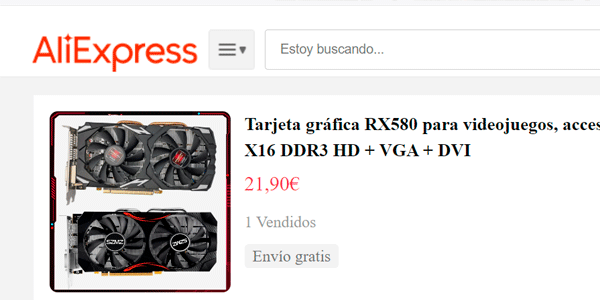
Shame it isn't real.
Because now the next step is to click the options selector.
And when we do, the popup opens and we see the problem:

I want to buy an RX 580 (it's in the product title) and what appears selected by default in the options is another graphics card model. From a different brand, even.
Specifically, the Nvidia GT 610, a hopelessly outdated and much worse model.
A different product has been entered as an attribute, with a much lower price that acts as advertising bait.
The moment I choose the correct attribute (the RX 580), the price goes back to normal:

And if anyone thinks the old model might not be an attribute, but that the page we land on from the ad is a list of cards, note that the different models are entered as values of the “color” attribute.
Clear as day.
This is the usual process in these stores.
Now, this chain of errors (Google Shopping + store with attributes) can happen for 3 reasons:
1) Deliberately programmed and executed that way
Which is what seems to be happening here:
One item name is used and beneath it, other items -not attributes- that are worse and cheaper, to try to attract attention with the price.
The unsuspecting user falls for it because they think they've bought a huge bargain, which isn't true.
The AliExpress seller will argue that they sent what was actually purchased (an attribute selected by default, but one that doesn't match the product title).
So the most likely outcome is that, if the customer complains, some kind of agreement is reached.
But if they don't complain, then profit for the seller, because they've got rid of a product nobody wants.
And, of course, for AliExpress, which takes its commission on the sale.
This is what's known as a dark-pattern and Europe is supposedly going to fight them, since the stores involved don't seem too worried. The thing is, I think it will be hard to prove that the cause of these "errors" isn't one of the following two.
You also have to understand that these stores are marketplaces, so in reality, it's the sellers on these stores who create these "traps", even if the platform itself doesn't put a stop to them.
2) Human error
When entering product prices in an ecommerce site, it's easy to fat-finger something and enter the wrong price for an attribute. Especially if you're doing bulk uploads with Excel.
Everyone who has ever managed this kind of process has had it happen, including, of course, major players such as Mediamarkt or Fnac.
The strange thing is for it to happen so many times and across so many products as it does on AliExpress…
3) Technical impossibility
This third cause is a little more complex because, as I said, it's technical and it's the one I was talking about earlier when mentioning the problems that arise when generating data feeds for online stores that use attributes.
Wrapping up the AliExpress case
As you can see, in the case of attribute abuse in Chinese stores, we find plenty of holes in the process that the "guilty" stores have little interest in plugging and that sellers exploit to rip off the most unsuspecting users.
But this is only the first tricky use of attributes.
Let's move on to one that's (a little) less tricky.
The Amazon case
Before I start talking about this use of attributes, I want to clarify a couple of points:
- Amazon used to use “normal” attributes. If it has changed them for these, with all the testing it does, it's because they work for them. Period. So what I think about this use of attributes matters very little.
- The fact that it works for Amazon doesn't mean that the 99,999% of online stores that aren't Amazon will also find its system works. We don't have its traffic, its customers or its tests. So be very careful about copying something “because Amazon does it this way”.
Right, let's see how Bezos's people use attributes.
In this case, we've already bought the graphics card on AliExpress and now we need a case gaming to match.
You know, one of those all lights and color.
As before, we search on Google:

And I see this Amazon model, which I like and isn't too expensive. So I click it.
When I enter Amazon, I can already see that, unlike the AliExpress case the price stays the same:

However, underneath I see a “style” selector.
This already smells a little off because “style” isn't something objective like “color” or “size”, but something much more subjective.
When I open it, I see they're very different case models, all placed on the same product page.

And when I say different, I mean completely different:

Neither the shape, the color nor, of course, the price of this case model resembles the previous one.
It's a new product, entered as an attribute so the user sees several options within the same product page.
Everyone can decide for themselves whether they think that's good UX practice or not.
However, Amazon doesn't always use this kind of attribute selector. It also uses a more traditional one in other sections, most likely because of the number of options:

Here we can see that it uses an attribute selector with all options visible.
The problem is that, again, this isn't the same laptop model with different configurations, but different models. In fact, it even tells you so directly in the specifications.
As a result, not all combinations of the three attributes are available. Not even close. There are only 4 possible ones and, depending on where you click, Amazon will select the “closest” one.
Personally, I'm not convinced, because each option is as different as chalk and cheese and instead of helping me choose the model, they make it harder.
But perhaps they've found that by showing different models, users spend more time on the site and the conversion rate ultimately increases.
Maybe with such an enormous product catalog, users miss a lot of it and this way they see more “more or less” similar options.
No idea.
What I do know is that it's a forced use of what I think product attributes should be.
But UX aside, this also creates an SEO problem…
Duplicate content
Let's go back to our gaming case.
Look at these two images:
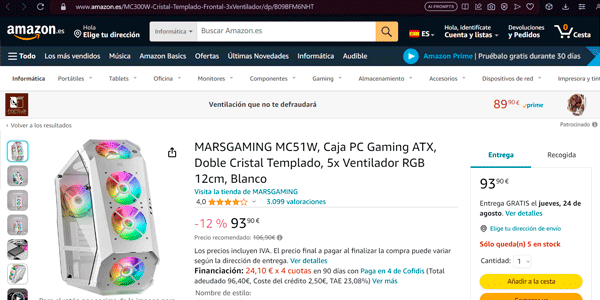
This one corresponds to this URL:
However, this other image —which looks similar but isn't the same URL—:
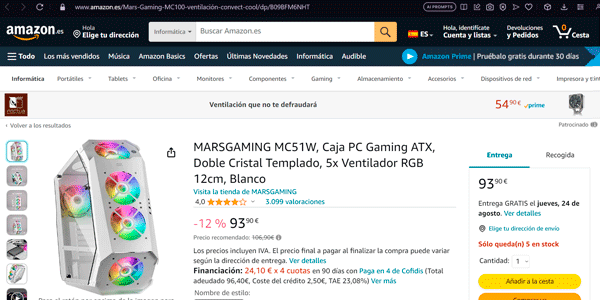
It corresponds to this other one (you can look at the browser bar to make sure):
https://www.amazon.es/Mars-Gaming-MC100-ventilación-convect-cool/dp/B09BFM6NHT?ref_=ast_sto_dp&th=1
You know what? This is Google's definition of duplicate content.
And you know what else? Amazon isn't penalized.
Despite having several more URLs (besides these two) that are virtually identical.
If you search for the brand and model on Google (“mars gaming mc51w”), the third result is theirs. Ahead of other competitors that do SEO very well, such as PcComponentes.
And only beaten by the brand's official website:

Amazon plays by different rules.
Would you bet that Google treats your website the same way?
Because with mine, I know perfectly well it doesn't.
So, as I said: be very careful about copying them.
Recommendations when deciding whether or not to use product attributes
Right, by this point you've been able to see which model (with or without attributes) fits your sector or business better.
You've also seen how badly used attributes can be abused.
So whichever option you choose, I want to give you some of the tips experience has taught me.
#1. Catalog size
If your website has many products and they have variants, I'd say I'm 99% sure that it's advisable to use attributes on your product pages.
If your store is small today (a few dozen products) but you think it will grow, same thing.
If you don't think it will grow and you believe you can create unique content for each product variant, then don't use attributes.
#2. Use attributes that really are attributes
Remember what we just saw in the case of Chinese stores, led by AliExpress.
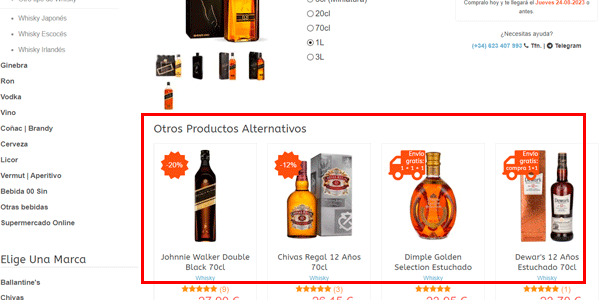
In short: use attributes to add variants of the same product, not to add new products.
To add similar products there are more suitable modules for that:
#3. Number of attributes
Except in very specific cases and products with maximum customization, don't use more than three types of attributes per product, because they will create multiple combinations that don't exist.
When there are non-existent options the solution we've implemented at Yo pongo el hielo is the following:
- We don't allow a non-existent combination to be selected: when the user selects an attribute value that would produce that result, we change the values of the other attributes so that the combination exists.
- We have “primary” and “secondary” attributes: this means that if we have to change the value of one of the attributes because an impossible combination is about to occur, we prioritize changing values in secondary attributes first, assuming the primary one is the one the user cares about most.
- We prioritize combinations that are in stock: if a combination exists but is out of stock, we prioritize showing the user one that is in stock. Even if we have to change the value of a primary attribute to do so.
For now, we're happy with these rules, although I'm sure there's room for improvement.
#4. Make them appear in listings
Attributes that change the product price should appear in listings.
It happens with alcohol, perfumes, dog food…
There may be some case where this shouldn't happen, but honestly I can't think of one right now.
And, of course, clicking them should take users to the URL with the correct attribute selected.
#5. SEO matters
And the approach you need when you have attributes is different from the one recommended when you don't.
I hope what I explained earlier about duplicate content and long-tail gives you something to think about for your project.
#6. The product feed matters
And it will matter more as your project grows.
So, here are the recommendations:
- One way or another, get unique URLs. If you have attributes, find out how you can get them without hurting SEO.
- When you have them, if they use parameters with “#”, you'll need to create two different feeds:
- One for Google, with all products and their attributes, which will work correctly.
- Another for the other platforms, which can be one of two types:
- If the platform allows it, send it the URLs correctly tagged with UTMs as I explained and send the full catalog of products and attributes. Make absolutely sure they NEVER add any parameter after them.
- If the platform doesn't let you send URLs with UTMs, then what you need to do is send only one attribute per product —the primary attribute— and send the clean URL, without attribute parameters using “#”. This way the catalog will be smaller, but there will be no errors either when displaying the ads or in the analytics tool.
#7. If you don't use attributes
Make sure you add a clearly visible module on the product page with the different product options available to the user.
#8. If you're a user…
I assume that if you're reading this article and have made it this far, you're not a beginner.
But just in case, I'll point out that it's essential to look at the store's returns policy, the reviews from other users and to pay with PayPal, because in these cases it gives users more protection than bank cards.
Final conclusions
Anyone who hasn't faced this decision in a project probably hasn't given much importance to many of the issues I raise in this article.
But I hope I've made you see how relevant they are.
And that using attributes or not has implications beyond the obvious ones.
I'd have liked to add one more point: the different UX options that exist for selecting attributes.
Although we've already seen several approaches (Amazon, AliExpress, Yo pongo el hielo…) there are some others I find interesting, such as the pop-up used by TiendAnimal, for example.
However, I'm already past 5.000 words and I didn't want to make the article even denser.
Maybe I'll return to the subject of attributes in the future, but exclusively from the UX.
In any case, my intention was to give you a little more context so you can understand everything involved in a decision that seems so harmless at first.
But of course, in medium or large ecommerce projects, no central decision is ever harmless.
I assume you'll agree.

Leave a Reply