
When many people talk about the internet, they mix up privacy, security and anonymity as if they were the same thing. They are not.
- Privacy means limiting what data you give away and who can link it to you.
- Security means reducing the risk of malware, account theft or unauthorised access.
- Anonymity means preventing a specific action from being linked to your real identity.
And in this article, although I will touch on the second and third a little, I will focus mainly on the first.
Because in daily use, the sensible thing is not to chase absolute anonymity, but to reduce our exposure, which is far more important than we think.
So the approach of this article is this:
When browsing the internet you are not going to be invisible, but you can avoid giving away more data than necessary and make it harder for third parties to connect every piece of your digital life.
When you understand how much depth that contains, you realise it is extremely valuable.
And to achieve it we need to add certain layers, because there is no miracle tool that does everything for you.
The digital footprint
Every time you:
- Browse.
- Access a social network.
- Send a WhatsApp.
- Or an email.
- Or simply have mobile data enabled on your phone (let alone location).
You are leaving a trail.
A trail that, when grouped together, forms your digital footprint.
And if you think it does not matter because you have nothing to hide, you are falling into the trap: that data is used, above all, to be able to manipulate you.
Just like that, bluntly.
That is why you get ads for baby strollers when you have talked about it with your partner (and you buy more).
Or you receive emails from lists you do not remember signing up for (and they attempt phishing by impersonating your bank).
Or you only see news / videos based on what an algorithm thinks interests you, (which polarises your opinion even more).
In other words: your digital footprint is being used, whether you like it or not.
And this is not about accepting cookies on a website or not, which is generally the least of it -advertising tracking and anonymous usage data on a website-.
The scale is much higher and obviously runs through the Big Tech (Meta, Google, Apple, Microsoft), but it does not stop there; it even reaches public bodies such as the tax authorities. And higher up, depending on what they infer about you.
It is not magic, it is your digital footprint.
That is why it makes sense to fight this abuse and, since you are not going to become a hermit overnight or go live in the mountains, I at least suggest you make things a little harder for these data vampires.
You will see now that it is not that complicated. Especially because I am going to explain the exact route, step by step, that you should follow.
One nuance before we start: I am not against using data as a form of exchange for offering you free content (such as advertising in news media), but against abuse and the use of our data without our knowledge and consent. It is not the same thing.
Now yes, let’s go with the first step.
#1. VPN
A VPN ( Virtual Private Network ) hides your IP from many services, encrypts data and protects your traffic, adding an intermediate layer between you and the internet.
This is useful on normal networks and essential on untrusted networks such as open ones in airports, trains or hotels.
That said:
- It does not make you anonymous.
- It does not prevent you from giving your data to a website if you register with your real email.
- It does not stop Google from knowing who you are if you sign in to your account.
- It does not replace other good practices; it starts them.
To use it, you will need to sign up for a free or paid service and install it on your phone or PC. It is super simple and the only thing you need to worry about is keeping it active.
A note: sometimes, there will be certain services that will not work well if you have the VPN enabled and you will have to disconnect it. Because Google, for example, likes your data far too much to let you watch YouTube videos if it detects that you are browsing with a VPN.
Here are the two services I use.
Free VPN: Proton VPN
If you want to start without paying, Proton VPN is a reasonable option.
Its free plan, for one device and with limited servers, is still one of the few free services whose goal is to be a gateway to privacy, not a business based on ads or selling data like others.
Paid VPN: Proton VPN or NordVPN
If you want more speed, more locations and more comfortable use, the normal thing is to move to a paid version.
There are many, but the two options I suggest are Proton VPN -which has a paid plan in addition to the free one I just linked- and NordVPN (affiliate link that gives you one month free).
Why NordVPN when there are cheaper or free options like Proton?
Well, because it is not especially expensive — I pay between 3 and 4 euros a month — and it has always worked quite well for me on all the devices on which I have installed it:
- Windows PC.
- Linux PC.
- Chromebook.
- Android phone.
- iPad.
- Xiaomi TV stick.
Besides, I have never read of any scandal about it (data leaks, above all), as I have with others, and the plan I have allows it to be connected on up to 10 devices, which is extremely useful in my case.
It also has dedicated servers for P2P torrent and magnet downloads that work very well.
Of course, I am convinced it is a great investment for what it costs and the first step toward increasing your privacy.
In fact, I will tell you that NordVPN is, together with ChatGPT, the only subscription I have kept paying for several years.
#2. The browser
I mentioned above that Google and Microsoft are real data devourers.
And that is why, if you want to browse privately, you should avoid using their browsers (Chrome and Edge).
Because I have seen many people using a VPN and then browsing:
- With a browser from those two vampires.
- Loaded with extensions (one of the biggest scourges of privacy).
- With sessions open everywhere (hello Facebook).
- Login with Google or Meta.
- And full data synchronisation (passwords, addresses, cards…)
If you browse like that, no matter how much VPN you put in between, you are anything but private.
Brave
That is why, if you want a quick and relatively simple improvement, Brave is the option I suggest as your browser.
It already includes several protections by default and avoids part of the usual tracking (ad-trackers, analytics trackers) without you having to build a Frankenstein of extensions.
And if you absolutely need an extension, the good thing about Brave is that, by sharing Chrome’s rendering engine (Chromium, open source), you will be able to use Google’s browser extensions without any problem.
And by the way, another magnificent detail is that Brave even removes YouTube ads.
Yes, as you read it. YouTube Premium for free.
Browser extensions
As I said before: better to browse without extensions unless there is a real need.
Because:
- Many extensions add risk.
- They can access what you do on web pages
- They add more fingerprinting.
- And even if they solve one problem, they can create another, such as selling your data (even if anonymous).
The simpler and cleaner the browser, the better.
Private browsing or incognito mode
This may sound familiar. And it sounds good, right? Well, I can tell you now that it is a tall tale.
Yes, it avoids certain data and prevents passwords and so on from being saved, so for a specific moment on someone else’s PC it may be useful, but not much more. This thing called incognito mode is more marketing than real privacy.
So, for your own computer, use another browser and not Edge or Chrome’s incognito browsing.
Login with Google / Meta / Microsoft / Apple and saving passwords
I suppose you already know what I am going to say about these two options: if you want privacy, never use them.
I know they are very convenient, but the amount of personal information you are providing to these Big Tech companies is enormous.
Then we are surprised when things like Cambridge Analytica.
Besides, I am going to explain a much better registration system that is almost as convenient a couple of sections below.
Browser profiles
To finish talking about the browser, I invite you to use different profiles for each use:
- Leisure (browsing, social networks, email).
- Banking matters.
- Professional matters.
- …
This way, you can limit the use of necessary extensions to each profile and minimise the risks when logging in or saving passwords.
A simple usage detail, but one that helps. At the end I will expand on this concept of compartmentalising your browsing.
#3. Email
We are now starting to get serious about privacy. Several points to cover here.
The first thing is that you should know that your email is one of the pieces most used to unify your digital identity.
If you always reuse the same address for everything, then triangulating your information and profiling you is very simple.
It is practically the same as using the Google login functionality we mentioned just above.
There are simple ways to avoid it and, as I said above, I will shortly show you how to do it better.
Free email services with data encryption
On the other hand, at a technical level, if you want data encryption end-to-end — that is, so that no one except the recipient can see what you write — you have no choice but to use one of these services:
- Proton Mail (yes, the VPN people)
- Tuta Mail
There are more, but these allow you to create free email accounts.
So create one as soon as possible and start using it for serious matters.
That said, you need to keep a couple of details in mind:
- If you use it and the address you send to is Gmail, the encryption breaks. Encryption works only when both the sending address and the receiving email address encrypt the content.
- And even more: even if you both use Proton Mail, you are not safe from the person you send the email to taking a screenshot.
So you know: be careful what you send and, in any case, avoid using Gmail, Yahoo or Outlook. At least for serious things.
#4. Registration identity
This is one of the most useful and least applied points, probably due to lack of knowledge about convenient alternatives.
And because of this convenience, most people use the same email when we sign up for any service.
Well, we may use two: the personal one and the work one, depending on what it is for. But that is where we stop.
And worse still, we add to this:
- The same name (the real one).
- Often the same phone number.
- And even the same date of birth.
When we register for a service.
Result: any leak connects pieces. And as you will have noticed lately, more of these happen every day.
The sad thing is that, when we give our real data, many times it is not even for convenience, but simply because we do not even consider why we are giving them (is it good for us or for the service?). We give them and that is it.
Mistake.
But of course, if you have nothing to hide, it does not matter, right?
Mistake.
And know that I did it myself. Until I discovered the following.
AliasVault
A fairly practical and simple way to cut that off is to use tools like this, which allow you to create different registration identities (aliases), especially at email level.
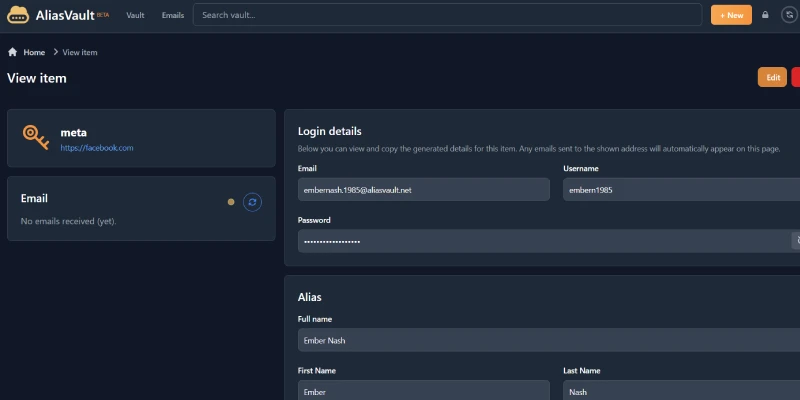
That way we do not give every website our real data, but different data for each one.
If a database is leaked, if they start spamming or if a service shares data, the damage remains completely limited.
Besides, creating different aliases is ultra-convenient. And more importantly, they allow you to click the typical double opt-in link for registration for most services.
Obviously, I would not use it to sign up for my bank account, but I would say that for everything else, probably yes.
It is incredible that a service like this is free.
Make the most of it while it lasts.
Fakexy
Not as complete as the previous one, but equally useful for certain low-importance registrations, fakexy.com helps us to generate alternative or fictitious addresses, bank details or phone numbers.
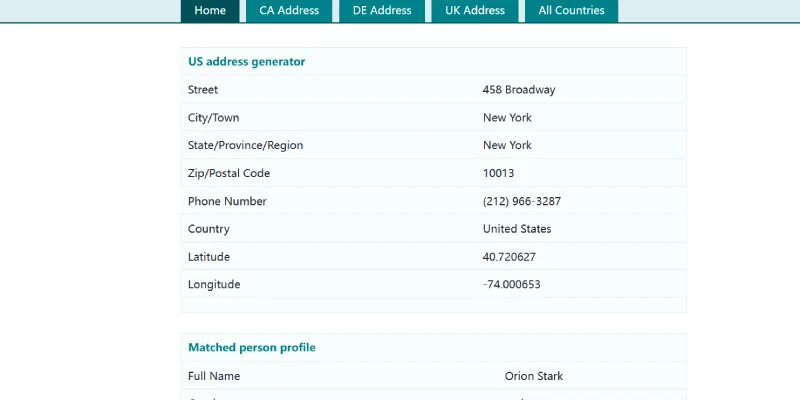
Right, once you know these services, it is worth using your head:
- Not every service we register for allows non-real data.
- In some cases it may breach their terms.
- Or make account recovery harder.
Because privacy is not about falsifying everything without thinking, but about avoiding giving away real data when it is not needed at all.
So, before using either of these two services, the question you have to ask yourself is: does this platform really need my real phone, my real address and my exact identity? What for?
Depending on the answer, you will know what to do.
#5. Personal communications and messaging
On the internet, not everything is browsing or registering. Obviously, what you talk about with others also matters. And how you talk about it.
And although until recently Telegram seemed like a solid bastion, the various conflicts its creator -Pavel Durov- is facing and the particular nature of his country’s government -Russia- make it seem less reliable to me in this regard than before.
So what then?
Signal
Well, if we are talking about messaging services, Signal is the most private, within mainstream applications.
But of course, for it to work, your circle has to adopt it. Because you can install the most private app in the world, but if none of your contacts use it, its practical impact will be limited.
So, if there is someone you want to communicate with especially privately, both of you install this app and that is it.
But remember that this does not rule out that someone takes a screenshot…
#6. Devices
So far we have focused on services, but the truth is that privacy does not start with the VPN. It starts on the device you connect from.
If the device is compromised, everything else does not matter.
And I am telling you this at the end because changing device or operating system is probably the step with the most friction in all of this.
On PC: Linux
Since I do not use Apple on computers, I do not know how it handles privacy, beyond imagining it does it well. At least that is what it sells you in its advertising.
What I do know is that, after years using Windows, I am very clear that it is the opposite of privacy. Reasons:
- Telemetry to Microsoft servers that you cannot easily disable.
- Constant requests to send data.
- Microsoft account requirement for Windows 11 setups (although it looks like there may be some backtracking).
- Millions of users mean hackers and creators of viruses and spyware focus on these devices, so you always need to stay alert, use a lot of common sense and have a good antivirus.
That is why, when we want to make the jump toward more privacy, a very interesting option is to use Linux.
Not because it is magic or because it automatically makes you invisible, but because it provides several real advantages:
- It reduces malware and moves you away from part of the ecosystem most saturated with viruses and junk software.
- It gives you more control over the system and greater security at permission level.
- Much less invasive telemetry.
Besides, for anyone who mainly works with a browser, office tools, email and online tools, moving to a Linux distribution like Mint is much less traumatic today than years ago.
In fact, anyone can make the jump, because interfaces and UX have become much more homogeneous.
It is clear that it is not for everyone and, if you depend on very specific software, it may not be worth it. In fact, it happened to me for years because of intensive use of Microsoft Office and the Adobe suite, but there are now more than decent alternatives. And none of the PCs I have bought lately use Windows.
Because beyond the privacy and security layer, Linux is lighter and manages system resources better. With less machine, it performs better.
And besides, with current PCs, virtual machine performance even covers the use case of ultra-specific Windows software.
On mobile: GrapheneOS
On smartphones it is more complex.
Because if you skip Apple, you only have one solution to increase privacy, which is to stop using Android. And that is not easy.
You have GrapheneOS, a system focused on security and privacy, but today you can only install it on Google Pixel.
In other words, if you are looking for that level of privacy, do not complicate the search: you already know which hardware is compatible.
I do not use it and have not used it, so I do not know how complex the privacy setup is there, but it is clear that if you want something, it costs something.
If you want more privacy at device level…
If all this seems too little to you and you are looking for a Julian Assange level of paranoia, I will leave you a couple of systems to investigate:
- Pi-hole, with Raspberry Pi.
- Whonix, for your PC.
And well, I have barely gone into security throughout this article, but to everything mentioned, two more legs could be added for cases where your device could be compromised (that it gets
- Password managers: I use Passbolt, but there are others like Bitwarden or Proton Pass. With them you avoid saving them in the browser.
- Two-factor authentication: such as Google Authenticator or physical USB keys.
Both systems are simple and, at the cost of losing some convenience, our data will be much more secure.
A practical approach: separate contexts
Finally, if I had to summarise a reasonable privacy strategy in a single idea, it would be this: if you can afford it, do not mix contexts.
I would return to the idea I explained earlier of using different browser profiles depending on the use you are going to give them and expand it:
If you can afford it, do not use the same:
- Device.
- Browser.
- Browser profile.
- Email address.
For professional and personal use.
And even better: within personal use, do not use the same browser profile to browse Instagram as you use to access your bank account.
Separate your private email (the new Proton one) from the public one (the one you have used your whole life).
If we add these guidelines we have already discussed to this context separation:
- Do not always browse with sessions open.
- Do not save passwords.
- Do not give real data by inertia, nor centralise your entire digital life in a single identity.
Privacy improves a lot.
To achieve this, I would tell you to think about all these areas:
- Work.
- Leisure:
- Shopping.
- Main registrations (banks, services like electricity, internet, water).
- Secondary registrations (Netflix).
- Personal communications (social networks, WhatsApp).
- Tests or low-trust services.
Where you have two devices (work and personal) and a different browser profile for each personal area.
Just with this, without installing VPN or Brave, the profiling of your digital footprint is greatly reduced, as is the impact of leaks.
But of course, it is always better to add those layers. So if you want greater privacy, better follow the full protocol. You just have to follow the step-by-step I have explained:
- Sign up for a VPN.
- Start using Brave and separate uses into different profiles.
- Create a private Proton email that you will give to (almost) no one.
- Use different identities for each registration with AliasVault.
That is the basics. The advanced level would be:
- Start using Signal with whoever you need to.
- Replace Windows with Linux.
All this is more than manageable for anyone who uses a computer and a phone every day.
It is not difficult or slow, and except for the jump to Linux, which can be a tiny bit more complex, in a couple of hours you will have everything else set up, so beat laziness and stop complaining that privacy on the internet does not exist.
Conclusion
Applying a layer of internet privacy is not about going to live in the countryside and never using the internet again. It is about regaining some control.
Over your data, your privacy and your identity. Digital, at least.
Stop giving away data by default, add friction to tracking, reduce easy correlations and assume that, although total privacy does not exist, total exposure is not mandatory either.
With a decent base on devices, a VPN, a clean browser, a more private email and different identities for registrations, you can already greatly improve your privacy without going crazy.
And that, in the times we live in, where data is the new oil, is no small thing.
Frequently asked questions
What is the difference between privacy, security and anonymity?
Privacy limits what data you share, security prevents hacks and anonymity hides your real identity. The most practical everyday approach is to focus on protecting your privacy.
What exactly is the digital footprint?
It is the trail of data you leave every time you browse, use social networks or send an email. Big Tech uses it to profile you and manipulate what you see online.
Why should I use a VPN and which one do you recommend?
A VPN hides your IP and encrypts your data, which is vital on public Wi-Fi networks. Highly recommended options are Proton VPN (with a free plan) or NordVPN (paid and for multiple devices).
Which browser is best for maintaining my privacy?
Brave is an excellent option because it blocks trackers and ads by default without needing to add extensions. Also, because it is based on Chromium, it is compatible with the extensions you already use.
Is incognito mode any use for protecting my privacy?
No, it is only an illusion that prevents history from being saved on your own computer. Your internet provider and the websites you visit still track everything you do.
Because by doing so you give them your browsing data and make it easier for them to create your digital footprint. It is much safer to register using an independent email address.
Do I have to give my real data every time I register on a website?
Only if it is strictly necessary, such as with a bank or an official service. For everything else, you can use tools like AliasVault or Fakexy to generate alternative identities and emails.
Which emails and messaging apps are the most private?
For email, options with real encryption such as Proton Mail or Tuta Mail are ideal. For instant messaging, Signal is currently the safest and most private alternative.
Is it safe to use Windows on my personal computer?
Windows collects a lot of telemetry and user data that is difficult to disable completely. If you want maximum privacy on your PC, moving to a Linux distribution like Mint is the best
Is there a private alternative to Android and iOS for my phone?
Yes, you can install GrapheneOS, an operating system focused on security and privacy. Bear in mind that it is currently only compatible with Google Pixel devices.
What does separating contexts when browsing consist of?
It consists of not mixing your professional, personal and financial life in the same browser or device. Using different profiles for each area drastically reduces tracking of your digital footprint.

Leave a Reply