
Some people prefer Spotify, but I’m more into sessions than playlists. That’s why, for listening to music, I’ve always preferred YouTube content.
Until a few years ago, the amount of advertising seemed acceptable to me: one ad at the start, another every hour, and another when moving on to the next video.
Ok, I’m enjoying content I like without paying; listening to a bit of advertising is reasonable.
The thing is, the current amount of advertising on the platform, for me, goes beyond reasonable. And that’s where the alternatives begin:
- Pay for YouTube Premium.
- Look for a free workaround.
And I’ve found one that works wonderfully, thanks to the Brave browser.
These are the steps:
#1. Install the browser
Download Brave on PC, on Android or on iOS.
#2. Make sure Brave Shields are enabled
If you haven’t touched anything in the settings, they’ll be enabled by default.
Here’s an explanation of what Brave Shields are, but basically, remember this: they block trackers and ads.
#3. Go to YouTube and enjoy
Open the platform with your shiny new browser (in my opinion, the best in the world) and enjoy it again like in the old days.
#4. Bonus: listen to audio with your phone screen off
This one is even better if what you want is to listen to YouTube from your phone, because the screen doesn’t need to stay on. You can keep listening with the screen locked.
To do that, enable "Background playback" in the Brave app settings and you’re done:
Settings icon (three dots) > Settings > Media
Done, you’ll now be able to listen to video audio with the screen locked (you’ll even see a few extra YouTube options there).
But wait, there’s more.
#5. Bonus 2: enjoy YouTube in the living room
This one is for the real geeks. Like me.
Because the next step is sending YouTube audio to your soundbar or sound system.
And yes, managing everything you want to listen to at any moment with one hand, using something you always have in your pocket, is a huge change when, for example, you have a baby. Which is my case.
So, if your equipment has Bluetooth, just connect your phone and that’s it.
But there are two important details: it has to be via Bluetooth or through one of the old Chromecasts, the ones that didn’t have apps installed.
If you try to do it with a normal set-top box with apps, like the latest Chromecasts or Xiaomi Mi Box devices, the trick won’t work: the YouTube app will open on the new device and you’ll have ads again.
The second drawback is that your equipment may be a bit old (like mine) and have no Bluetooth.
So, to solve it, all you have to do is buy a device like this:
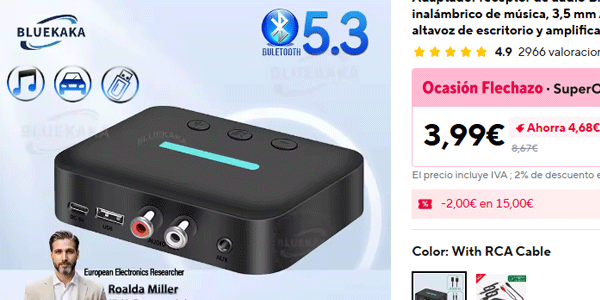
Which, for less than €4 (and you can use coupons to lower it even more), works like a charm for this use.
All the power of YouTube:
- Without turning on the TV.
- Without ads.
- Always within reach.
- In your living room.
In short: enjoy YouTube again.
Oh, by the way, I’ve focused this on long music sessions, but if you want to watch your favourite videos without ads, using Brave works for that too.
Frequently asked questions
Is it legal to watch YouTube without ads using Brave?
Yes. Brave is a legal browser that includes ad and tracker blockers. It doesn’t modify YouTube or access private content: it simply blocks ads from loading in your browser.
Do I need to pay for YouTube Premium to remove ads?
No. YouTube Premium is the official paid option, but there are free alternatives such as using Brave, which let you watch YouTube without ads from the browser.
Does this method work to watch YouTube without ads on mobile?
Yes. Brave works on both Android and iOS, letting you watch videos without ads directly from the mobile browser.
Can you listen to YouTube videos with the screen off?
Yes. With Brave you can enable background playback, which lets you listen to the audio even when the screen is locked, without needing YouTube Premium.
Does Brave block all YouTube ads?
In most cases, yes. Brave blocks pre-roll, mid-roll and banner ads. Occasionally YouTube changes something, but Brave usually adapts quickly.
Can I sign in to my YouTube account using Brave?
Yes. You can sign in with your Google account and access your subscriptions, lists and recommendations as usual.
Does Brave work with Chromecast or Smart TV?
It depends. It works via Bluetooth or with older Chromecasts without apps. It doesn’t work with devices that directly open the YouTube app, such as newer Chromecasts or Android TV.
Does this method affect video or audio quality?
No. Video and audio quality is exactly the same as when using the official app or Chrome.
Is Brave safe for privacy?
Yes. Brave stands out for blocking trackers and invasive ads, and for reducing data collection.
Is there any disadvantage compared with YouTube Premium?
Yes. You don’t directly support creators through ads, and some premium features, such as official downloads, are not available.

Leave a Reply