
Churchill said that “The Balkans produce more history than they can consume”.
That is exactly how I have felt these past few days in the world of AI, where a whirlwind of major news has been flying by.
First, Gemini 2.0.
Then AI can see our world and our screens.
And apparently agents are finally going to become intelligent (let us see whether they put one in my Samsung TV and make it genuinely Smart, as the label claimed).
Then Sora.
In short, unless you spend your entire day testing things, it is very difficult to keep up with everything.
So, since I cannot cover it all, the sensible thing is to choose what to test. And how to test it.
This week I decided to try Sora. To do that, I came up with a use case. One I had not tested before.
Then I remembered that I had wanted for some time to make a music video for Maroon 5’s song “Memories”.
So it seemed like a good example.
Here is the four-step process I followed.
#1. Script and storyboard
I generated it with ChatGPT, starting with this prompt:
You are an expert creator of music videos for songs. I need a script for this song I am giving you: [I paste the full song lyrics here]I found it interesting that ChatGPT recognised the song without me telling it:
🎥 I am an expert creator of music videos for songs. I know the visual storytelling techniques needed to move and connect with an audience.
I am going to develop a detailed script that is visually striking for your song. I will guide you step by step through the development of an emotional and meaningful music video for "Memories".
I then followed the same steps as for creating an advert with AI, which I will not repeat here.
The difference is that, knowing Sora’s real strength is generating videos from a prompt rather than an image, I asked Chat to create the Sora prompt for each shot.
This was the result:
🎥 Generating prompts for AI clips
Here are the detailed prompts for each storyboard shot. Every prompt is designed to generate precise images that capture the music video’s nostalgic and emotional tone.
📜 Prompts for "Memories"
| Shot | AI prompt |
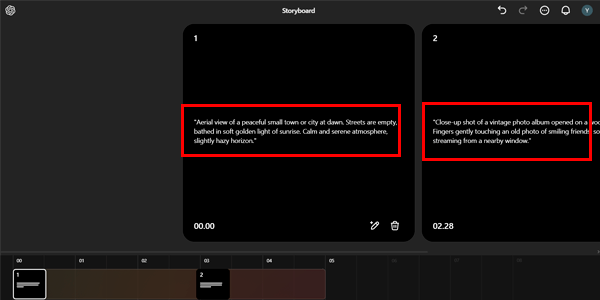
| 1 | "Aerial view of a peaceful small town or city at dawn. Streets are empty, bathed in soft golden light of sunrise. Calm and serene atmosphere, slightly hazy horizon." |
| 2 | "Close-up shot of a vintage photo album opened on a wooden table. Fingers gently touching an old photo of smiling friends, soft sunlight streaming from a nearby window." |
| 3 | "Retro-style scene of friends gathered around a table outdoors. Hanging string lights glow warmly. People are laughing, toasting drinks, and smiling, with soft focus." |
| 4 | "Slow-motion shot of a group of friends jumping into a clear lake from a wooden dock. The sunlight reflects on the water, creating a nostalgic and joyful atmosphere." |
| 5 | "A man sitting alone in a dimly lit bar. He holds a glass of whiskey or beer, staring into the distance with a thoughtful, nostalgic expression. Empty chairs around him." |
| 6 | "Close-up of a man’s face, eyes glossy with emotion. A single tear is visible, but he smiles softly. Warm, gentle lighting enhances the emotional tone." |
| 7 | "Group of friends sitting around a large bonfire in a nighttime forest or beach setting. The fire illuminates their faces, casting warm orange glows, with stars above." |
| 8 | "Close-up of hands holding small candles or torches, being lit one by one. The flames flicker gently, symbolizing hope and remembrance in a dark setting." |
| 9 | "Candid moments of friends laughing, hugging, and celebrating outdoors in a sunlit setting. Natural and spontaneous vibes, soft focus for nostalgic feel." |
| 10 | "Close-up of old photos scattered on a wooden table. The images slowly blur and dissolve into scenes of joyful memories with friends, creating a dreamy effect." |
| 11 | "Wide shot of a man walking toward a glowing sunrise horizon. He smiles faintly as the warm golden light surrounds him, suggesting hope and a new beginning." |
🎨 Aesthetic considerations
- Colours:
- Past: Warm tones such as gold, sepia and orange for flashbacks.
- Present: Cool tones (blues and greys) for present-day scenes, highlighting the nostalgia.
- Lighting:
- Use soft, diffused lighting in emotional scenes.
- Contrast light and shadow in scenes such as the bonfire or the bar.
- Visual effects:
- Apply vintage filters (soft grain and an old-film look) in flashbacks.
- For transitions, consider AI "fade" or "double exposure" effects.
#2. Generating the clip for each shot
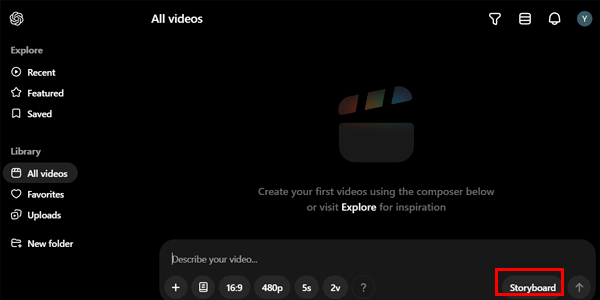
We open Sora — remember, we do it this way if we are in Spain — and click Storyboard:
We enter each prompt in the corresponding shot:
We can improve the prompts by clicking this icon:
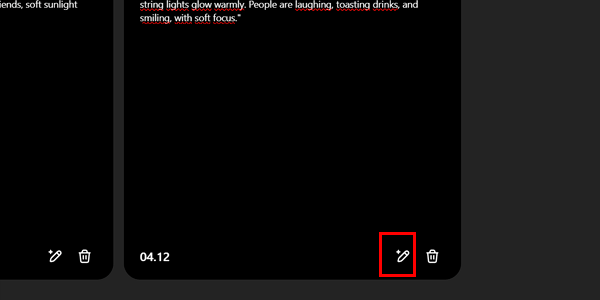
The prompt will probably become longer.
The result in my case was mixed: in some cases it improves the video and in others, especially with storyboards, it clearly does not:
Example video using the original prompts (straight from ChatGPT):
Example video using the “improved” prompts:
It does some odd things, honestly.
You should also know that, beyond the prompt itself, the result depends on what we are about to look at next.
Storyboard structure
One important point: the maximum total clip length Sora currently allows us on the Plus plan (the cheaper one) is 10 seconds at 480p resolution or 5 seconds at 720p.
This means that, if the final music video is longer, you will have to work out how to fit the prompts for each shot together.
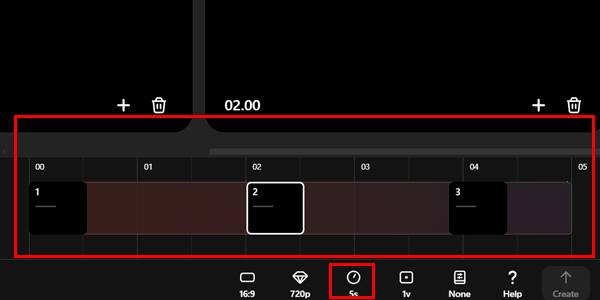
You will need to structure the shots with the same characters or locations within the same storyboard, so you can later cut and assemble them in the video editor.
And if Sora cannot make sense of it—as I think happened when I clicked “improve” on the prompt—the result will be rather mediocre.
In my case, I put prompts 2, 5 and 11 into the first storyboard, and the result is the videos above.
Then I made a storyboard with shots 3, 4 and 9.
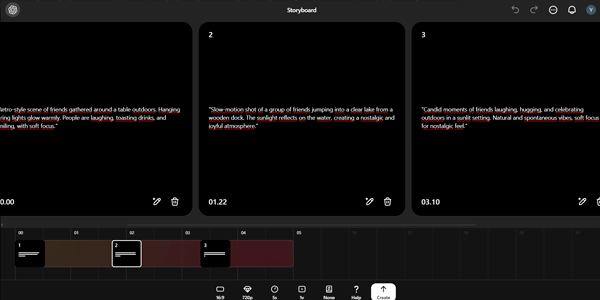
I then created two-shot storyboards to maintain some consistency:
- Shots 7 and 8 first.
- Shots 6 and 10 afterwards.
- Finally, I generated shot 1 on its own.
Clip modifications
In one of the clips, the man’s tear remained frozen:
So I used this option to ask Sora to change it:
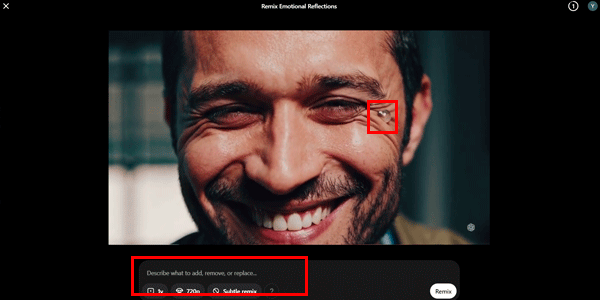
In my case, I requested a slight modification to the video, as Sora lets you choose how extensive the change should be.
The result:
Since I did not like it, I asked for a medium-strength modification:
As you can see, it removed the tear.
Well, it will be a matter of experimenting with the settings and the “fix” prompt you give it.
That reminds me that there is an important point I have not mentioned yet.
General clip controls
When creating the clip, we have several options available. These vary depending on the tool plan we have subscribed to (the Pro plan offers more possibilities than Plus, logically).
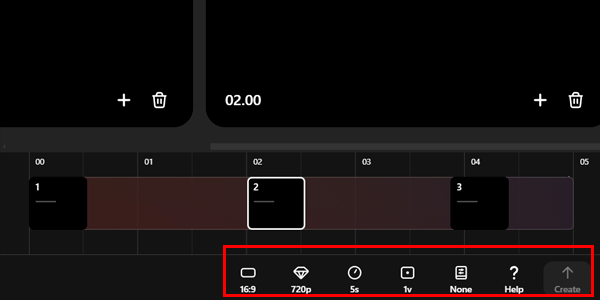
From left to right, we have:
- The option to choose the format of the video.
- The resolution: depending on what we choose, it will let us create longer videos (at 480p) or shorter ones (at 720p).
- The duration: linked to the previous option. Clips of 5 or 10 seconds.
- Number of videos: variable depending on the previous two options. Sora lets us create 1, 2 or 4 different versions of the video at once.
- Presets: a few settings that give the result a particular aesthetic.
- Upload video or image: to complement the prompt. Curiously, storyboards do not allow this.
Tip for extending the clip:
To increase the clip’s duration, remember that you can always use slow motion later in your video editor, increasing the length of each clip by between 20% and 50%.
#3. Editing the video
Here is what you need to do:
- Merge the different clips.
- Add the original song.
- Adjust the timing.
I did it with Premiere, but you can use CapCut if you prefer.
Tip to hide Sora’s watermark:
The Plus plan does not let you remove watermarks, so the videos remain suitable for social media or non-professional productions.
But I am going to share a trick I use in those cases.
It is not actually a way to export the video without a watermark, but rather a way to stop the watermark from being visible.
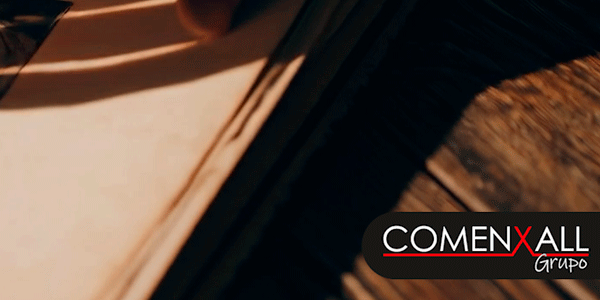
The trick is very simple: when editing, place something over it.
In my case, I used our business group’s logo. You can put whatever you like:
Otherwise, you know what to do: pay for the tool’s Pro plan.
#4. Adding the song lyrics
I definitely recommend doing this with CapCut, because it takes one click.
Once you have it, all that remains is to export it and publish it wherever you want.
Final result
Here it is:
In my opinion, the results are surprisingly realistic, although the level of control you have over them is much lower than with other tools such as Kling AI.
As always, you will use one tool or another depending on what you need. In other words, Sora is not the killer app of generative video. At least, not yet.
This is the quality from the first serious use I have made of it. In terms of time, the complete process took me just over an hour, which is not bad at all, honestly.
Conclusions
After this first use case, here are my impressions:
I have to say that my feelings about the tool are mixed.
On the one hand, I see some positives:
- The realism of many videos made from basic prompts.
- The storyboard concept.
- The fact that it is included with the ChatGPT Plus plan.
But there are also negatives:
- The control you have over the clip is fairly limited.
- The “prompt improvement” and “clip changes” options did not work as I expected. Perhaps it is a matter of learning to use them better and knowing what to expect from each one.
- The limitations of storyboards. The idea is brilliant, but it is still at a very early stage. It will be a game changer when it lets you make videos a couple of minutes long, for example.
- The limits of the Plus plan—resolution, duration and watermarks—mean it cannot be considered a professional tool. The Pro plan is another matter, if you can afford it and it is worthwhile for you.
In reality, it is another tool to add to your content-generation arsenal. From that perspective, it is a very good one, honestly.
After using Sora, I am certainly convinced that video generation is becoming more interesting by the day.
With so much competition between tools, before too long we will be able to create audiovisual productions that until recently we could only dream of.
And you can keep up if you visit the section on advances in the world of video on this website.
Or by subscribing to my newsletter, where an article like this will arrive in your inbox every Thursday.

Leave a Reply