
If memory serves, this is the third year I have created AI commercials for one of my projects.
I like to set aside some time for this work for two reasons:
- To create content that is different from the usual.
- To see how AI video creation is evolving with minimal time and effort.
And the truth is that the progress has been obvious.
You only have to look at these examples from previous years:
For Yo pongo el hielo:
For Pincelada de Historia:
And the one I created this year, also for Pincelada:
Despite having quite a few flaws and not being suitable for a paid campaign, it already shows that the time has finally come when this kind of commercial can be created professionally with AI.
So, as a Christmas present, I am sharing the full workflow I followed, which, with a few more hours of work (which I did not have), would have produced a pretty cool video.
One thing: I used Veo 3 from the Gemini interface because I have a Google Workspace Pro account (with a limit of three videos per day), but if you do not have one, you can use this model for free through Google Flow or other third-party platforms.
Or you can use Sora.
In any case, the full process does not change. Shall we get started?
How to create an AI video ad from scratch
When I say from scratch, I mean from scratch.
Sofi, my partner and the creator of Pinceladas de Historia, asked me to make her a commercial overnight.
She did not give me any kind of creative concept or anything. It was basically, “Pretty please, can you make me an ad like last year’s?”
And since she asked while holding Enrique, our six-month-old, asleep in her arms before going to bed with him, there was no way I could say no.
That is where the workflow begins.
#1. Define the creative concept
The very first thing when creating a commercial is to think about the creative concept. In other words, what the ad will be about.
Well, if you are an experienced creative or copywriter, you may only need to give it a little thought before the idea clicks.
Otherwise, it is time to find inspiration. Which is what I did.
Where?
On websites such as some of the Clio sites (they have several different ones), which are basically the Oscars of advertising.
There, after watching enough ads, it is unusual not to come away with an idea or concept to work on.
With that idea, prepare a draft of the ad.
#2. Write the script
Again, if you are a trained creative, copywriter or screenwriter, you can skip this step.
Otherwise, feed the draft to Gemini or ChatGPT so it can help you create the actual script.
Do not expect to have a good script on the first try.
You will have to iterate with the machine and edit until you get something you like.
#3. Draw the storyboard
This one is easier, but there is a trick:
- Go to Gemini.
- Upload the script
- Trick: make sure you have “Thinking” or “Pro” mode enabled.
- Ask it to create the storyboard for you.
This way, it will use the Nano Banana Pro model instead of the regular one, producing much better results.

You may or may not get what you want on the first try here. Either way, the goal is to get a general idea of the commercial.
If it is close enough to what you want, the next step is where you finish defining it properly.
#4. Generate the images for each shot
Because here you are going to ask it for the images that open each shot.
Use the thinking-mode trick and generate the opening image for each shot in the ad, one by one.
Iterate on each one until you get what you want. Here is an example of an initial image that does not work:
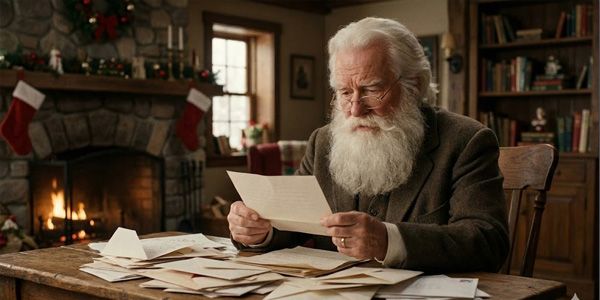
Then, by the fourth prompt, much better:

Edit images in JSON format
Here is another good trick.
If you generally like an image but there is one detail you do not, do the following:
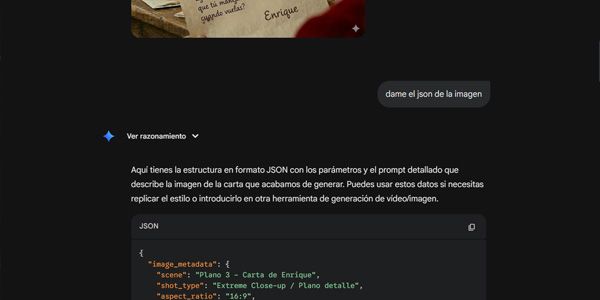
- Ask Gemini to convert the image into JSON.
- Copy and paste it: you can do this in a text editor or in the assistant’s own chat, but do not send it before doing the following.
- Edit the element that does not work for you. For example, if it is text, change it so it says what you want.
- Now ask Gemini to generate the image based on the modified JSON.
The point here is to make fine adjustments.
#05. Develop the shooting script
Ask Gemini to generate it based on the original script and the images for the shots.
It will generally give you something fairly accurate. These are the technical instructions that clarify aspects of the shot, such as camera movement or the sounds it will include.
If you think about it, at this point we are well past halfway through the process and we still have not generated a video.
These are the preliminary steps required to make the actual video creation work properly.
And do not think this is just an AI thing.
Not at all: in traditional shoots, all of this is known as “pre-production” and it is almost always longer than shooting the commercial itself (which is known as “production”)”).
#06. Create the videos
Now, finally.
We already have all the material needed for our shoot, except that in this case there will be no actual shoot: we will use AI to obtain the audiovisual material.
Here, grab your preferred free or paid tool and let us get to work.
As I mentioned at the beginning, I used Veo 3 for this commercial.
What you have to do is very simple (in theory): give it the image for the shot—which it will use as a reference to generate the first frame—along with the shooting script, and ask it to create the video.
Do this for each shot.
It will generate some on the first try, while others will take ten attempts or more. I will tell you more about that now.
The thing is, free tools have relatively low limits, so if that is your situation, this step will take more time than any other part of the process.
Keep in mind that Veo 3, used through Gemini, only allowed me to generate three videos per day. And there were originally 14 shots (although I later cut a couple).
Do the math.
There was also an extra problem:
Censorship.
Gemini does not like dictatorships, so, to get it to animate Hitler and Franco, I had to ask in a thousand and one different ways.
I even resorted to tricks such as animating only the illustrations of their faces and using a still image as the background.
That is why Carlos V is animated differently—much better—than those two.
And yes, with more editing time and more video generations I could have achieved a better result, but I simply had no more time available, so I left it as it was, far from a perfect finish.
It is what it is.
By the way, even when censorship is not necessarily the reason, you often do not get a video that matches what you had in your head, so you have two options:
- Either you keep pushing and iterating.
- Or you adapt to what the tools give you.
That is it.
You decide how forgiving you are with the final result.
#07. Add the voices
Here Veo 3 may produce suitable voices for you (as with my Santa Claus and Carlos V), or it may not.
If it does not, you will need another AI tool:
It is not a difficult tool to use—quite the opposite:
- Choose a voice.
- Write the text you want it to speak.
- Download it once it has been generated.
It does not sound difficult, and it is not. The difficulties lie elsewhere:
- Finding voices that fit the characters, especially if they are famous. In my case, for example, Enrique’s voice is a woman’s voice, modified so it is less noticeable.
- Making sure the voice is in the right language: because there are thousands in English, but far fewer that speak European Spanish…
- Adjusting speed and animation: this is worse. Your character’s video has its own pace and pauses. It will be your job during editing to synchronize the lips with the voice-over. Fair warning: this may take a while, because it is not always immediate.
#08. Add music (optional)
This step is optional, but most ads use music at some point.
To get one, you have two options:
- Royalty-free music libraries
- Use an AI tool such as Suno.
I almost always choose the first option because it is faster, but Suno is also perfectly valid.
The same applies to sound effects, if the ad has any.
#09. Editing
The final step, where you:
- Assemble videos and images with voice-overs, music and sound effects.
- Mask whatever you need to.
- Choose the speed and duration of each shot (my video has plenty of room for improvement here).
- Create the transitions between them.
- Adjust the audio volume.
- Add text.
- One more trick: use your own logo to cover the watermark from the video-generation tool.
I use Premiere, but you can use CapCut (easier) or DaVinci Resolve (Open Source).
Yes, this is usually the other step you will spend the most time on. But as you see how cool it is becoming, you feel like carrying on.
Until you finish it and export it in the appropriate format:
Generally, it will be an .mp4 file encoded in H265, in stereo and with a resolution of 1280 x 720 pixels (the resolution generated by Veo 3).
And that is it.
Your creation is ready to share through the project’s channels.
Good job.
Conclusions
As you can see, creating a video ad from scratch with AI is perfectly possible today, but reaching a professional standard requires a certain amount of dedicated time.
It is not “AI, this is my brand—make me a viral commercial””.
It does not work like that, at least not yet.
Even so, the progress from one year to the next in this area is striking. So perhaps next year we will be closer to that point.
For now, you have to go step by step until you complete the nine I have described here.
And honestly, nine does not seem like that many when you consider what it used to cost—in time and money—to create ads like these.
I hope you liked it. You can leave any comments below.
You can also subscribe below to my newsletter, where I let you know when I publish articles like this one. It is free; all you have to do is fill in the form.
Or you can subscribe to my YouTube channel if video is more your thing than reading.
We all have our vices.
Frequently asked questions
Can you create professional AI videos for free?
Yes, but with caveats. You can create semi-professional videos using free or freemium tools. The result depends more on the process (pre-production, script, storyboard) than on the tool itself. Paid campaigns still require more time and manual adjustments.
How long does it take to create an AI video ad from scratch?
Longer than it seems. Although video generation is fast, pre-production (concept, script, storyboard and shooting script) takes up more than half the work. The bottleneck is usually the daily limits of free tools.
Which AI tools can be used to create videos?
You can use models such as Veo 3, Sora or alternatives available through platforms such as Google Flow. The workflow is practically the same in all of them: reference image + shooting script + multiple iterations.
Do you need creativity or scriptwriting skills to use AI?
It is not essential, but it helps a lot. If you have no creative training, AI can help you generate scripts and storyboards, although you will still have to iterate, correct and decide. AI does not replace creative judgment.
Why is pre-production so important when using AI?
Because AI does not think for you. Without a clear concept, a script and a shooting script, the videos come out inconsistent. This is not an AI problem: in traditional advertising, pre-production is also the longest phase.
How many attempts does it take to generate a good video shot?
It depends on the shot. Some work on the first try; others require 10 or more attempts. Your tolerance for the result and the time available come into play here. Persistence improves the outcome, but it is not always worth it.
Does censorship in AI tools limit the results?
Yes. Some models restrict historical figures or sensitive topics. In those cases, you have to find creative workarounds: partial animations, still backgrounds or changes to the prompts.
Do AI-generated voices work well?
Sometimes yes, sometimes no. If the video tool does not provide a believable voice, you can use external generators such as Eleven Labs. The biggest problem is not quality but lip-syncing, which requires manual work during editing.
Is it mandatory to add music to an AI-created ad?
No, but it usually improves the result. You can use royalty-free music libraries or generate music with AI. The choice depends on how quickly you need it and how much creative control you want.
What editing software is recommended for the final cut?
Whichever one you know how to use. Premiere offers more precision, CapCut is faster, and DaVinci Resolve is a powerful free alternative. Editing remains a key phase, even when using AI.
No. As of today, there is no “AI, make me a viral ad.” AI speeds up tasks, but the result depends on human judgment, the time invested and the ability to iterate.

Leave a Reply