
If you are here, I imagine you already know that schema markup is a technique that helps Google and other bots understand your website content better. It has been around for quite a while, but now it matters more than ever.
Why?
Because Google is using this data—among other things—to display its new AI-generated answers (AI Overviews) directly in search results.
Although popular WordPress SEO plugins such as RankMath and Yoast SEO include schema markup, their implementation is usually generic and limited to certain content types.
That is why this guide will show you how to add a less common schema that is particularly useful in the age of AI: the “HowTo”, ideal for step-by-step tutorials or guides like the one you are reading.
Here it is on video:
And below, in text, together with the links you need.
#1. Write and publish a HowTo article
This comes first, obviously.
Before inserting any schema markup on your website, you need to have an article ready. In this case, it must also be clearly and practically structured into several steps.
This is roughly the process I follow:
- I choose the topic about “how to do something”. In my case, these are usually processes related to analytics, marketing or AI.
- I create an outline with all the steps.
- I develop each point, creating a guide organised into numbered steps.
- In addition to text, I add examples, images or videos that support the content.
#2. Ask ChatGPT to generate the HowTo schema
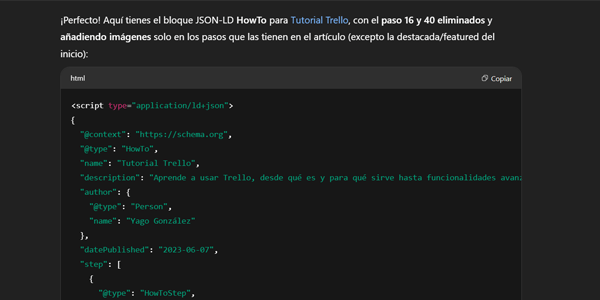
The fastest and most effective way I know to generate correct JSON-LD schema is to use ChatGPT.
In this case, and until I test 4.1, I recommend using the o4-mini-high version. Otherwise, use o4-mini or o3.
Once you have selected the model, use a prompt like this:
"Como experto SEO, genera un schema HowTo para la siguiente URL: https://dominio.com/articulo-ejemplo/". Incluye todos los pasos detallados con su nombre, descripción, URL e imágenes y utiliza el contexto schema.org."For the URLs, each step will need to be a heading. I make it easy because I use the Table of Contents Plus plugin to create a table of contents and tell it to take the URLs from there.
When you get the response, copy it.
#3. How to add it in WordPress
There are several options here. I have ordered them from the simplest to the most complex, based on the work required.
Genesis theme options
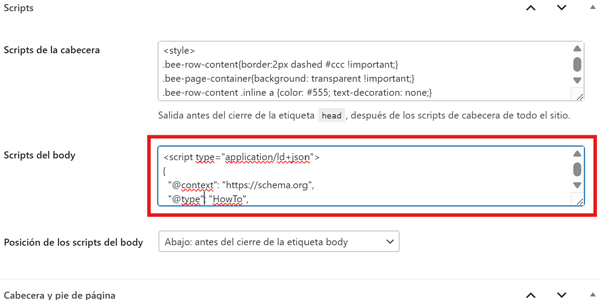
If you use a theme such as Genesis, implementation is simple because each post includes an option at the bottom to add a script.
Paste the script ChatGPT gave us in the previous step into the body section:
PixelYourSite plugin
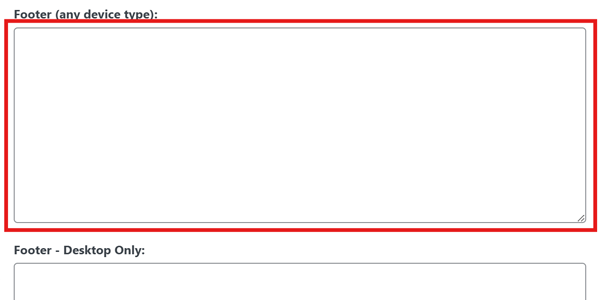
Another practical option is the PixelYourSite plugin, which makes it easy to insert specific scripts on individual pages.
To use it, follow this process:
- Install and activate the PixelYourSite plugin from the WordPress repository.
- Open the article where you want to add the markup.
- Insert the JSON-LD code in the “Footer” section.
- Save the changes.
Google Tag Manager (GTM)
Finally, if for some reason you do not have access to the WordPress admin area, you can still implement the schema.
Google Tag Manager is your friend here.
Follow this process:
- Create a “Custom HTML” tag.
- Insert the generated HowTo schema code.
- Configure a specific trigger for your tutorial page, such as Window Loaded with URL matching.
- Publish the changes in your GTM container.
The problem is that you will need to create one tag and one trigger for every page, so your container will quickly fill up.
I only see this option as a last resort.

#4. Check that it is correct
Once you have implemented the schema markup, all that remains is to validate that everything works as it should.
To do that:
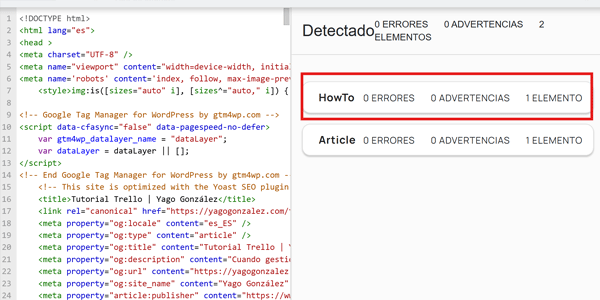
- Open the official validator: https://validator.schema.org/.
- Enter your URL.
- Run the validation.
- If everything has gone as it should, there will be no errors.
And that is it.
Conclusion
As you can see, it is not difficult.
It is tedious if, like me, you have more than 100 articles of this kind and need to go through them one by one. I considered automating it, but the cure was worse than the disease.
So my advice is to start implementing it as soon as possible.
And if you want Recipe, Review or Movie markup instead of HowTo, you can replicate the process.
I hope this helps you improve your AI traffic. And if you want more tips like this, you can get one in your inbox every week by subscribing below, or follow me on my YouTube channel.
Frequently asked questions
What is HowTo schema markup?
HowTo schema markup is a type of schema markup used to tell Google that a page explains a process step by step.
What does adding HowTo schema to WordPress do?
It helps Google and other bots understand a practical guide, including its steps, tools, images and structure.
When does it make sense to use HowTo schema?
It makes sense for articles that explain how to do something through a clear sequence of steps. It does not make sense for opinion pieces, analyses or purely informational content.
Do Yoast SEO or RankMath automatically add HowTo schema?
They can add general schema markup, but they do not always generate a specific, complete HowTo adapted to the actual content of the article.
How can I generate HowTo schema?
A quick way is to ask ChatGPT to generate the JSON-LD from the article URL, including steps, names, descriptions, URLs and images where available.
Why is a table of contents useful?
Because it makes it easy to obtain the internal URLs for each tutorial step and use them inside the HowTo schema.
Where can I insert HowTo schema in WordPress?
You can insert it through theme options such as Genesis, plugins that allow scripts to be added per page, or Google Tag Manager.
What is the easiest way to add it in WordPress?
If your theme supports it, the easiest method is to paste the JSON-LD script into the post's body scripts area.
Can HowTo schema be added with Google Tag Manager?
Yes. You can create a Custom HTML tag containing the schema and trigger it only on the tutorial's specific URL, although this is less convenient when you have many articles.
How do I check whether the HowTo schema is implemented correctly?
The best approach is to use the official Schema.org validator, enter the URL and check that it returns no errors.

Leave a Reply