
Let me make this clear from the outset: if in 2025 (and beyond) you do not have a professional website for yourself, your project or your business, it is because you do not want one.
Because with the workflow I am about to explain, you can have one for less than $5 a year. In other words, €0.35 a month.
And with a professional finish.
Yes, I am not joking.
To clarify:
- I mean business websites, not Ecommerce sites or blogs.
- In other words, they do not require a database.
- The project includes a business email address.
In short, the basics you need for an acceptable online presence.
Does the idea appeal to you? Then let me explain the workflow.
#1. Choose a name for the business / website
Here I gave ChatGPT a couple of concepts so it could suggest names while I checked in the Cloudflare domain registrar whether they were available.
#2. Buy the domain
When I found one I liked and the .com was available, I bought it.
It cost me $10 (not euros—one of the perks of using a VPN), and it was my only expense.
I could have chosen cheaper alternatives, such as .org, .work or .stream, which also suited me and cost from $4, but I went with the .com:
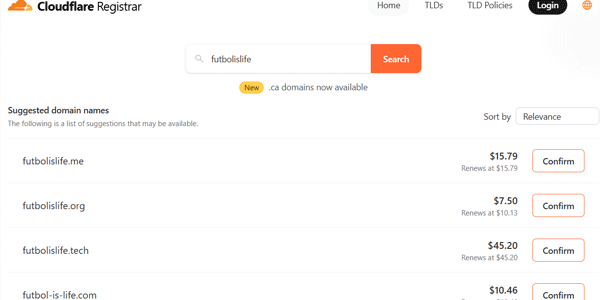
This was the only expense I had to pay.
By the way, the domain in the image is an example taken from the great series Ted Lasso; it is not the one I chose.
#3. Create a logo
Once the name was decided, I went to Ideogram and asked it for a logo like this:
“I need an attractive retro logo for this web project name: "Futbol is life"”

#4. Remove the background from the logo
I did it with Photoshop, but you can do it on any website, for example this one (there are thousands more).
#5. Create the website
Yes, even if you have no idea how, there are AIs that can create the website for you.
I wanted to try one, so I used Lovable. Open Lovable and look at the examples on its website.
Buuuut that was a mistake on my part, because although it was genuinely good visually and in terms of content, it uses technologies such as React that are no use for what we want.
Here you need the AI to create the website in plain HTML, CSS and JS, without requiring servers such as Node.js.
ChatGPT can do it, but the first version of the website is not very attractive.
Manus.ai does it considerably better, but it is a paid service, although you get a one-week trial.
Additional considerations:
You can create a single-page site with everything on it (simpler) or a website with different URLs (more complex).
That said, you will always need terms and conditions for use in your country. Use ChatGPT or another tool to generate them and link them from the footer, or use the website-building app.
In my example, I asked Lovable and it generated and linked the terms. You can use a prompt like this:
“I am an NGO and I need a website to explain how football saves lives. I am sending you the logo so you can use the same style and colours. I will need a terms-of-use URL linked from the footer”
And include the transparent logo generated in the previous step.
This way, we would end up with a website like this:

This is the result it gave me first time, without even iterating with other prompts that would have improved the website considerably.
And no, it is not an ideal website for selling a service. It is missing a lot of things, of course. In fact, in this case I did not even ask it to generate a form, which Lovable can create without any problem.
But if you need a complete website with images, text and code in five minutes, it is hard to do better (at least as of October 2025).
#6. Download the website files
This is the most complicated step if you use Lovable as I did.
As I said earlier, that is because the platform does not work with plain HTML, CSS and JS, but with React, Tailwind, Vite and Node.js.
This makes it harder to obtain the files we need to upload to Cloudflare later.
I did it by saving the websites from the browser and editing the paths where necessary, because setting it up in Git first did not work for me when creating the deployment on services such as Vercel or Netlify.
Perhaps there is a way to obtain the static files and I did not spend enough time investigating it, but I could not manage it. So my recommendation, if you are not technically confident, is to use another builder such as Manus.ai.
The point is that you need one HTML file for each URL on your website, plus the CSS and JS files they use. That is all.
Once you have them, compress them all into a .zip file so you only have to upload one file in the next step.
#7. Deploy the website on Cloudflare
It is easier than it sounds. I had never done it before and it took me less than two minutes.
Basically, inside the “Workers & Pages” section of our Cloudflare customer area (you are already a customer if you bought the domain in step 2), you need to:
- Create a new page.
- Upload the zip file from the previous step.
- Select the purchased domain to link it to the website you created.
And that is it: within moments, our website will be live on the chosen domain.
IMPORTANT: it is not a professional website; it only looks like one.
I say that because we have not applied any SEO, UX or CRO criteria. Nor have we set up any analytics. So it will be difficult for it to sell.
But we will have a professional-looking website for four dollars in under 15 minutes, starting from scratch.
#8. Corporate email (optional)
If you need corporate email using the domain (in my example, something like info@futbolislife.com) for the project, you have two options: one better and one simpler.
Receive-only email inbox
In this case, the corporate email will allow people to send us messages, but we will not be able to send from the corporate address.
If that is enough, we only need to go to Cloudflare's “Email Routing” option, where:
- We will create the email address linked to the domain we purchased.
- We will add one of our own email addresses, to which messages received at the previous address will be forwarded. This address can be our Gmail account, for example.
- Some DNS records will be configured automatically.
In other words, when someone sends an email to the corporate address, we will receive it in our Gmail inbox.
That is why we will not be able to send from it: we would be sending from Gmail.
Full email inbox
To get one, you will need to follow this Zoho Mail tutorial or this other tutorial in which I explain how to do it with Gmail.
You should also know that it can be done with Brevo and a few other tools.
Whichever method you choose, your email inbox will then be up and running.
Conclusions
In this article, I have explained step by step how to get a decent corporate website for 30 euro cents a month.
I have not gone into detail because, honestly, ChatGPT can explain everything I mention better—and you can ask it the relevant questions if you get stuck at any point—but what it does not give you is the idea. The proven system.
It looks as though this will be the approach of my articles from now on: shorter, more to the point, and more focused on ideas and systems than on how to execute every step.
That is what the age of generative AI calls for.
If you like it and it is enough for you, the subscription form is below the FAQs, where I will notify you every time I publish a new one.
For a more detailed step-by-step guide, head to my YouTube channel, which you can also subscribe to for notifications.
So, if you feel like it, see you there.
Frequently asked questions
Can I build a professional business website for less than $5 a year?
Yes. With a low-cost domain, AI to generate the code and free hosting on Cloudflare, you can build a professional-looking website for around $4–5 a year.
What type of website can I create with this method?
Simple business websites (without a database): company profile, contact, services or portfolio pages. It is not suitable for Ecommerce or blogs.
What tools are used in the process?
- ChatGPT or a similar tool for naming, prompts and copy.
- Ideogram to create the logo.
- Manus.ai (or ChatGPT) to generate plain HTML, CSS and JS code.
- Cloudflare Pages to host the website.
- Cloudflare Email Routing or Gmail/Zoho/Brevo for corporate email.
Does Lovable work for this workflow?
No. Lovable usa React, Tailwind, Vite y Node.js, lo que complica la exportación a archivos estáticos que Cloudflare necesita.
How long does it take to get the website ready?
Less than 10 minutes if you already have the name and logo.
Half the time goes into choosing and registering the domain.
Does it include SEO or integrated analytics?
No. The method prioritises speed and minimum cost. Technical SEO, CRO and analytics must be added afterwards.
Can I add more pages or forms?
Yes. Manus.ai or ChatGPT can generate new pages or basic forms; just make sure you save each HTML file and link them correctly.
What are its limitations?
There is no CMS or database, and the design is static. It is not suitable for projects with frequent updates or dynamic functionality.

Leave a Reply