
If you were busy dealing with AI Overviews and their impact, you may have missed the change that is really coming to SEO.
Google has launched its new AI Mode, its AI-powered conversational search feature built directly into Google.
For now, this is only available in the United States, but it is set to be the real game-changer for SEO.
If you want to try it before it arrives in Spain, this tutorial explains how you can use it from Spain in just a few minutes.
First in video, then in text below:
What is Google Gemini's AI Mode?
It is a new conversational mode that answers your searches as if you were chatting with ChatGPT.
And it is all built directly into Google.
I think you can imagine how we will be using Google within, what, 12 months at most?
Requirements for access from outside the US
To access it from Spain—or any country that is not yet supported—you need to meet two basic requirements:
- Have a VPN (free or paid) active and make it look as though you are browsing from the United States.
- Have your Google account set to English.
Steps to access AI Mode
They are as follows
Step 1: Activate a VPN (free or paid)
The VPN will let you fool Google into thinking you are connecting from US territory.
You have several options:
- NordVPN: paid, stable and very fast. It is the one I use in the video—for this and many other things
- Opera browser: a free browser with a built-in VPN. Perfect if you do not want to install anything else.
In this tutorial I explain how to use Opera’s built-in VPN. It is extremely simple.
Important: make sure the virtual location is in the United States. Obvious, perhaps, but worth checking.
Step 2: Change the language of your Google account
Essential. Even with a VPN, it will not work if your account is set to Spanish.
To change the language—you can do this with a secondary account if you have several—follow these steps:
- Go to your Google Account: https://myaccount.google.com
- In the menu on the left, open “Personal info”.
- Scroll down to “General preferences for the web”.
- Click Language and select “English (United States)”.
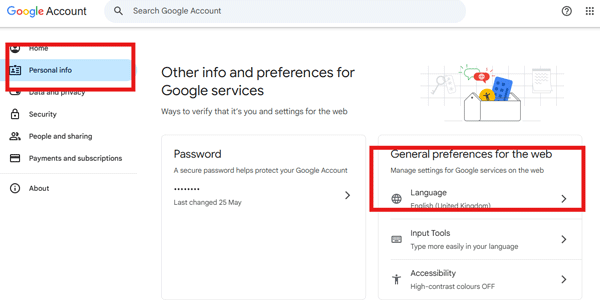
Important: make sure you sign out and back in if it does not update automatically.
Step 3: Activate AI Mode with the VPN enabled
Once:
- Your VPN is enabled (US)
- Your account is in English
You will be able to access it from this link and activate AI Mode.
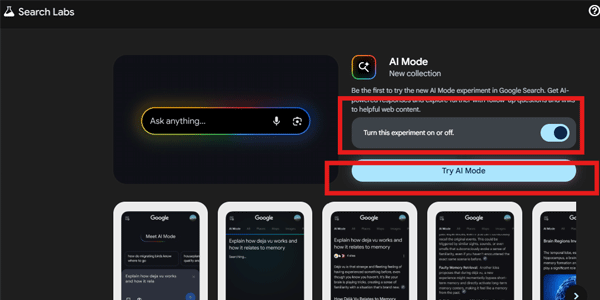
If everything is configured correctly, the button to activate AI Mode will appear, along with another option to try it directly.
Step 4: Try AI Mode in action
Done.
Click the button and start experimenting with it.
From there, you can ask any question and receive AI-generated answers.
For now, though, everything is in English—both the questions and the answers.
What happens if you do not meet the requirements
If you open the AI Mode activation URL without a VPN, or without your Google account set to English, you will see an error like this—or something similar:

Conclusion
As you can see, although Google has not yet enabled this feature worldwide, a couple of adjustments let you use AI Mode from Spain without any trouble.
Ideal if you want to see how artificial intelligence will be integrated into the world's most powerful search engine.
So far, I have found it a little slow, honestly. Although, to be fair, I have not tested it in depth either.
But one thing is clear to me: this is the future of Google.
And of SEO.
In the short term. The change is already arriving — I explain it in more detail here —but make no mistake: this is disruptive for the digital landscape.
If you liked the article, you can get a new one in your inbox in 7 days if you subscribe here.
Or find new videos and tutorials on my YouTube channel.
See you.

Leave a Reply