
These days, the Xiaomi stick I have connected to my sound system for using Stremio and having a decent browser on the TV suddenly lost its configuration for no apparent reason.
I could have set it up again, but between that and the fact that I was looking at computers for some of the things I used my Chromebook for, such as downloading torrents, I decided to do something else: buy one computer that could do everything.
With that goal in mind, and wanting to spend only what was strictly necessary for the machine to cover those uses, I started researching the best options.
Well, even before I started, I was fairly sure that the best choice for this would be a mini PC with an Intel N150 CPU. But RAM prices have gone completely off the rails—machines that now cost nearly €200 were €68 less than a year ago—so I ruled them out and started looking at systems with older, cheaper CPUs.
Preferably, they also had to be small and discreet enough not to stand out in the living room or force me to hide them inside a cabinet—with ventilation, obviously.
After researching for a few days, I settled on systems fitted with this seventh-generation i5, because it meets everything I need.
As for the actual machine, I found my champion: an HP ProBook with this CPU, 12 GB of RAM, a SATA SSD and no GPU.
It cost me €40, which is a great bargain, although in return I had to give the machine a serious clean, both outside and especially inside. There is always a catch.
With that said, let me explain why I chose it.
Intel i5-7500: an affordable all-round processor
Of course there are better processors today, but none of them can be found for just €10 .
We are talking about a seventh-generation i5, launched ten years ago—no more, no less—with four cores and no Hyper-Threading, clock speeds from 3.4 GHz to 3.8 GHz in turbo mode, and a standard power draw of 65 W.
It also natively decodes 10-bit H.265 (essential if you want it for watching video) and still meets the minimum acceptable performance for the most common PC uses today, as we will see.
All of this makes it the best-value processor you can currently buy second-hand.
Important: I am talking about the regular i5-7500, not the i5-7500T, its lower-power sibling, which also delivers less performance.
Performance
Let us start with the raw figures.
This CPU scores 2,245 points in single-core and 6,039 in multi-core performance in the PassMark benchmark, which is the one I like to use to estimate roughly how a computer will perform.
Those figures may mean nothing to you, so let me put them into context. I consider normal computer use to include things such as:
- Advanced office work with Excel and large presentations.
- Editing and rendering training videos—not films.
- Image editing.
- Heavy web browsing.
For that kind of use, if you want to work comfortably, you need roughly 2,100 single-core points and at least 5,000 multi-core points in this benchmark.
As I said, that is approximately the floor you should not go below, provided the CPU is paired with suitable components, which we will discuss shortly.
As you can see, the i5-7500 exceeds both figures, so even before tinkering with it, I already know we are on the right track.
That said, if you use extremely complex Excel files, render video on the CPU, play highly CPU-intensive games or run any heavily multithreaded application, these figures will not be enough. You will need more single-core performance, more multi-core performance or both to work comfortably.
There are better options.
For all the other uses mentioned above, the i5-7500 will do the job well.
By the way, here is a gaming test video so you can see how it handles a demanding scenario:
How to pair it: suitable components
Of course, a computer's final performance depends on more than the CPU. The other components matter too, especially the RAM, the type of storage and the graphics card—when one is actually needed, which is not always.
Here is how I would pair the processor if you want a balanced machine.
RAM: an absolute minimum of 8 GB in dual channel for work, although 16 GB is recommended. If you only want it for video playback, you can get by with 4 GB, but only in that case.
We also benefit from the fact that it uses DDR4 , which is available at much more reasonable prices—€2–3 per GB—than the absurdly expensive DDR5.
SSD: SATA or NVMe, depending on the system's motherboard. No HDD here.
GPU: optional, depending on what you want to do with the computer:
- For office work: not required. The exception is if you have a 4K monitor without a DisplayPort input. In that case, you will need a GPU to output 4K at 60 Hz, but only then.
- For use as a media centre and watching films: not required—and that is a major advantage.
- For video rendering: it depends on whether you prefer to use the GPU or not.
- For gaming: essential for practically anything released in the last five years.
Complete second-hand systems
If you have a system with a sixth-generation i3 and want to give it a boost, you can buy this CPU for €10. But if you are looking for a complete computer, here is what is available.
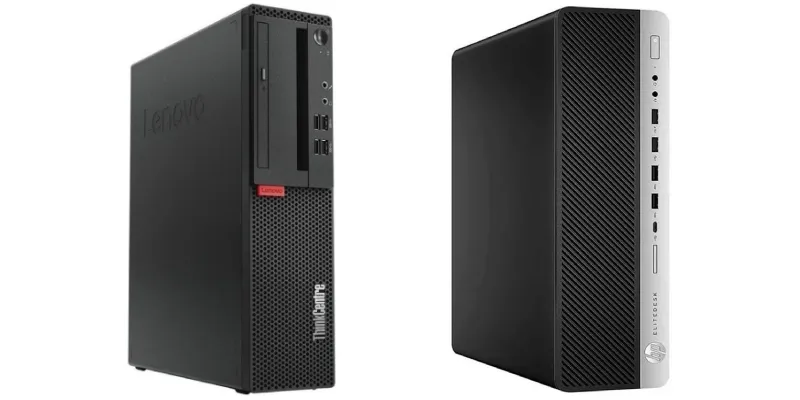
There are plenty of second-hand Lenovo and HP systems fitted with this processor.
They include the Lenovo ThinkCentre and the HP ProDesk (mid-range) and EliteDesk (high-end) lines. I prefer Lenovo for build quality, support for a dual-slot GPU on some models and a more flexible BIOS, but the HP machines—especially the EliteDesk range—are not bad either.
They are generally office computers, which are not usually used as intensively as gaming PCs or workstations, so they tend to be less worn out. That said, they may be a little dirty, like mine.
Look for them, and anything around €50–60 that includes RAM—and ideally storage—is a very good option.
Verdict
After several weeks using it both as a media centre and for normal work, I have to say that moving down from my usual, more powerful Ryzen 7 2700 is less noticeable than I expected.
Because their single-core performance is similar, in everyday use they feel about the same..
However, I have noticed the difference in two types of task:
The first was transcoding long videos —between 90 and 120 minutes—to H.265 using the CPU. With fewer threads than the Ryzen, the CPU took considerably longer than I am used to. It is not my main use case, but it is good to know.
The other area where I noticed a difference was when opening the Unity game engine..
This is a fairly heavy task that already makes the Ryzen work hard, and it feels slower here. Nothing that prevents you from using it, but again, if this were part of my daily work, I think stepping back in performance would be difficult.
Apart from that, the i5 held its own in every other use.
We are talking about a €10 processor inside a €40 computer—including the CPU. In other words, the price is almost a joke.
That is why it deserves the honorary title of “value-for-money king”. At least for now, until something else comes along and beats it.
That will not happen soon, I can tell you. So, if you need a work computer, do not require the latest hardware and do not want to spend much, take a look at the systems mentioned above on Wallapop and similar marketplaces.
Rating
Who it is for
✔️ For anyone who needs a cheap computer for office work, web browsing and everyday tasks.✔️ For anyone who wants a media centre capable of playing 10-bit H.265 video without adding a graphics card.
Who it is not for
❌ For anyone who regularly performs CPU video rendering or uses applications that take advantage of many cores and threads.❌ For anyone who uses extremely complex spreadsheets or very heavy professional projects.
❌ For anyone looking for a new computer with plenty of upgrade headroom and several years of support ahead.
Frequently asked questions
Is the Intel i5-7500 worth buying?
Yes, provided you find it very cheaply, because it still performs well for office work, web browsing, multimedia and everyday tasks.
Is the i5-7500 suitable for work?
Yes. It works well for office tasks, browsing, image editing and moderate video editing when paired with an SSD and at least 8 GB of RAM.
Can the Intel i5-7500 be used for gaming?
Yes, but you will need a dedicated graphics card for recent games, and the CPU may limit performance in very demanding titles.
Does it need a dedicated graphics card?
Not for work, browsing or watching video, but it does for modern gaming or accelerating certain editing tasks.
How much RAM does an i5-7500 system need?
The recommended minimum is 8 GB in dual channel, although 16 GB provides a much more comfortable experience.
What is the difference between the i5-7500 and the i5-7500T?
The i5-7500T uses less power, but it also delivers less performance than the regular i5-7500.
What components should be paired with the i5-7500?
Ideally, pair it with an SSD, 16 GB of RAM and a dedicated graphics card only if you plan to game.
Which second-hand computers use the i5-7500?
It is commonly found in Lenovo and HP office computers, especially the ThinkCentre, ProDesk and EliteDesk ranges.

Leave a Reply