
One of the simplest ways to get more organic traffic is to translate a website.
It makes sense: more URLs, more search intents, and if the content is good, more traffic.
Sure, doing it with AI sounds easy. And it is, on small websites.
On medium and large websites, things get complicated, at least if you try to do it properly.
Because it is not just about taking an article in Spanish, pasting it into ChatGPT and asking for five versions.
That works for a test, but a real website has categories, tags, SEO, images, custom fields, internal links, menus, archive pages, home pages, slugs, dates, hreflang and editorial structure.
Not to mention that inside every article there are bold text, lists and italics that you ideally want to preserve in the translation.
And everything has to be translated.
What I have done this week on my website is build a system to turn a Spanish website into a multilingual site in ten languages: English, French, Portuguese, Italian, German, Dutch, Swedish, Polish and Norwegian, using the Polylang plugin, a custom-built plugin and a couple of custom GPTs.
The result is that I now have the website in ten languages, with the whole category and tag structure and several published articles already translated.
And with a system that adds between 5 and 10 extra minutes to any Spanish article to get it translated into these ten languages, which feels more than reasonable to me.
I’ll walk you through the whole process in case you want to repeat it.
1. The initial problem: translating articles was not enough
When I started analysing the development work, I discovered that in my case, beyond the articles themselves, I had to translate all of this:
- Categories.
- Tags.
- Slugs.
- Meta descriptions.
- SEO titles.
- Featured images.
- Alt texts.
- ACF fields.
- Internal blocks.
- Links between articles.
- Archive pages.
- Fixed theme strings.
- Home-page modules.
- CTAs.
- Forms.
- Tables of contents.
- Related articles.
- Preserve dates and ratings.
- …
A lot of copy there, and far too many languages to do it one by one.
But it had to be translated, because if any of those pieces stays in Spanish, the translation is only half done.
So the goal was not “translate content”, but to create a complete, scalable multilingual architecture in case I want to add more languages tomorrow.
Which is, in fact, what happened: I started with only five languages (English, Portuguese, French, German and Italian) and added the other four on the fly. And along the way I confirmed that the system could scale as much as I needed.
2. The base: WordPress, Polylang and a local copy
The project starts from a WordPress website with a Genesis theme, a custom magazine-style design and several custom templates.
Because it was a fairly serious job and was going to require a lot of testing, I worked with a local copy using LocalWP. The idea was to be able to break things without fear, test imports, review taxonomies and validate that Polylang linked each translation correctly.
By the way, I used this plugin as the base because it already generates everything needed to have a site in several languages. From there, I created my own plugin to complement it and adapt it to what I needed: quickly creating the website structure and articles in multiple languages.
Also in this first phase I optimised LocalWP because at first the environment was too slow and I needed one where I could export, import, delete, repeat and validate smoothly..
3. The system: my own plugin plus GPTs
I could have used a standard automatic translation solution, but the goal was different.
Simple translation of each post
With the translation of the posts I was VERY ambitious, because I wanted a system in which GPTs created for this would translate the content of each post while preserving:
- My personal style.
- The same structure as the original article.
- Official titles of films, series or books in each language (that is, if the work is in Spanish, the translation should use the title under which it was released in Italy, for example.
- Clean slugs.
- Image alt text translated.
- Yoast with fully translated fields, including description.
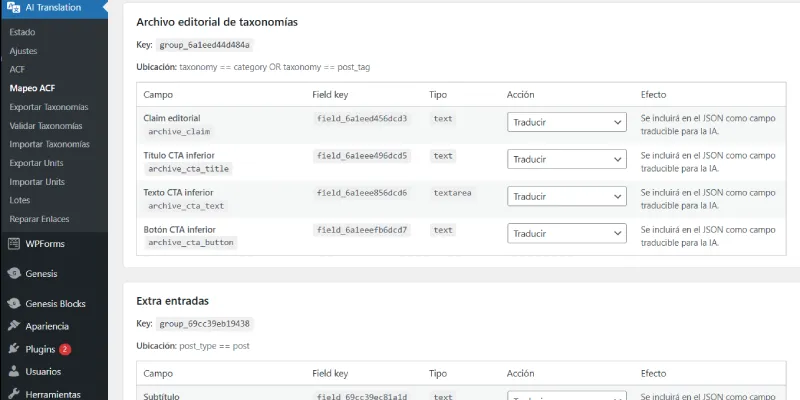
- Custom ACF fields, so I could choose whether they are exported or not, or whether they are translated or stay as they were (for example, the rating I give each work in my reviews).
- HTML fragments without breaking them: lists, bold text, code blocks… preserving them and leaving the necessary parts untranslated (such as code scripts).
- Internal article links: pointing to the URL for each language, not always to the original.
- Publication date: the original date of the Spanish post has to be kept.
As you can see, the logic behind this is not “translate and done”. There is a lot of testing behind it and even some discarded pieces, such as the schema which, for now, only goes in Spanish.
And, on top of that, I wanted it to be a free system, using GPTs instead of the OpenAI or Claude API. More manual, but cheaper.
The solution I adopted includes these steps:
- I publish an article in Spanish as usual.
- I use my plugin to export a structured JSON that contains all the post content split up for translation.
- A GPT translates that JSON into the nine languages, returning nine JSON files (one per language).
- The plugin imports the nine translated JSON files.
- Polylang links each translation to its original.
- The articles are generated as drafts.
- I review and/or publish.
- I repair internal links (automatically) if needed.
In addition, there was an initial step: creating the structure in several languages. This is only done the first time there are new languages, which in my case happened twice: first for the initial five languages and then for the other four.
If we remove that first one-timetask, the process I designed adds about five extra minutes to the creation of each post only, while multiplying the useful content of my website by nine.
Not bad.
The multilingual structure
Let’s see:
- A fully customised website.
- With interface copy.
- A home page that stored almost all its text in code.
- 23 categories and subcategories, with their module headings, multiple bits of copy in custom fields and SEO variables.
- 24 tags with similar characteristics.
- Several custom modules.
- Plugins that do not support multilingual use by default.
And I do not know if I am forgetting something else.
All of this had to be translated once per language. And it would have taken me, I don’t know, at least four hours in each case. And that is assuming I knew all the languages involved, which I do not.
No f*cking way.
What did I do?
Well, this process:
- Adapt all the copy to variables, in code and in ACF custom fields..
- Create a feature in the plugin that exports all these variables from each category or tag as JSON.
- Create a GPT that translates that JSON into the language I need.
- Add an importer to the plugin that takes the translated JSON and creates the complete taxonomy structure in the new language.
- Repeat the process for each language.
- Change the texts that were still pending.
There were several points that gave me grief, such as the slugs in the taxonomies, because basic Polylang does not allow two identical slugs to be created (only Pro does).
In other words, the “comic” tag in Spanish could not be created as “comic” in English; it had to be “comic-en” or something similar.
I developed the plugin so it would allow it, keeping dominio.com/comic in Spanish and dominio.com/en/comic in English.
Yaarp (the plugin I used for related articles) also caused problems, so I deactivated it because it recommended articles in other languages. I will probably create a feature for it in the future that prioritises language over the other variables in its recommendations.
The subscription to the mailing list in other languages has also been discarded for launch. Maybe in the future I will decide to send my translated newsletter, but for now I am not going to do it, so I did not create new lists in Acumbamail.
4. Already-created content: little by little
Everything I have told you works beautifully for new articles, but what about the more than two hundred I already have published?
Well, I would love to tell you that I created a feature that automates their translation, but that is not the case.
The furthest I have got is creating a feature that generates JSON exports in batches of several articles, but when I tried to translate several articles at once into nine languages, the GPT processed it worse. So for now, one by one.
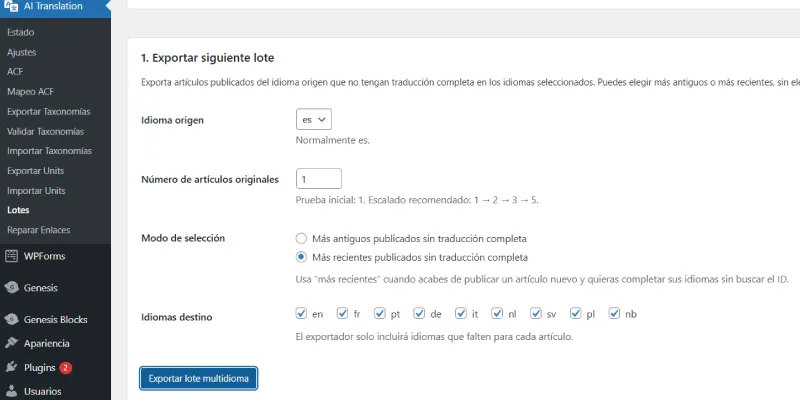
Considering that it takes me about three minutes per article, it is quite easy for me to translate ten per day, which would mean having the whole website in the ten languages in less than a month.
That works for me.
I have also thought about setting up a Hermes and testing whether it can do it manually, but since I am not in a hurry for now and this does not make me money, I prefer not to spend more on tokens than necessary.
The result
For now, I am happy. I already have more than ten articles translated into ten languages. In other words, my website has grown by 33% in a week.
For now I am not forcing the indexing of anything. I want to wait until I have at least 50 or 60 articles. But if it gets indexed, I am not worried either. This is long term.
What I can tell you is that I am happy with the result.
I think the system I have built is fairly robust—with its likely improvements, of course—but not even in my wildest dreams a year ago could I have imagined managing a multilingual website with this volume of content.
Now, as I always say, let’s see where all this takes me.
Lessons learned from the process and conclusion
The main conclusion—which I already expected—is that translating a website with AI is not about “translating texts”, but about designing a system.
AI is super useful if it receives clean inputs and returns controlled outputs. But if you give it a huge block, without structure and without rules, it returns something pretty that is useless for importing.
Believe me, that happened to me a lot at the beginning.
The key has been to build a system where each part does what it is supposed to do:
- WordPress is the heart of everything.
- Polylang connects content.
- The plugin exports and imports.
- GPT translates.
- I make the editorial decisions.
Being clear about where each piece fits and why it does that and nothing else is what has allowed me to create a real system for scaling a website using AI translation as leverage.
If you liked my system and want me to clarify any point, leave your questions in the comments and I will answer.

Leave a Reply